Swarm Space – Replacing the OpenAPI Client

At the start of this project I used NSwag and Open API Swagger definition file (provided by Swarm Space technical support) to generate a Swarm Space Bumble bee hive client and the core of a simulator.

Swarm Space Bumble hive classes in Visual Studio 2022

My SwarmSpaceAzureIoTConnector project only needed to login, get a list of devices and send messages so all the additional functionality was never going to be used. The method to send a message didn’t work, the class used for the payload (UserMessage) appears to be wrong.

OpenAPI Swagger docs for sending a message

The Open API Swagger definition for sending a message to a device

"post": {
        "tags": [ "messages" ],
        "summary": "POST user messages",
        "description": "<p>This endpoint submits a JSON formatted UserMessage object for delivery to a Swarm device. A JSON object is returned with a newly assigned <code>packetId</code> and <code>status</code> of<code>OK</code> on success, or <code>ERROR</code> (with a description of the error) on failure.</p><p>The current user must have access to the <code>userApplicationId</code> and <code>device</code> given inside the UserMessage JSON. The device must also have the ability to receive messages from the Hive (\"two-way communication\") enabled. If these conditions are not met, a response with status code 403 (Forbidden) will be returned.</p><p>Note that the <code>data</code> field is the <b>Base64-encoded</b> version of the data to be sent. This allows the sending of binary, as well as text, data.</p>",
        "operationId": "addApplicationMessage",
        "requestBody": {
          "content": { "application/json": { "schema": { "$ref": "#/components/schemas/UserMessage" } } },
          "required": true
        },
        "responses": {
          "401": {
            "description": "Unauthorized",
            "content": { "*/*": { "schema": { "$ref": "#/components/schemas/ApiError" } } }
          },
          "403": {
            "description": "Forbidden",
            "content": { "*/*": { "schema": { "$ref": "#/components/schemas/ApiError" } } }
          },
          "400": {
            "description": "Bad Request",
            "content": { "*/*": { "schema": { "$ref": "#/components/schemas/ApiError" } } }
          },
          "200": {
            "description": "OK",
            "content": { "application/json": { "schema": { "$ref": "#/components/schemas/PacketPostReturn" } } }
          }
        }
      }
    },

The Open API Swagger definition for a UserMessage

[System.CodeDom.Compiler.GeneratedCode("NJsonSchema", "13.17.0.0 (NJsonSchema v10.8.0.0 (Newtonsoft.Json v13.0.0.0))")]
    public partial class UserMessage
    {
        /// <summary>
        /// Swarm packet ID
        /// </summary>
        [Newtonsoft.Json.JsonProperty("packetId", Required = Newtonsoft.Json.Required.Always)]
        public long PacketId { get; set; }

        /// <summary>
        /// Swarm message ID. There may be multiple messages for a single message ID. A message ID represents an intent to send a message, but there may be multiple Swarm packets that are required to fulfill that intent. For example, if a Hive -&gt; device message fails to reach its destination, automatic retry attempts to send that message will have the same message ID.
        /// </summary>
        [Newtonsoft.Json.JsonProperty("messageId", Required = Newtonsoft.Json.Required.DisallowNull, NullValueHandling = Newtonsoft.Json.NullValueHandling.Ignore)]
        public long MessageId { get; set; }

        /// <summary>
        /// Swarm device type
        /// </summary>
        [Newtonsoft.Json.JsonProperty("deviceType", Required = Newtonsoft.Json.Required.Always)]
        public int DeviceType { get; set; }

        /// <summary>
        /// Swarm device ID
        /// </summary>
        [Newtonsoft.Json.JsonProperty("deviceId", Required = Newtonsoft.Json.Required.Always)]
        public int DeviceId { get; set; }

        /// <summary>
        /// Swarm device name
        /// </summary>
        [Newtonsoft.Json.JsonProperty("deviceName", Required = Newtonsoft.Json.Required.DisallowNull, NullValueHandling = Newtonsoft.Json.NullValueHandling.Ignore)]
        public string DeviceName { get; set; }

        /// <summary>
        /// Direction of message
        /// </summary>
        [Newtonsoft.Json.JsonProperty("direction", Required = Newtonsoft.Json.Required.Always)]
        public int Direction { get; set; }

        /// <summary>
        /// Message data type, always = 6
        /// </summary>
        [Newtonsoft.Json.JsonProperty("dataType", Required = Newtonsoft.Json.Required.Always)]
        public int DataType { get; set; }

        /// <summary>
        /// Application ID
        /// </summary>
        [Newtonsoft.Json.JsonProperty("userApplicationId", Required = Newtonsoft.Json.Required.Always)]
        public int UserApplicationId { get; set; }

        /// <summary>
        /// Organization ID
        /// </summary>
        [Newtonsoft.Json.JsonProperty("organizationId", Required = Newtonsoft.Json.Required.Always)]
        public int OrganizationId { get; set; }

        /// <summary>
        /// Length of data (in bytes) before base64 encoding
        /// </summary>
        [Newtonsoft.Json.JsonProperty("len", Required = Newtonsoft.Json.Required.DisallowNull, NullValueHandling = Newtonsoft.Json.NullValueHandling.Ignore)]
        public int Len { get; set; }

        /// <summary>
        /// Base64 encoded data string
        /// </summary>
        [Newtonsoft.Json.JsonProperty("data", Required = Newtonsoft.Json.Required.Always)]
        [System.ComponentModel.DataAnnotations.Required(AllowEmptyStrings = true)]
        public byte[] Data { get; set; }

        /// <summary>
        /// Swarm packet ID of acknowledging packet from device
        /// </summary>
        [Newtonsoft.Json.JsonProperty("ackPacketId", Required = Newtonsoft.Json.Required.DisallowNull, NullValueHandling = Newtonsoft.Json.NullValueHandling.Ignore)]
        public long AckPacketId { get; set; }

        /// <summary>
        /// Message status. Possible values:
        /// <br/>0 = incoming message (from a device)
        /// <br/>1 = outgoing message (to a device)
        /// <br/>2 = incoming message, acknowledged as seen by customer. OR a outgoing message packet is on groundstation
        /// <br/>3 = outgoing message, packet is on satellite
        /// <br/>-1 = error
        /// <br/>-3 = failed to deliver, retrying
        /// <br/>-4 = failed to deliver, will not re-attempt
        /// <br/>
        /// </summary>
        [Newtonsoft.Json.JsonProperty("status", Required = Newtonsoft.Json.Required.DisallowNull, NullValueHandling = Newtonsoft.Json.NullValueHandling.Ignore)]
        public int Status { get; set; }

        /// <summary>
        /// Time that the message was received by the Hive
        /// </summary>
        [Newtonsoft.Json.JsonProperty("hiveRxTime", Required = Newtonsoft.Json.Required.Always)]
        [System.ComponentModel.DataAnnotations.Required(AllowEmptyStrings = true)]
        public System.DateTimeOffset HiveRxTime { get; set; }

        private System.Collections.Generic.IDictionary<string, object> _additionalProperties;

        [Newtonsoft.Json.JsonExtensionData]
        public System.Collections.Generic.IDictionary<string, object> AdditionalProperties
        {
            get { return _additionalProperties ?? (_additionalProperties = new System.Collections.Generic.Dictionary<string, object>()); }
            set { _additionalProperties = value; }
        }

    }

After several attempts I gave up and have rebuilt the required Bumble bee hive integration with RestSharp

public async Task SendAsync(uint organisationId, uint deviceId, byte deviceType, ushort userApplicationId, byte[] data, CancellationToken cancellationToken)
{
    await TokenRefresh(cancellationToken);

    _logger.LogInformation("SendAsync: OrganizationId:{0} DeviceType:{1} DeviceId:{2} UserApplicationId:{3} Data:{4} Enabled:{5}", organisationId, deviceType, deviceId, userApplicationId, Convert.ToBase64String(data), _bumblebeeHiveSettings.DownlinkEnabled);

    Models.MessageSendRequest message = new Models.MessageSendRequest()
    {
        OrganizationId = (int)organisationId,
        DeviceType = deviceType,
        DeviceId = (int)deviceId,
        UserApplicationId = userApplicationId,
        Data = data,
    };

    RestClientOptions restClientOptions = new RestClientOptions()
    {
        BaseUrl = new Uri(_bumblebeeHiveSettings.BaseUrl),
        ThrowOnAnyError = true,
    };

    using (RestClient client = new RestClient(restClientOptions))
    {
        RestRequest request = new RestRequest("api/v1/messages", Method.Post);

        request.AddBody(message);

        request.AddHeader("Authorization", $"bearer {_token}");

        // To save the limited monthly allocation of mesages downlinks can be disabled
        if (_bumblebeeHiveSettings.DownlinkEnabled)
        {
           var response = await client.PostAsync<Models.MessageSendResponse>(request, cancellationToken);

            _logger.LogInformation("SendAsync-Result:{Status} PacketId:{PacketId}", response.Status, response.PacketId);
        }
    }
}

The new Data Transfer Objects(DTOs) were “inspired” by the NSwag generated ones.

public partial class MessageSendRequest
{
    /// <summary>
    /// Swarm device type
    /// </summary>
    [Newtonsoft.Json.JsonProperty("deviceType", Required = Newtonsoft.Json.Required.Always)]
    public int DeviceType { get; set; }

    /// <summary>
    /// Swarm device ID
    /// </summary>
    [Newtonsoft.Json.JsonProperty("deviceId", Required = Newtonsoft.Json.Required.Always)]
    public int DeviceId { get; set; }

    /// <summary>
    /// Application ID
    /// </summary>
    [Newtonsoft.Json.JsonProperty("userApplicationId", Required = Newtonsoft.Json.Required.Always)]
    public int UserApplicationId { get; set; }

    /// <summary>
    /// Organization ID
    /// </summary>
    [Newtonsoft.Json.JsonProperty("organizationId", Required = Newtonsoft.Json.Required.Always)]
    public int OrganizationId { get; set; }

    /// <summary>
    /// Base64 encoded data string
    /// </summary>
    [Newtonsoft.Json.JsonProperty("data", Required = Newtonsoft.Json.Required.Always)]
    [System.ComponentModel.DataAnnotations.Required(AllowEmptyStrings = true)]
    public byte[] Data { get; set; }
}

public class MessageSendResponse
{
    /// <summary>
    /// Swarm packet ID.
    /// </summary>
    [Newtonsoft.Json.JsonProperty("packetId", Required = Newtonsoft.Json.Required.Always)]
    public long PacketId { get; set; }

    /// <summary>
    /// Submission status, "OK" or "ERROR" with a description of the error.
    /// </summary>
    [Newtonsoft.Json.JsonProperty("status", Required = Newtonsoft.Json.Required.Always)]
    [System.ComponentModel.DataAnnotations.Required(AllowEmptyStrings = true)]
    public string Status { get; set; }
}

The RestSharp based approach is significantly smaller and less complex….

Swarm Space – Underlying Architecture sorted

After figuring out that calling an Azure Http Trigger function to load the cache wasn’t going to work reliably, I have revisited the architecture one last time and significantly refactored the SwarmSpaceAzuureIoTConnector project.

Visual Studio 2022 solution

The application now has a StartUpService which loads the Azure DeviceClient cache (Lazy Cache) in the background as the application starts up. If an uplink message is received from a SwarmDevice before, it has been loaded by the FunctionsStartup the DeviceClient information is cached and another connection to the Azure IoT Hub is not established.

...
using Microsoft.Azure.Functions.Extensions.DependencyInjection;

[assembly: FunctionsStartup(typeof(devMobile.IoT.SwarmSpaceAzureIoTConnector.Connector.StartUpService))]
namespace devMobile.IoT.SwarmSpaceAzureIoTConnector.Connector
{
...
    public class StartUpService : BackgroundService
    {
        private readonly ILogger<StartUpService> _logger;
        private readonly ISwarmSpaceBumblebeeHive _swarmSpaceBumblebeeHive;
        private readonly Models.ApplicationSettings _applicationSettings;
        private readonly IAzureDeviceClientCache _azureDeviceClientCache;

        public StartUpService(ILogger<StartUpService> logger, IAzureDeviceClientCache azureDeviceClientCache, ISwarmSpaceBumblebeeHive swarmSpaceBumblebeeHive, IOptions<Models.ApplicationSettings> applicationSettings)//, IOptions<Models.AzureIoTSettings> azureIoTSettings)
        {
            _logger = logger;
            _azureDeviceClientCache = azureDeviceClientCache;
            _swarmSpaceBumblebeeHive = swarmSpaceBumblebeeHive;
            _applicationSettings = applicationSettings.Value;
        }

        protected override async Task ExecuteAsync(CancellationToken cancellationToken)
        {
            await Task.Yield();

            _logger.LogInformation("StartUpService.ExecuteAsync start");

            try
            {
                _logger.LogInformation("BumblebeeHiveCacheRefresh start");

                foreach (SwarmSpace.BumblebeeHiveClient.Device device in await _swarmSpaceBumblebeeHive.DeviceListAsync(cancellationToken))
                {
                    _logger.LogInformation("BumblebeeHiveCacheRefresh DeviceId:{DeviceId} DeviceName:{DeviceName}", device.DeviceId, device.DeviceName);

                    Models.AzureIoTDeviceClientContext context = new Models.AzureIoTDeviceClientContext()
                    {
                        OrganisationId = _applicationSettings.OrganisationId,
                        DeviceType = (byte)device.DeviceType,
                        DeviceId = (uint)device.DeviceId,
                    };

                    await _azureDeviceClientCache.GetOrAddAsync(context.DeviceId, context);
                }

                _logger.LogInformation("BumblebeeHiveCacheRefresh finish");
            }
            catch (Exception ex)
            {
                _logger.LogError(ex, "StartUpService.ExecuteAsync error");

                throw;
            }

            _logger.LogInformation("StartUpService.ExecuteAsync finish");
        }
    }
}

The uplink and downlink payload formatters are stored in Azure Blob Storage are compiled (CS-Script) as they are loaded then cached (Lazy Cache)

Azure Storage explorer displaying list of uplink payload formatter blobs.
Azure Storage explorer displaying list of downlink payload formatter blobs.
private async Task<IFormatterDownlink> DownlinkLoadAsync(int userApplicationId)
{
    BlobClient blobClient = new BlobClient(_payloadFormatterConnectionString, _applicationSettings.PayloadFormattersDownlinkContainer, $"{userApplicationId}.cs");

    if (!await blobClient.ExistsAsync())
    {
        _logger.LogInformation("PayloadFormatterDownlink- UserApplicationId:{0} Container:{1} not found using default:{2}", userApplicationId, _applicationSettings.PayloadFormattersUplinkContainer, _applicationSettings.PayloadFormatterUplinkBlobDefault);

        blobClient = new BlobClient(_payloadFormatterConnectionString, _applicationSettings.PayloadFormatterDownlinkBlobDefault, _applicationSettings.PayloadFormatterDownlinkBlobDefault);
    }

    BlobDownloadResult downloadResult = await blobClient.DownloadContentAsync();

    return CSScript.Evaluator.LoadCode<PayloadFormatter.IFormatterDownlink>(downloadResult.Content.ToString());
}

The uplink and downlink formatters can be edited in Visual Studio 2022 with syntax highlighting (currently they have to be manually uploaded).

The SwarmSpaceBumbleebeehive module no longer has public login or logout methods.

    public interface ISwarmSpaceBumblebeeHive
    {
        public Task<ICollection<Device>> DeviceListAsync(CancellationToken cancellationToken);

        public Task SendAsync(uint organisationId, uint deviceId, byte deviceType, ushort userApplicationId, byte[] payload);
    }

The DeviceListAsync and SendAsync methods now call the BumblebeeHive login method after configurable period of inactivity.

public async Task<ICollection<Device>> DeviceListAsync(CancellationToken cancellationToken)
{
        if ((_TokenActivityAtUtC + _bumblebeeHiveSettings.TokenValidFor) < DateTime.UtcNow)
        {
            await Login();
        }

        using (HttpClient httpClient = _httpClientFactory.CreateClient())
       {
            Client client = new Client(httpClient);

            client.BaseUrl = _bumblebeeHiveSettings.BaseUrl;

            httpClient.DefaultRequestHeaders.Add("Authorization", $"bearer {_token}");

            return await client.GetDevicesAsync(null, null, null, null, null, null, null, null, null, cancellationToken);
        }
}

I’m looking at building a webby user interface where users an interactivity list, create, edit, delete formatters with syntax highlighter support, and the executing the formatter with sample payloads.

Swarm Space Azure IoT Connector Identity Translation Gateway Architecture

This approach uses most of the existing building blocks, and that’s it no more changes.

Swarm Space – Underlying Architecture Revisited

After figuring out that calling a CS-Script uplink payload formatter inside an Azure Http Trigger function wasn’t going to work I needed a new architecture.

Swarm Space Azure IoT Connector Identity Translation Gateway Architecture

The new approach uses most of the existing building blocks but adds an Azure HTTP Trigger which receives the Swarm Space Bumble bee hive Webhook Delivery Method calls and writes them to an Azure Storage Queue.

Swarm Space Bumble bee hive Web Hook Delivery method

The uplink and downlink formatters are now called asynchronously so they have limited impact on the overall performance of the application.

Swarm Space – Uplink Payload Startup Problem

I initially noticed a couple of duplicate Swarm Space message PacketIds in Azure IoT Central.

Azure IoT Central with consecutive duplicate PacketIds

Then I started to pay more attention and noticed that duplicate PacketIds could be interleaved

Azure IoT Central with interleaved duplicate PacketIds

Shortly after noticing the interleaved PacketIds I checked the Delivery Method and found there were message delivery timeouts.

Swarm Space Delivery with method timeouts

In Azure Application Insights I could see that the UplinkController was taking up to 15 seconds to execute which was longer than the bumblebee hive delivery timeout.

Azure Application Insights displaying UplinkController metrics.

In Telerik Fiddler I could see calls to the UplinkController taking 16 seconds to execute. (I did see 30+ seconds)

Telerik Fiddler showing duration of Uplink controller calls

To see if the problem was loading CS-Script I added code to load a simple function as the application started. After averaging the duration over many executions there was little difference in the duration.

public interface IApplication
{
    public DateTime Startup(DateTime utcNow);
}
...
protected override async Task ExecuteAsync(CancellationToken cancellationToken)
{
    await Task.Yield();

    _logger.LogInformation("StartUpService.ExecuteAsync start");
            
    // Force the loading and startup of CS Script evaluator
    dynamic application = CSScript.Evaluator
        .LoadCode(
                @"using System;
                public class Application : IApplication
                {
                    public DateTime Startup(DateTime utcNow)
                    {
                        return utcNow;
                    }
                }");

    DateTime result = application.Startup(DateTime.UtcNow);
            
    try
    {
        await _swarmSpaceBumblebeeHive.Login(cancellationToken);

       await _azureIoTDeviceClientCache.Load(cancellationToken);
    }
    catch (Exception ex)
    {
        _logger.LogError(ex, "StartUpService.ExecuteAsync error");

        throw;
    }

    _logger.LogInformation("StartUpService.ExecuteAsync finish");
}

The Swarm Eval Kit uplink formatter (UserApplicationId 65535.cs) “unpacks” the uplink Javascript ObjectNotation(JSON) message, adds an Azure IoT Central compatible location which requires a number of libraries to be loaded.

using System;
using System.Globalization;
using System.Text;

using Microsoft.Azure.Devices.Client;

using Newtonsoft.Json;
using Newtonsoft.Json.Linq;

public class FormatterUplink : PayloadFormatter.IFormatterUplink
{
    public Message Evaluate(int organisationId, int deviceId, int deviceType, int userApplicationId, JObject telemetryEvent, JObject payloadJson, string payloadText, byte[] payloadBytes)
    {
        if ((payloadText != "") && (payloadJson != null))
        {
            JObject location = new JObject();

            location.Add("lat", payloadJson.GetValue("lt"));
            location.Add("lon", payloadJson.GetValue("ln"));
            location.Add("alt", payloadJson.GetValue("a"));

            telemetryEvent.Add("DeviceLocation", location);
        }

        Message ioTHubmessage = new Message(Encoding.ASCII.GetBytes(JsonConvert.SerializeObject(telemetryEvent)));

        ioTHubmessage.Properties.Add("iothub-creation-time-utc", DateTimeOffset.FromUnixTimeSeconds((long)payloadJson.GetValue("d")).ToString("s", CultureInfo.InvariantCulture));

        return ioTHubmessage;
    }
}

I then added code to load the most complex uplink and downlink formatters as the application started. There was a significant reduction in the UplinkController execution durations, but it could still take more than 30 seconds.

try
{
    await _swarmSpaceBumblebeeHive.Login(cancellationToken);

    await _azureIoTDeviceClientCache.Load(cancellationToken);

    await _formatterCache.UplinkGetAsync(65535);

    await _formatterCache.DownlinkGetAsync(20);
}
catch (Exception ex)
{
    _logger.LogError(ex, "StartUpService.ExecuteAsync error");

    throw;
}

I then added detailed telemetry to the code and found that the duration (also variability) was a combination of Azure IoT Device Provisoning Service(DPS) registration, Azure IoT Hub connection establishment, CS-Script payload formatter loading/compilation/execution, application startup tasks and message uploading durations.

After much experimentation It looks like that “synchronously” calling the payload processing code from the Uplink controller is not a viable approach as the Swarm Space Bumblebee hive calls regularly timeout resulting in duplicate messages.

Swarm Space – Uplink Payload Formatters revisited

The approach used in Swarm Space–Uplink Payload Message Creation Time had significant limitations e.g. setting the iothub-creation-time-utc message property.

public interface IFormatterUplink
{
    public Message Evaluate(int organisationId, int deviceId, int deviceType, int userApplicationId, JObject telemetryEvent, JObject payloadJson, string payloadText, byte[] payloadBytes);
}

Uplink payload formatters now return a Microsoft.Azure.Azure.Devices.Client message object to the UplinkController.

...
JObject telemetryEvent = new JObject
{
    { "packetId", payload.PacketId},
    { "deviceType" , payload.DeviceType},
    { "DeviceID", payload.DeviceId },
    { "organizationId", payload.OrganizationId },
    { "UserApplicationId", payload.UserApplicationId},
    { "ReceivedAtUtc", payload.HiveRxTime.ToString("s", CultureInfo.InvariantCulture) },
    { "DataLength", payload.Len },
    { "Data", payload.Data },
    { "Status", payload.Status },
};

    _logger.LogDebug("Uplink-DeviceId:{0} PacketId:{1} TelemetryEvent before:{0}", payload.DeviceId, payload.PacketId, JsonConvert.SerializeObject(telemetryEvent, Formatting.Indented));

    using (Message ioTHubmessage = swarmSpaceFormatterUplink.Evaluate(payload.OrganizationId, payload.DeviceId, context.DeviceType, payload.UserApplicationId, telemetryEvent, payloadJson, payloadText, payloadBytes))
{
    _logger.LogDebug("Uplink-DeviceId:{0} PacketId:{1} TelemetryEvent after:{0}", payload.DeviceId, payload.PacketId, JsonConvert.SerializeObject(telemetryEvent, Formatting.Indented));

    ioTHubmessage.Properties.Add("PacketId", payload.PacketId.ToString());
    ioTHubmessage.Properties.Add("OrganizationId", payload.OrganizationId.ToString());
    ioTHubmessage.Properties.Add("UserApplicationId", payload.UserApplicationId.ToString());
    ioTHubmessage.Properties.Add("DeviceId", payload.DeviceId.ToString());
    ioTHubmessage.Properties.Add("deviceType", payload.DeviceType.ToString());

    await deviceClient.SendEventAsync(ioTHubmessage);

    _logger.LogInformation("Uplink-DeviceID:{deviceId} PacketId:{1} SendEventAsync success", payload.DeviceId, payload.PacketId);
}
...

The default uplink payload formatter (UserApplicationId 0.cs) returns a Microsoft.Azure.Azure.Devices.Client message object with a serialised TelemetryEvent payload.

public class FormatterUplink : PayloadFormatter.IFormatterUplink
{
    public Message Evaluate(int organisationId, int deviceId, int deviceType, int userApplicationId, JObject telemetryEvent, JObject payloadJson, string payloadText, byte[] payloadBytes)
    {
        Message ioTHubmessage = new Message(Encoding.ASCII.GetBytes(JsonConvert.SerializeObject(telemetryEvent)));

        return ioTHubmessage;
    }
}

The Swarm Eval Kit uplink sample formatter (UserApplicationId 65535.cs) “unpacks” the uplink Javascript ObjectNotation(JSON) message, adds an Azure IoT Central compatible location to the TelemetryEvent and an “iothub-creation-time-utc” message property.

public class FormatterUplink : PayloadFormatter.IFormatterUplink
{
    public Message Evaluate(int organisationId, int deviceId, int deviceType, int userApplicationId, JObject telemetryEvent, JObject payloadJson, string payloadText, byte[] payloadBytes)
    {
        if ((payloadText != "") && (payloadJson != null))
        {
            JObject location = new JObject();

            location.Add("lat", payloadJson.GetValue("lt"));
            location.Add("lon", payloadJson.GetValue("ln"));
            location.Add("alt", payloadJson.GetValue("a"));

            telemetryEvent.Add("DeviceLocation", location);
        }

        Message ioTHubmessage = new Message(Encoding.ASCII.GetBytes(JsonConvert.SerializeObject(telemetryEvent)));

        ioTHubmessage.Properties.Add("iothub-creation-time-utc", DateTimeOffset.FromUnixTimeSeconds((long)payloadJson.GetValue("d")).ToString("s", CultureInfo.InvariantCulture));

        return ioTHubmessage;
    }
}

If the uplink formatter compilation or execution fails, a detailed exception message is logged to Azure Application Insights

Detailed compilation error message in Application Insights

I need to add some tools to make the creation, modification, deletion and debugging of downlink/uplink formatters easier.

Swarm Space – Uplink Payload Message Creation Time

The Swarm Space satellite constellation doesn’t have continuous coverage (Jan 2023) so messages sent when there is no coverage are queued (default 48hrs) by the Swarm M138 Modem for transmission when a satellite passes overhead.

Satellite Passes with gap in coverage from 16:18 to 18:42 highlighted

In the Swarm Hive Delivery Method messages from the Swarm Eval Kit and Swarm Tracker in my backyard arriving in “clusters”.

Swarm Hive Delivery Methods webhook calls.

The messages in each “cluster” were processed by a payload formatter then forwarded to Azure IoT Central for processing. All the messages in a cluster had similar event creation times which was “breaking” graphs and device tracking maps. After running the application locally using Telerik Fiddler to try different payloads I realised that the Microsoft.Azure.Azure.Devices.Client message iothub-creation-time-utc property was set to the when the message was received by Swarm Space infrastructure.

_logger.LogDebug("Uplink-DeviceId:{0} PacketId:{1} TelemetryEvent before:{0}", payload.DeviceId, payload.PacketId, JsonConvert.SerializeObject(telemetryEvent, Formatting.Indented));

telemetryEvent = swarmSpaceFormatterUplink.Evaluate(telemetryEvent, payload.Data, payloadBytes, payloadText, payloadJson);

_logger.LogDebug("Uplink-DeviceId:{0} PacketId:{1} TelemetryEvent after:{0}", payload.DeviceId, payload.PacketId, JsonConvert.SerializeObject(telemetryEvent, Formatting.Indented));

// Send the message to Azure IoT Hub
using (Message ioTHubmessage = new Message(Encoding.ASCII.GetBytes(JsonConvert.SerializeObject(telemetryEvent))))
{
   // Ensure the displayed time is the acquired time rather than the uploaded time. 
   ioTHubmessage.Properties.Add("iothub-creation-time-utc", payload.HiveRxTime.ToString("s", CultureInfo.InvariantCulture));
   ioTHubmessage.Properties.Add("PacketId", payload.PacketId.ToString());
   ioTHubmessage.Properties.Add("OrganizationId", payload.OrganizationId.ToString());
   ioTHubmessage.Properties.Add("ApplicationId", payload.UserApplicationId.ToString());
   ioTHubmessage.Properties.Add("DeviceId", payload.DeviceId.ToString());
   ioTHubmessage.Properties.Add("deviceType", payload.DeviceType.ToString());

   await deviceClient.SendEventAsync(ioTHubmessage);

   _logger.LogInformation("Uplink-DeviceID:{deviceId} SendEventAsync success", payload.DeviceId);
}

The Swarm Eval Kit uplink (JSON) message generated by the sample firmware “d” field is the number of seconds since the Unix Epoch that the message payload was constructed.

Swarm Hive Messages with “d” field in the JSON payload highlighted
Online Unix Epoch Convertor displaying Unix Epoch 1672561286 in NZDT and UTC time

The revised 65355.cs payload formatter adds an “iothub-creation-time-utc” field to the TelemetryEvent

using System;
using System.Globalization;

using Newtonsoft.Json.Linq;

public class FormatterUplink : PayloadFormatter.IFormatterUplink
{
    public JObject Evaluate(JObject telemetryEvent, string payloadBase64, byte[] payloadBytes, string payloadText, JObject payloadJson)
    {
        if ((payloadText != "" ) && ( payloadJson != null))
        {
            JObject location = new JObject();

            location.Add("lat", payloadJson.GetValue("lt"));
            location.Add("lon", payloadJson.GetValue("ln"));
            location.Add("alt", payloadJson.GetValue("a"));

            telemetryEvent.Add("DeviceLocation", location);
        };

        telemetryEvent.Add("iothub-creation-time-utc", DateTimeOffset.FromUnixTimeSeconds((long)payloadJson.GetValue("d")).ToString("s", CultureInfo.InvariantCulture));

        return telemetryEvent;
    }
}

Which, if present is used to populate theMicrosoft.Azure.Azure.Devices.Client message iothub-creation-time-utc property

_logger.LogDebug("Uplink-DeviceId:{0} PacketId:{1} TelemetryEvent before:{0}", payload.DeviceId, payload.PacketId, JsonConvert.SerializeObject(telemetryEvent, Formatting.Indented));

telemetryEvent = swarmSpaceFormatterUplink.Evaluate(telemetryEvent, payload.Data, payloadBytes, payloadText, payloadJson);

.LogDebug("Uplink-DeviceId:{0} PacketId:{1} TelemetryEvent after:{0}", payload.DeviceId, payload.PacketId, JsonConvert.SerializeObject(telemetryEvent, Formatting.Indented));

Send the message to Azure IoT Hub
using (Message ioTHubmessage = new Message(Encoding.ASCII.GetBytes(JsonConvert.SerializeObject(telemetryEvent))))
{
   // Ensure the displayed time is the acquired time rather than the uploaded time. 
   ioTHubmessage.Properties.Add("PacketId", payload.PacketId.ToString());
   ioTHubmessage.Properties.Add("OrganizationId", payload.OrganizationId.ToString());
   ioTHubmessage.Properties.Add("UserApplicationId", payload.UserApplicationId.ToString());
   ioTHubmessage.Properties.Add("DeviceId", payload.DeviceId.ToString());
   ioTHubmessage.Properties.Add("deviceType", payload.DeviceType.ToString());

   if (telemetryEvent.ContainsKey("iothub-creation-time-utc"))
   {
      ioTHubmessage.Properties.Add("iothub-creation-time-utc",telemetryEvent.Value<string>("iothub-creation-time-utc"));
   }

   await deviceClient.SendEventAsync(ioTHubmessage);

   _logger.LogInformation("Uplink-DeviceID:{deviceId} SendEventAsync success", payload.DeviceId);
}

The Azure IoT Central message now had the correct timestamp and “event creation time” values.

AzureIoT Central “Raw Data” with valid timestamp and event creation times

I don’t think this is a good solution

The design of the payload formatters will have to be revisited

Swarm Space – Uplink Payload formatter caching and files

The payload formatters of my Azure IoT Hub Cloud Identity Translation Gateway use CS-Script and even a simple one was taking more than half a second to compile each time it was called.

using System;
using System.Globalization;

using Newtonsoft.Json.Linq;

public class FormatterUplink : PayloadFormatter.IFormatterUplink
{
    public JObject Evaluate(JObject telemetryEvent, string payloadBase64, byte[] payloadBytes, string payloadText, JObject payloadJson)
    {
        if ((payloadText != "" ) && ( payloadJson != null))
        {
            JObject location = new JObject();

            location.Add("lat", payloadJson.GetValue("lt"));
            location.Add("lon", payloadJson.GetValue("ln"));
            location.Add("alt", payloadJson.GetValue("a"));

            telemetryEvent.Add("Location", location);
        };

        return telemetryEvent;
    }
}

The Swarm Eval Kit default message has a userApplicationId of 65335

{"ln":123.456,"si":0.0,"bi":0.2,"sv":0.152,"lt":-12.345,"bv":4.032,"d":1671704370,"n":2,"a":9.0,"s":1.0,"c":208.0,"r":-94,"ti":0.032}

The 65355.cs payload formatter adds an Azure IoT Central compatible location to the telemetry payload.

Azure IoT Central uplink telemetry message payload

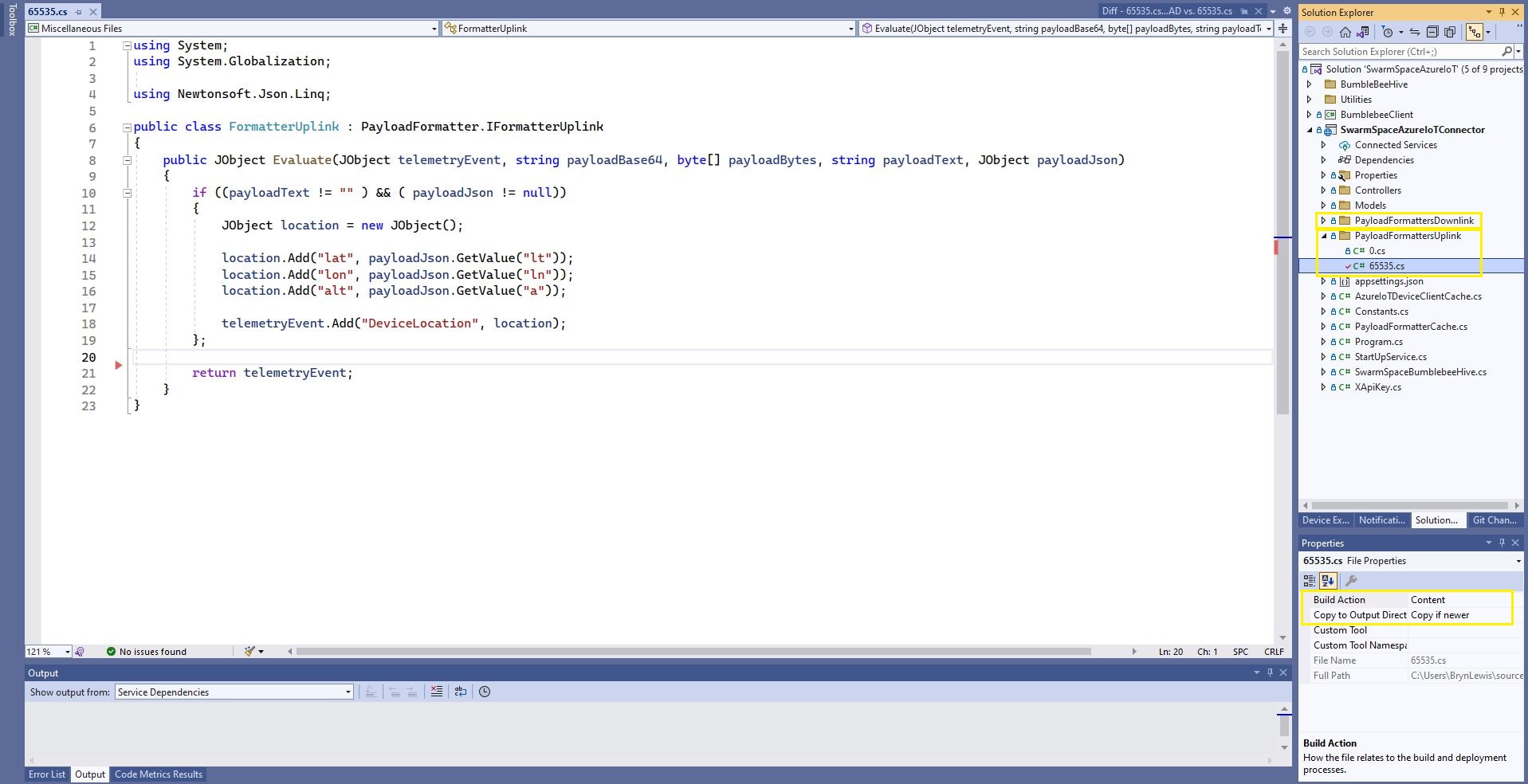
The formatter files are currently part of the SwarmSpaceAzureIoTConnector project (moving to Azure Blob Storage) so are configured as “content” (bonus syntax highlighting works) and “copy if newer” so they are included in the deployment package.

Visual Studio 2022 Sample payload formatter

I used Alastair Crabtrees’s LazyCache to store compiled payload formatters with Uplink/Downlink + UserApplicationId as the cache key.

public class FormatterCache : IFormatterCache
{
    private readonly ILogger<FormatterCache> _logger;
    private readonly Models.ApplicationSettings _applicationSettings;
    private readonly static IAppCache _payloadFormatters = new CachingService();

    public FormatterCache(ILogger<FormatterCache>logger, IOptions<Models.ApplicationSettings> applicationSettings)
    {
        _logger = logger;
        _applicationSettings = applicationSettings.Value;
    }

    public async Task<IFormatterUplink> UplinkGetAsync(int userApplicationId)
    {
        IFormatterUplink payloadFormatterUplink = await _payloadFormatters.GetOrAddAsync<PayloadFormatter.IFormatterUplink>($"U{userApplicationId}", (ICacheEntry x) => UplinkLoadAsync(userApplicationId), memoryCacheEntryOptions);

        return payloadFormatterUplink;
    }

    private async Task<IFormatterUplink> UplinkLoadAsync(int userApplicationId)
    {
        string payloadformatterFilePath = $"{_applicationSettings.PayloadFormattersUplinkFilePath}\\{userApplicationId}.cs";

        if (!File.Exists(payloadformatterFilePath))
        {
            _logger.LogInformation("PayloadFormatterUplink- UserApplicationId:{0} PayloadFormatterPath:{1} not found using default:{2}", userApplicationId, payloadformatterFilePath, _applicationSettings.PayloadFormatterUplinkDefault);

            return CSScript.Evaluator.LoadFile<PayloadFormatter.IFormatterUplink>(_applicationSettings.PayloadFormatterUplinkDefault);
        }

        _logger.LogInformation("PayloadFormatterUplink- UserApplicationId:{0} loading PayloadFormatterPath:{1}", userApplicationId, payloadformatterFilePath);

        return CSScript.Evaluator.LoadFile<PayloadFormatter.IFormatterUplink>(payloadformatterFilePath);
    }
...
}

The default uplink and downlink formatters are configured in application settings and are used when a UserApplicationId specific formatter is not configured.

Fiddler Composer illustrating compiled formatter timings before and after caching

Swarm Space – Uplink Payload formatter Proof of Concept(PoC)

My Azure IoT Hub Cloud Identity Translation Gateway will support the translation of Base64 encoded uplink payloads to Javascript Object Notation (JSON) so they can be processed by Azure IoT Hub client applications and Azure IoT Central. This PoC uses CS-Script by Oleg Shilo to transform the Swarm Eval Kit Base64 encoded JSON uplink messages.

Swarm Hive message list with a message payload

A sample decoded (JSON) Swarm Eval Kit uplink message

{"ln":123.456,"si":0.0,"bi":0.2,"sv":0.152,"lt":-12.345,"bv":4.032,"d":1671704370,"n":2,"a":9.0,"s":1.0,"c":208.0,"r":-94,"ti":0.032}

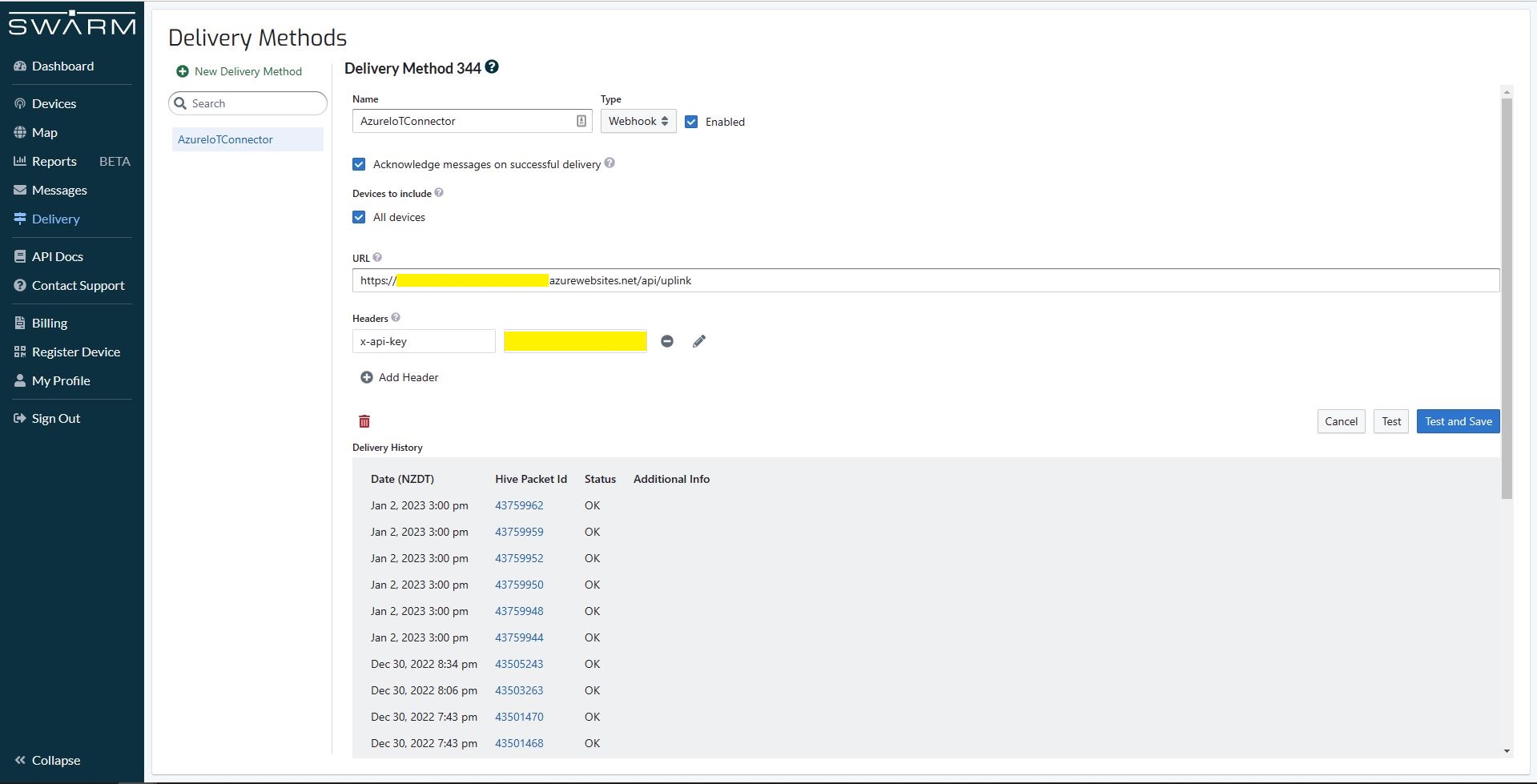
A Webhook Delivery method forwards uplink messages to my Azure IoT Hub Cloud Identity Translation Gateway.

Swarm Hive Delivery configuration with recent uplink messages

My first hard-coded payload formatter adds an Azure IoT Central compatible location to the telemetry event payload.

const string codeSwarmSpaceUplinkFormatterCode = @"
   using Newtonsoft.Json.Linq;

   public class UplinkFormatter : PayloadFormatter.ISwarmSpaceFormatterUplink
   {
       public JObject Evaluate(JObject telemetryEvent, string payloadBase64, byte[] payloadBytes, string payloadText, JObject payloadJson)
       {
           if ((payloadText != """" ) && ( payloadJson != null))
           {
               JObject location = new JObject() ;

               location.Add(""Lat"", payloadJson.GetValue(""lt""));
               location.Add(""Lon"", payloadJson.GetValue(""ln""));
               location.Add(""Alt"", payloadJson.GetValue(""a""));

               telemetryEvent.Add( ""location"", location);
           };

           return telemetryEvent;
       }
   }";
}

The PayloadFormatter namespace was added to reduce the length of the payload formatter C# interface declarations.

namespace PayloadFormatter 
{
    using Newtonsoft.Json.Linq;

    public interface ISwarmSpaceFormatterUplink
    {
        public JObject Evaluate(JObject telemetry, string payloadBase64, byte[] payloadBytes, string payloadText, JObject payloadJson);
    }

    public interface ISwarmSpaceFormatterDownlink
    {
        public string Evaluate(JObject payloadJson, string payloadText, byte[] payloadBytes, string payloadBase64);
    }
}

namespace devMobile.IoT.SwarmSpace.AzureIoT.Connector
{
    using System.Threading.Tasks;
    using Microsoft.Extensions.Logging;

    using CSScriptLib;

    using PayloadFormatter;

    public interface ISwarmSpaceFormatterCache
    {
        public Task<ISwarmSpaceFormatterUplink> PayloadFormatterGetOrAddAsync(int userApplicationId);

    }

    public class SwarmSpaceFormatterCache : ISwarmSpaceFormatterCache
    {
        private readonly ILogger<SwarmSpaceFormatterCache> _logger;

        public SwarmSpaceFormatterCache(ILogger<SwarmSpaceFormatterCache>logger)
        {
            _logger = logger;
        }

        public async Task<ISwarmSpaceFormatterUplink> PayloadFormatterGetOrAddAsync(int deviceId)
        {
            return CSScript.Evaluator.LoadCode<PayloadFormatter.ISwarmSpaceFormatterUplink>(codeSwarmSpaceUplinkFormatterCode);
        }
...
}

The parameters of the formatter are Base64 encoded, textual and a Newtonsoft JObject representations of the uplink payload and a telemetry event populated with some uplink message metadata.

Azure IoT Central uplink telemetry message payload

The initial “compile” of an uplink formatter was taking approximately 2.1 seconds so they will be “compiled” on demand and cached in a Dictionary with the UserApplicationId as the key. A default uplink formatter will be used when a UserApplicationId specific uplink formatter is not configured.

Swarm Space – Payload formatters with CS-Script

My Azure IoT Hub Cloud Identity Translation Gateway needs to support the translation of Base64 encoded uplink payloads to Javascript Object Notation (JSON) and downlink payloads to Base64 encoded from Javascript Object Notation (JSON) . This so uplink and downlink messages can be processed and generated by Azure IoT Hub connected and Azure IoT Central applications.

To format uplink and downlink messages I had been looking at CS-Script by Oleg Shilo which is a Common Language Runtime(CLR) based scripting system that uses European Computer Manufacturers Association (ECMA)-compliant C# as a programming language.

I started with a modified version of the first sample on Github.

public class Samples
{
    const string codeMethod = @"
        int Multiply(int a, int b)
        {
            return a * b;
        }";

    public void Execute1()
    {
       dynamic script = CSScript.Evaluator.LoadMethod(codeMethod);

        int result = script.Multiply(3, 2);

        Console.WriteLine($"Product 1:{result}");
    }
...
internal class Program
{
    static void Main(string[] args)
    {
        new Samples().Execute1();
...
        Console.WriteLine($"Press Enter to exit");
        Console.ReadLine();
    }
}

I then modified it to use a C# interface and the application failed with an exception

CSScriptLib.CompilerException
  HResult=0x80131600
  Message=(2,39): error CS0246: The type or namespace name 'IMultiplier' could not be found (are you missing a using directive or an assembly reference?)

  Source=CSScriptLib
  StackTrace:
   at CSScriptLib.RoslynEvaluator.Compile(String scriptText, String scriptFile, CompileInfo info)
   at CSScriptLib.EvaluatorBase`1.LoadCode[T](String scriptText, Object[] args)
   at devMobile.IoT.SwarmSpace.AzureIoT.PayloadFormatterCSScript.Samples.Execute2A() in C:\Users\BrynLewis\source\repos\SwarmSpaceAzureIoT\PayloadFormatterCSScipt\Program.cs:line 90
   at devMobile.IoT.SwarmSpace.AzureIoT.PayloadFormatterCSScript.Program.Main(String[] args) in C:\Users\BrynLewis\source\repos\SwarmSpaceAzureIoT\PayloadFormatterCSScipt\Program.cs:line 375

After some trial and error, I figured out I had the namespace wrong

const string codeClassA = @"
    public class Calculator : devMobile.IoT.SwarmSpace.AzureIoT.PayloadFormatterCSScript.IMultiplier
    {
        public int Multiply(int a, int b)
        {

            return a * b;
        }
    }";

public void Execute2A()
{
    IMultiplier multiplierA = CSScript.Evaluator.LoadCode<IMultiplier>(codeClassA);

    Console.WriteLine($"Product 2A:{multiplierA.Multiply(3, 2)} - Press Enter to exit");
}

The long namespace would have been a pain in the arse (PITA) for users creating payload formatters and after some experimentation I added another interface with a short namespace. (Not certain this is a good idea).

namespace PayloadFormatter // Additional namespace for shortening interface for formatters
{
    public interface IMultiplier
    {
        int Multiply(int a, int b);
    }
}
...
public void Execute2B()
{
      PayloadFormatter.IMultiplier multiplierB = CSScript.Evaluator.LoadCode<PayloadFormatter.IMultiplier>(codeClassB);

     Console.WriteLine($"Product 2B:{multiplierB.Multiply(3, 2)} - Press Enter to exit");
}

I then wanted to figure out how to limit the namepaces the script has access to

const string codeClassDebug = @"
    using System.Diagnostics;

    public class Calculator : devMobile.IoT.SwarmSpace.AzureIoT.PayloadFormatterCSScript.IMultiplier
    {
        public int Multiply(int a, int b)
        {
           Debug.WriteLine(""Oops""); // Comment out the using System.Diagnostics;

            return a * b;
        }
    }";

public void Execute3()
{
    CSScript.Evaluator.Reset(true);

    IMultiplier multiplier = CSScript.Evaluator
        .LoadCode<IMultiplier>(codeClassDebug);

    int result = multiplier.Multiply(6, 2);

    Console.WriteLine($"Product 3:{result}");
}

The CSScript.Evaluator.Reset(true); removes all of the “default” references but a using directive could make namespaces available, so this needs some more investigation

The next step was to build the simplest possible payload formatter a “pipe” which displayed the text encoded in Base64 string.

const string codeSwarmSpaceFormatterPipe = @"
    public class SwarmSpaceFormatter:devMobile.IoT.SwarmSpace.AzureIoT.PayloadFormatterCSScript.ISwarmSpaceFormatterPipe
    {
        public string Pipe(string payloadBase64)
        {
            var payloadBase64Bytes = System.Convert.FromBase64String(payloadBase64);

             return System.Text.Encoding.UTF8.GetString(payloadBase64Bytes);
        }
    }";
...
public void Execute4()
{
    ISwarmSpaceFormatterPipe SwarmSpaceFormatter = CSScript.Evaluator
           ...
                        .LoadCode<ISwarmSpaceFormatterPipe>(codeSwarmSpaceFormatterPipe);

    string payload = SwarmSpaceFormatter.Pipe(PayloadBase64);

    Console.WriteLine($"Pipe:{payload}");
}

The Base64 encoded uplink payloads will have to be converted to JSON and the downlink JSON payloads will have to be converted to Base64 encoded binary, so I created an uplink and downlink formatters.

public void Execute5()
{
    string namespaces = $"using Newtonsoft.Json.Linq;using System;\n";
    string code = namespaces + codeSwarmSpaceFormatter;

    JObject telemetry = new JObject
    {
            { "ApplicationID", 12345 },
            { "DeviceID", 54321 },
            { "DeviceType", 2 },
            { "ReceivedAtUtc", DateTime.UtcNow.ToString("s", CultureInfo.InvariantCulture) },
    };

    ISwarmSpaceFormatter SwarmSpaceFormatter = CSScript.Evaluator.LoadCode<ISwarmSpaceFormatter>(code);

    string pipePayload = SwarmSpaceFormatter.Pipe(PayloadBase64);

    Console.WriteLine($"Pipe:{pipePayload}");
    Console.WriteLine("");


    JObject uplinkPayload = SwarmSpaceFormatter.Uplink(telemetry, PayloadBase64, Convert.FromBase64String(PayloadBase64));

    Console.WriteLine($"Uplink:{uplinkPayload}");
    Console.WriteLine("");

    JObject command = new JObject
    {
        {"Temperature", 1},
    };

    string downlinkPayload = SwarmSpaceFormatter.Downlink(command);

    Console.WriteLine($"Downlink:{downlinkPayload}");
    Console.WriteLine("");
}

I found that having both the byte array and Base64 encoded representation of the uplink payloads was useful. The first formatter converts the temperature field of the downlink payload into a four byte array then reverses the array to illustrate how packed byte payloads could be constructed.

const string codeSwarmSpaceFormatter1 = @"
    public class SwarmSpaceFormatter : devMobile.IoT.SwarmSpace.AzureIoT.PayloadFormatterCSScript.ISwarmSpaceFormatter
    {
        public string Pipe(string payloadBase64)
        {
            var payloadBase64Bytes = System.Convert.FromBase64String(payloadBase64);

            return System.Text.Encoding.UTF8.GetString(payloadBase64Bytes);
       }

        public JObject Uplink(JObject telemetryEvent, string payloadBase64, byte[] payloadBytes)
        {
            var payloadBase64Bytes = System.Convert.FromBase64String(payloadBase64);

            telemetryEvent.Add(""PayloadBase64"", payloadBase64Bytes);
            telemetryEvent.Add(""PayloadBytes"",System.Text.Encoding.UTF8.GetString(payloadBytes));

            return telemetryEvent;
        }

        public string Downlink(JObject command)
        {
            int temperature = command.Value<int>(""Temperature"");

            return System.Convert.ToBase64String(BitConverter.GetBytes(temperature));
        }
    }";

const string codeSwarmSpaceFormatter2 = @"
    public class SwarmSpaceFormatter:devMobile.IoT.SwarmSpace.AzureIoT.PayloadFormatterCSScript.ISwarmSpaceFormatter
    {
        public string Pipe(string payloadBase64)
        {
            var payloadBase64Bytes = System.Convert.FromBase64String(payloadBase64);

            return System.Text.Encoding.UTF8.GetString(payloadBase64Bytes);
        }

        public JObject Uplink(JObject telemetryEvent, string payloadBase64, byte[] payloadBytes)
        {
            var payloadBase64Bytes = System.Convert.FromBase64String(payloadBase64);

            telemetryEvent.Add(""PayloadBase64"", payloadBase64Bytes);
            telemetryEvent.Add(""PayloadBytes"",System.Text.Encoding.UTF8.GetString(payloadBytes));

            return telemetryEvent;
        }

        public string Downlink(JObject command)
        {
            int temperature = command.Value<int>(""Temperature"");

            byte[] temperatureBytes = BitConverter.GetBytes(temperature);

            Array.Reverse(temperatureBytes);

            return System.Convert.ToBase64String(temperatureBytes);
        }
    }";
...
public void Execute6()
{
    string namespaces = $"using Newtonsoft.Json.Linq;using System;\n";
    string code1 = namespaces + codeSwarmSpaceFormatter1;
    string code2 = namespaces + codeSwarmSpaceFormatter2;

    JObject telemetry = new JObject
    {
        { "ApplicationID", 12345 },
        { "DeviceID", 54321 },
        { "DeviceType", 2 },
        { "ReceivedAtUtc", DateTime.UtcNow.ToString("s", CultureInfo.InvariantCulture) },
    };

    var formatters = new Dictionary<string, ISwarmSpaceFormatter>();

    Console.WriteLine($"Evaluator start");
    DateTime evaluatorStartAtUtc = DateTime.UtcNow;

    ISwarmSpaceFormatter SwarmSpaceFormatter1 = CSScript.Evaluator
                                  .LoadCode<ISwarmSpaceFormatter>(code1);

    ISwarmSpaceFormatter SwarmSpaceFormatter2 = CSScript.Evaluator
                                  .LoadCode<ISwarmSpaceFormatter>(code2);

    Console.WriteLine($"Evaluator:{DateTime.UtcNow - evaluatorStartAtUtc}");
    Console.WriteLine("");

    Console.WriteLine($"Evaluation start");
    DateTime evaluationStartUtc = DateTime.UtcNow;

    formatters.Add("F1", SwarmSpaceFormatter1);
    formatters.Add("F2", SwarmSpaceFormatter2);

    JObject command = new JObject
    {
        {"Temperature", 1},
    }; 

    ISwarmSpaceFormatter downlinkPayload;
    downlinkPayload = formatters["F1"];
    Console.WriteLine($"Downlink F1:{downlinkPayload.Downlink(command)}");
  
    downlinkPayload = formatters["F2"];
    Console.WriteLine($"Downlink F2:{downlinkPayload.Downlink(command)}");
  
    Console.WriteLine($"Evaluation:{DateTime.UtcNow - evaluationStartUtc}");
    Console.WriteLine("");

    const int iterations = 100;
    Console.WriteLine($"Evaluations start {iterations}");
    DateTime evaluationsStartUtc = DateTime.UtcNow;

    for (int i = 1; i <= iterations; i++)
    {
        JObject command1 = new JObject
        {
            {"Temperature", 1},
        };

        downlinkPayload = formatters["F1"];
        Console.WriteLine($" Downlink F1:{downlinkPayload.Downlink(command1)}");
       
        downlinkPayload = formatters["F2"];
        Console.WriteLine($" Downlink F2:{downlinkPayload.Downlink(command1)}");
    }

    Console.WriteLine($"Evaluations:{iterations} Took:{DateTime.UtcNow - evaluationsStartUtc}");
}

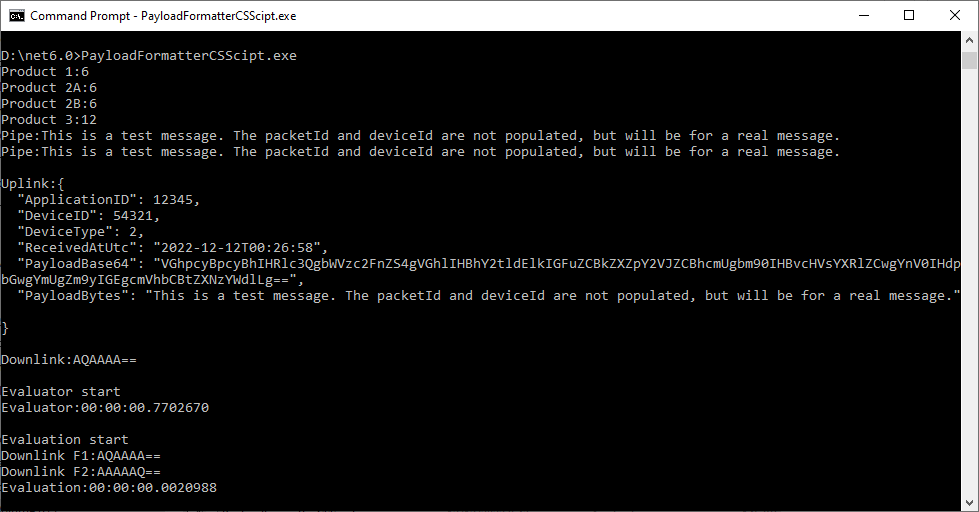
On my development box the initial “compile” of each function was taking approximately 2.1 seconds so I cached the “compiled” formatters in a dictionary so they could be reused. Cached in the dictionary executing the two formatters 100 times took approximately 15 milliseconds (which is close to native .NET performance).

Compatibility

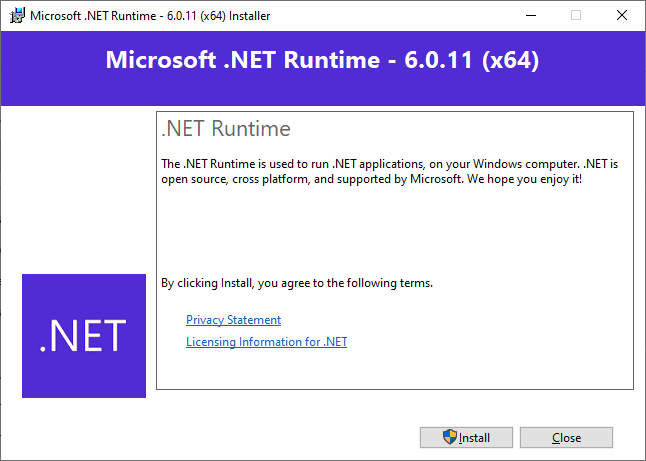
To check that the CS-Script tooling could run on a machine without the .NET 6 Software Development Kit (SDK) I tested the application on a laptop which had a “fresh” install of Windows 10.

CS-Script application failing due to missing .NET 6 runtime
Installing the .NET 6 Runtime
CS-Script application running after .NET runtime installation

The CS-Script library is pretty amazing and has made the development of uplink and downlink payload formatters significantly less complex than I was expecting.