EntLib Logging in Azure Pt 3 – Working

After some more reading starting here I added a counter to the onRun so I could see if log entries were getting dropped (my gut feel was correct, they were)

public override void Run()
{
int index = 0;
Microsoft.Practices.EnterpriseLibrary.Logging.Logger.Write("Run Start " + DateTime.UtcNow.ToLongTimeString());

while (true)
{
Microsoft.Practices.EnterpriseLibrary.Logging.Logger.Write(“Run Loop ” + index.ToString() + ” ” + DateTime.UtcNow.ToLongTimeString());
index++;
Thread.Sleep(10000);
}
}

So after some trial and error I settled on this initialisation approach as the most robust

public override bool OnStart()
{
CloudStorageAccount.SetConfigurationSettingPublisher((configName, configSetter) =>
{
configSetter(RoleEnvironment.GetConfigurationSettingValue(configName));
});

CloudStorageAccount storageAccount = CloudStorageAccount.Parse(RoleEnvironment.GetConfigurationSettingValue(“Microsoft.WindowsAzure.Plugins.Diagnostics.ConnectionString”));
RoleInstanceDiagnosticManager roleInstanceDiagnosticManager = storageAccount.CreateRoleInstanceDiagnosticManager(RoleEnvironment.DeploymentId, RoleEnvironment.CurrentRoleInstance.Role.Name, RoleEnvironment.CurrentRoleInstance.Id);

var configuration = roleInstanceDiagnosticManager.GetCurrentConfiguration();
configuration.Logs.BufferQuotaInMB = 4;
configuration.Logs.ScheduledTransferPeriod = TimeSpan.FromMinutes(1);
configuration.Logs.ScheduledTransferLogLevelFilter = LogLevel.Verbose;

roleInstanceDiagnosticManager.SetCurrentConfiguration(configuration);

EnterpriseLibraryContainer.Current = EnterpriseLibraryContainer.CreateDefaultContainer(new FileConfigurationSource(“web.config”, false));

Microsoft.Practices.EnterpriseLibrary.Logging.Logger.Write(“OnStart ” + DateTime.UtcNow.ToLongTimeString());

return base.OnStart();
}
This sample application seems to work and reliably log all the information I expect to the trace logs.
EntLib Logging in Azure Pt 2 – All is not what it seems

After confirming my environment was good I modified the sample code and added logging to the OnStart, I also added an OnRun with some logging and a simple while loop.

public override bool OnStart()
{
CloudStorageAccount.SetConfigurationSettingPublisher((configName, configSetter) =>
{
configSetter(RoleEnvironment.GetConfigurationSettingValue(configName));
});

var configuration = DiagnosticMonitor.GetDefaultInitialConfiguration();
configuration.Logs.BufferQuotaInMB = 4;
configuration.Logs.ScheduledTransferPeriod = TimeSpan.FromMinutes(1);
configuration.Logs.ScheduledTransferLogLevelFilter = LogLevel.Verbose;
DiagnosticMonitor.Start(“Microsoft.WindowsAzure.Plugins.Diagnostics.ConnectionString”, configuration);

EnterpriseLibraryContainer.Current = EnterpriseLibraryContainer.CreateDefaultContainer(new FileConfigurationSource("web.config", false));

Microsoft.Practices.EnterpriseLibrary.Logging.Logger.Write("OnStart " + DateTime.UtcNow.ToLongTimeString());

return base.OnStart();
}

public override void Run()
{
Microsoft.Practices.EnterpriseLibrary.Logging.Logger.Write("Run Start " + DateTime.UtcNow.ToLongTimeString());

while (true)
{
Microsoft.Practices.EnterpriseLibrary.Logging.Logger.Write("Run Loop " + DateTime.UtcNow.ToLongTimeString());
Thread.Sleep(10000);
}

base.Run();
}

Initially the webrole wouldn’t start and then after re-reading the full IIS vs. core post I realised that the entlib couldn’t find its config file so I added

EnterpriseLibraryContainer.Current = EnterpriseLibraryContainer.CreateDefaultContainer(new FileConfigurationSource(“web.config”, false));

I could then see some log entries (note the process name…)

<TraceSource>General</TraceSource>

But my onStart logging wasn’t working and when I looked at the timestamps on the log entries it felt like there were some missing. Time for some more reading…

Entlib Logging in Azure Pt 1 – The baseline

Back when the Azure SDK V1.3 was released several of my cloud services broke due to the change from core to full IIS. I use the Enterprise Library which was also broken by this update. The Azure team talked about the changes in detail here and SMarx talked about how to fix you configuration problems here. My customer was in a hurry so I just put in the quick ‘n’ dirty hack and moved on. Every so often the warnings in the error list tab would annoy me so I would go back and have another look.

warning CloudServices078: The web role XXX is configured using a legacy syntax that specifies that it runs in Hostable Web Core.

One of these webroles was an SMS Gateway which polled an Azure storage queue for messages to send in the onRun and had two simple asp.net pages which inserted inbound messages and delivery notifications into Azure Storage queues for processing by a queue handler worker role.

The problem was that at 5-15mins for a deploy it was easy to get distracted and with the release of the Azure integration pack nearly 2 years later I figured it was time to sort this properly. I wanted to be able use the Entlib logging etc in the onStart, onRun and ASP.Net pages of an webrole. There was some useful reading here and here.

To reduce the application to a managable size I started with the Azure Integration pack logging hands on lab and this is the key section of webrole.cs

public override bool OnStart()
{
CloudStorageAccount.SetConfigurationSettingPublisher((configName, configSetter) =>
{
configSetter(RoleEnvironment.GetConfigurationSettingValue(configName));
});

var configuration = DiagnosticMonitor.GetDefaultInitialConfiguration();
configuration.Logs.BufferQuotaInMB = 4;
configuration.Logs.ScheduledTransferPeriod = TimeSpan.FromMinutes(1);
configuration.Logs.ScheduledTransferLogLevelFilter = LogLevel.Verbose;
DiagnosticMonitor.Start("Microsoft.WindowsAzure.Plugins.Diagnostics.ConnectionString", configuration);

// For information on handling configuration changes
// see the MSDN topic at http://go.microsoft.com/fwlink/?LinkId=166357.

return base.OnStart();
}

I built the application and deployed it into the cloud and everything worked as expected. When I went to the default.aspx page and clicked on the button. I use Cerebrata Diagnostics Manager and with this I could see log entries appearing.

NiMH Batteries and Netduinos

The robot is pretty hard on batteries so I figured I would get some rechargables. (Eveready NiMH from Countdown on special every so often)

Charger (includes 4 AA batteries) NZD 24.69 + Batteries AA NZD 12.99

First thing I noticed was the Robot getting a bit more random than usual, then the backlight of the LCD on the QuakeZure stand alone demo kit stopped working. Using a multimeter I found that straight off the charger the batteries were 1.4v which then rapidly fell to the 1.2V as per the label (should have paid more attention to the label).
The batteries also do get quite hot charging.
The Magician chassis comes with a 4 x AA battery holder so the Netduino (or LCD display) was getting less than 5V under load and was browning out.
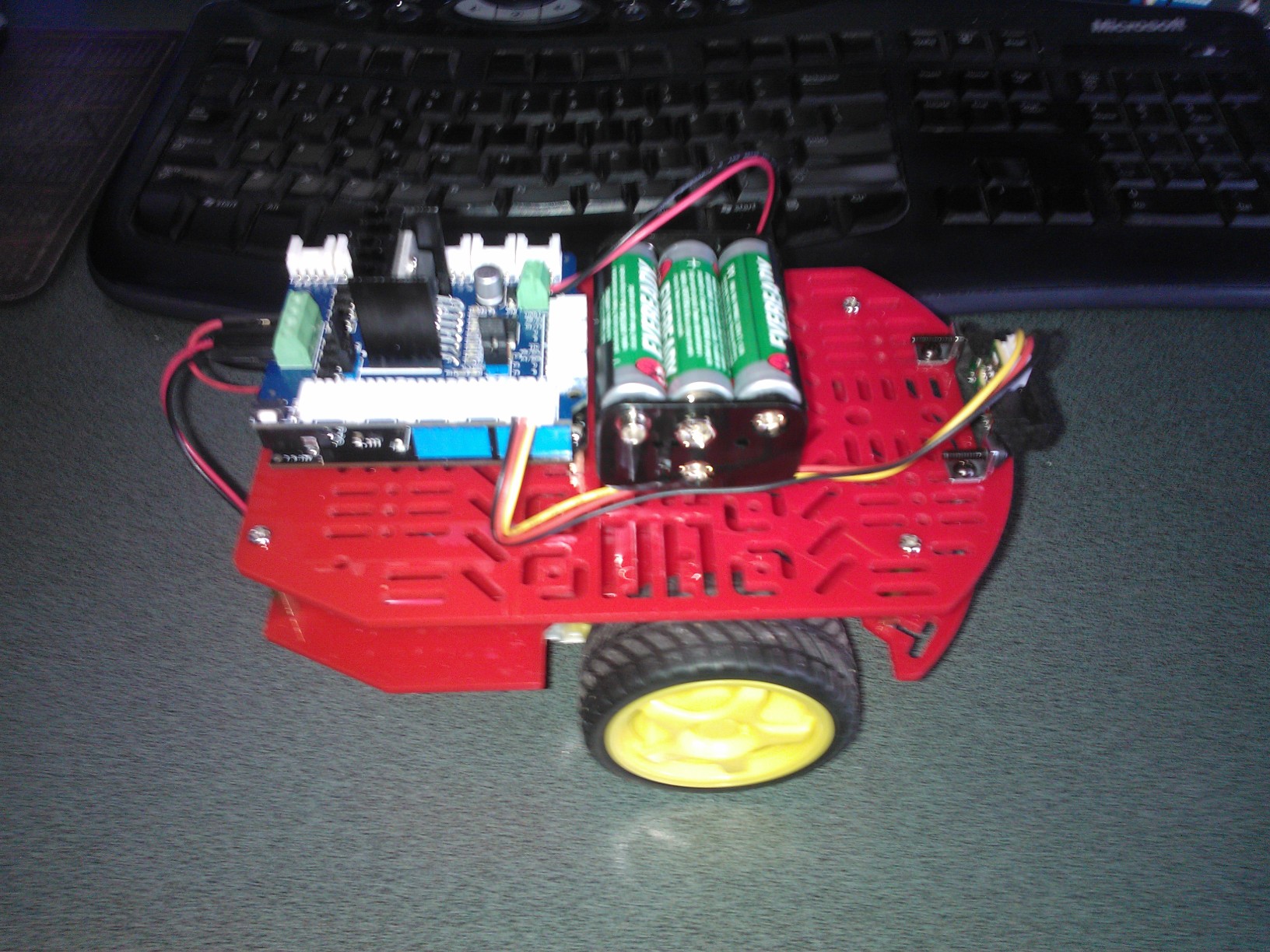
Hence the upgrade to the 6xAA battery pack for the robot. The SeeedStudio motor shield has a 5V regulator on board to ensure the Netduino isn’t fried.

My Robot – No tools required

A few local people have asked for a BoM for my robot.  This is for the entry level version with no soldering or additional tools required. (There is a screw driver included with the robot chassis kit)

2WD Robot chassis from Mindkits – NZD25

Netduino from Mindkits – NZD58

IR Distance Sensor and cable from SeeedStudio– USD 14

Motor Controller from SeeedStudio – USD 20

Mountings for IR Sensor from Mindkits – NZD 5

bracket x 2

screws x4

nuts x 2

With the Seeedstudio motor controller I use a larger battery pack –

Battery holder 6xAA NZD2.25

Battery snap NZD0.75

If you don’t mind some soldering or crimping …

Short range ID Distance sensor from Mindkits NZD 25.50

I swapped the long range Sharp sensor for the short range one.

Magician robot

Robot on my desk

Make sure you upgrade Netduino to 4.2 or later for improved PWM

Meredith’s first .Net MF application

Meredith who is 8 wrote her first .Net MF program

public class Program

{

public static void Main()

{

OutputPort led = new OutputPort((Cpu.Pin)FEZ_Pin.Digital.Di9, ledState);

AnalogIn volume = new AnalogIn((AnalogIn.Pin)FEZ_Pin.AnalogIn.An1);

while (true)

{

Debug.Print("Volume = " + volume.Read().ToString());

Thread.Sleep(volume.Read());

led.Write(!led.Read());

}

}
She wants to hack the robot code next, small steps

GNS Introduction

Starting to get serious now, went to a presentation at the NZi3 on Friday afternoon.

UC Geospatial month seminar series.  This talk is called: “GeoNet: Earthquakes,
Sensor Networks and Geospatial Knowledge”.

Had a chat with the presenter from GNS, have emailed an elevator pitch…

Thanks to TomW from the Geology Department at Canterbury for the intro.

Microsoft TechEd NZ 2012

Spoke at TechEd this year. My topic was about the Internet of Things and Windows Azure

(http://channel9.msdn.com/Events/TechEd/NewZealand/TechEd-New-Zealand-2012/AZR302)

Presentation Abstract Ericsson CEO Hans Vestberg estimates 50 billion devices will be connected to the Web by 2020. That’s seven devices for each human on the planet. Writing embedded software which has to interface to data acquisition devices, and building scalable Internet of Things applications, has historically been hard. The .Net Micro Framework makes embedded development easy for .Net developers. Coupled with Windows Azure, developing a scalable Internet of Things application is much easier. Using Windows Azure and the .Net Micro Framework I will give a practical demonstration of how easily you can use the Microsoft stack to construct an Internet of Things application. The application will acquire data from a selection of sensors, upload it to Azure for processing, and keep users updated in close to real-time. Come and see what you can build with a GPS, an Accelerometer, a Netduino Plus, SignalR and Windows Azure.

The scenario was QuakeZure – Commodity Hardware and cloud computing for earthquake early warning.

My feedback scores out of 4

AZR302 Azure, the Platform for Internet of Things Applications 06/9/2012 16:30 Epsom Room Speaker(s): Bryn Lewis

Num. Submitted 34

Session Content 3.44

Session Presenter 3.82

Overall Session 3.59

Technical level of this session

Just Right 91.18%

Not Technical Enough 5.88%

Too Technical 2.94%