FEZ Spider NetMF 4.2 Networking revisited

I was determined to get the J11D Ethernet module working in the graphical Designer so after a lot of reading + trial and error….

http://www.tinyclr.com/forum/topic?id=9438
http://www.tinyclr.com/forum/topic?id=9661
http://www.tinyclr.com/forum/topic?id=9816
http://www.tinyclr.com/forum/topic?id=9845
http://www.tinyclr.com/forum/topic?id=10120

Making the J11D work after both reflashing the firmware & reboot was critical

Custom MMA8451Q SeeedStudio Twig

Lastnight wired up a SeeedStudio Grove system compatible twig based on one of the MMA8451Q breakout boards I bought. It has two connectors one for the I2C interface the other for the two interrupt lines which the device has.

MMA8451Q SeeedStudio Twig

I can read acceleration values from the device and once I have the 14bit 2s complement value conversion thouroughly tested I will add code to to configure the interrupt functionality.

Need to make connector leads a bit longer on V2…

FEZ Spider MF 4.1 and 4.2 Networking differences

I upgraded one of the two FEZ Spider boards I have to Version 4.2 of the .NETMF and this has caused some problems with the MF Deploy Network Configuration and also broke some networking code.

The MFDeploy Network configuration save fails with “Invalid configuration data from Plug-In” which others in the GHI Forums have also encountered e.g. http://www.tinyclr.com/forum/topic?id=9661

When I ran up my code the client IP address, gateway address etc. weren’t getting setup properly, My home network uses DHCP and this was fixed with .EnableDhcp(). I then noticed that the DNS address was not what I was expecting. It was pointing to one of the OpenDNS project servers. This was fixed by the .EnableDynamicDns();

This code works with V4.1

// This could be configured via MFDeploy
networkInterface.EnableDhcp();
networkInterface.EnableDynamicDns();

// error checking etc. removed

Debug.Print("Client IP address:" + networkInterface.IPAddress.ToString());
Debug.Print("MAC Address: " + BytesToHexString(networkInterface.PhysicalAddress));
Debug.Print("IP Address: " + networkInterface.IPAddress.ToString());
Debug.Print("Subnet Mask: " + networkInterface.SubnetMask.ToString());
Debug.Print("Gateway: " + networkInterface.GatewayAddress.ToString());
foreach (string dnsAddress in networkInterface.DnsAddresses)
{
Debug.Print("DNS Server: " + dnsAddress.ToString());
}

After some mucking around I found this code works for a Fez SPider running V4.2
static readonly EthernetBuiltIn Ethernet = new EthernetBuiltIn();


void ProgramStarted()
{
Ethernet.Open();

if (!Ethernet.IsActivated)
{
NetworkInterfaceExtension.AssignNetworkingStackTo(Ethernet);
}

// This code could be removed once the MFDeploy issue is sorted
Ethernet.NetworkInterface.EnableDhcp();
Ethernet.NetworkInterface.EnableDynamicDns();

// error checking etc. removed

Debug.Print("Client IP address:" + Ethernet.NetworkInterface.IPAddress.ToString());
Debug.Print("MAC Address: " + BytesToHexString( Ethernet.NetworkInterface.PhysicalAddress));
Debug.Print("IP Address: " + Ethernet.NetworkInterface.IPAddress.ToString());
Debug.Print("Subnet Mask: " + Ethernet.NetworkInterface.SubnetMask.ToString());
Debug.Print("Gateway: " + Ethernet.NetworkInterface.GatewayAddress.ToString());
foreach( string dnsAddress in Ethernet.NetworkInterface.DnsAddresses )
{
Debug.Print("DNS Server: " + dnsAddress.ToString());
}
Netduino and MMA8451Q I2C

After an hour mucking around trying to figure out why my new MMA8451Q accelerometer breakout board was returning odd values I stumbled across this post which lead to this post. Then I went back to the device data sheet and found the key paragraph I had missed

A LOW to HIGH transition on the SDA line while the SCL line is high is defined as a stop condition (STOP). A data transfer is always terminated by a STOP. A Master may also issue a repeated START during a data transfer. The MMA8451Q expects repeated STARTs to be used to randomly read from specific registers.

After implementing the approach suggested in this post I can now reliably read registers on the device.

This appears to be applicable for the MMA8451Q, MMA8452Q and MMA8453Q devices.

MMA8451Q Breakout board

Finally got some time to try out the MMA8451Q breakout board that arrived last week.

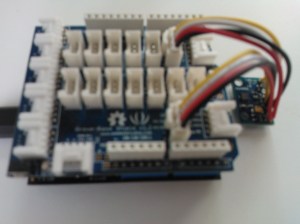
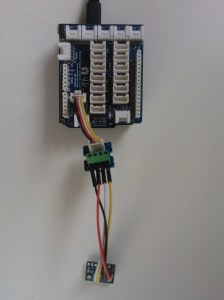
I’m using my Seeedstudio Grove Base Shield, 1 x Grove Universal 5cm cable, 1 x Grove Screw Terminal and 4 x jumper wires to build a test harness for the breakout board. Once I have got the I2C connectivity & device configuration sorted I’ll connect up the two interrupt outputs on the MMA8451Q in a similar way.

Bodged up MMA8451Q connectivity

Bodged up MMA8451Q connectivity

Netduino Plus V1 Clock Accuracy vs. NTP

The Quakezure client application needs a reasonably accurate clock for time stamping the arrival of P-waves and S-waves (P waves travel at 2000-8000 m/sec so a couple of seconds can make a significant difference).  A GPS unit would provide a very accurate reference but it adds significant cost. For example the SeeedStudio GPS twig costs USD39.90 which is roughly 1/3 of the current BoM. The QuakeZure device (or separate GPS unit) would also need to be installed where it could receive information from the GPS satellite constellation. .

In New Zealand the Measurements Standards Laboratory which is part of Industrial Research Limited (a Crown Research Institute) offers public SNTP & NTP services. Using a tiered SNTP approach looked like a cost-effective alternative to GPS for internet connected devices. I started with a ping on my ADSL connection to see what the connectivity with MSL was like (will be much slower on cellular, have seen approaching 10x slower on 2G GPRS)

Ping statistics for 131.203.16.6:     Packets: Sent = 4, Received = 4, Lost = 0 (0% loss), Approximate round trip times in milli-seconds:     Minimum = 33ms, Maximum = 33ms, Average = 33ms

I then wrote a quick ‘n dirty .NetMF console application which used a configurable (default 10mins) timer to regularly compare the current device time with the IRL time and display the difference. I wanted to see what the jitter was on the NTP request and how accurate the N+ on board clock was.

Current Time 12-12-16 06:45:00.09 Duration 43mSec Difference 0 mSec
Current Time 12-12-16 06:55:00.09 Duration 44mSec Difference 86 mSec
Current Time 12-12-16 07:05:00.09 Duration 44mSec Difference 174 mSec
Current Time 12-12-16 07:15:00.09 Duration 44mSec Difference 262 mSec
Current Time 12-12-16 07:25:00.09 Duration 44mSec Difference 349 mSec
Current Time 12-12-16 07:35:00.09 Duration 45mSec Difference 437 mSec
Current Time 12-12-16 07:45:00.09 Duration 44mSec Difference 524 mSec
Current Time 12-12-16 07:55:00.09 Duration 44mSec Difference 611 mSec

After running for an hour the N+ clock was just over half a second out, which equates to roughly 12.5 seconds a day so I then did some digging and found I was not alone.

Need to look at how often I should adjust the device time back into sync with the back office without generating to much NTP traffic.

Fez Spider and Pulse Oximeter power problems

When I initially started writing code for the Seeed Studio Pulse Oximeter I found that I was getting no pulseOximeter_Heartbeat notifications and it seemed to take an awfully long time to get pulseOximeter_ProbeAttached or pulseOximeter_ProbeDetached notifications.

I was powering the kit from the USB port on my development desktop box via a USB Client SP Module. While doing some research I read this post. I then swapped to one of the USB ports on the mother board and the problems went away. I’m going to get a USB Client DP Module so this issue is permanently resolved.

Fez Spider OOB Experience

Have just got some new kit on loan for a customer project a FEZ Spider V1.0USB Client SP Module and a Pulse Oximeter module.

FEZ Spider and Pulse Oximeter

FEZ Spider and Pulse Oximeter on my desk

Previously, I have used the Netduino & FEZ Panda II devices with SeeedStudio Grove Twigs which have quite a different development experience to the Gadgeteer model. The drag ‘n’ drop of components onto the design canvas and the automagic wiring up is neat. But, I’m not certain if this level of abstraction is a benefit or an impediment for more complex projects? I find the way the sockets are labelled and used a bit awkward compared to the Netduino etc.

I can see how those new to the platform could get something up and running quickly which is a real positive. I need to spend more time with the Gadgeteer tools to make sure I am using them in the way they were meant to be used rather than fighting them.

MMA7660FC & ADXL345 I2C Accelerometer read rates

Based on this USGS information I need to ensure a sufficiently high sampling rate to ensure the data collected is useful. Most earthquake waves appear to have a frequency of < 20Hz so taking Nyquist in account I need to be sampling at least at 40Hz.

In a tight loop doing nothing but communicating with the accelerometer I read X,Y & Z acceleration values then averaged the results over 10 lots of 10000 readings.

MMA7660FC – 6 bit acceleration value in 1 byte for each axis 650 RPS.

ADXL345 – 10 bit acceleration value in 2bytes for each axis 435 RPS

Netduino Plus using a SeeedStudio Grove Base ShieldMMA7660FC twig & ADXL345 twig.

The devices also have configurable acquisition rates & in some cases FIFOs for queuing readings which I need to look at some more

Accelerometer Evaluation Process

Two Analog devices ADXL345 Twigs from Seeedstudio arrived today. These offer much better sensitivity than the MMA7660FC Twigs that I have been using. The MMA7660 has a 6 bit 2’s complement output for X,Y & Z acceleration whereas the ADXL has 10 bit resolution in the +-2G range which I would be using.

I have also ordered a couple of MMA8451Q Accelerometer breakout boards from a vendor in China. These have a 14 bit accuracy and have a low noise mode which looks promising. The low noise mode requires a bit more power but for a non mobile application this shouldn’t be an issue.