wolkabout with MQTTnet

As I’m testing my Message Queue Telemetry Transport(MQTT) LoRa gateway I’m building a proof of concept(PoC) .Net core console application for each IoT platform I would like to support.

This PoC was to confirm that I could connect to the walkabout MQTT API then format topics and payloads correctly.

MQTTNet Console Client

The walkabout MQTT broker, username, API Key, and device ID are the required command line parameters. For this PoC I couldn’t get cloud to device (C2D) or Transport Layer Security(TLS) working so will have to do some more research.

namespace devmobile.Mqtt.TestClient.WolkAbout
{
   using System;
   using System.Diagnostics;
   using System.Threading;
   using System.Threading.Tasks;

   using MQTTnet;
   using MQTTnet.Client;
   using MQTTnet.Client.Disconnecting;
   using MQTTnet.Client.Options;

   using Newtonsoft.Json;
   using Newtonsoft.Json.Linq;

   class Program
   {
      private static IMqttClient mqttClient = null;
      private static IMqttClientOptions mqttOptions = null;
      private static string server;
      private static string username;
      private static string apiKey;
      private static string clientID;

      static void Main(string[] args)
      {
         MqttFactory factory = new MqttFactory();
         mqttClient = factory.CreateMqttClient();

         if ((args.Length != 4) )
            {
            Console.WriteLine("[MQTT Server] [UserName] [APIKey] [ClientID]");
            Console.WriteLine("Press <enter> to exit");
            Console.ReadLine();
            return;
         }

         server = args[0];
         username = args[1];
         apiKey = args[2];
         clientID = args[3];

         Console.WriteLine($"MQTT Server:{server} Username:{username} ClientID:{clientID}");

         // wolkabout formatted client state update topic
         string topicD2C = $"readings/{username}/";

         mqttOptions = new MqttClientOptionsBuilder()
            .WithTcpServer(server)
            .WithCredentials(username, apiKey)
            .WithClientId(clientID)
            //.WithTls()
            .Build();

         mqttClient.UseDisconnectedHandler(new MqttClientDisconnectedHandlerDelegate(e => MqttClient_Disconnected(e)));
         mqttClient.ConnectAsync(mqttOptions).Wait();

         while (true)
         {
            JObject payloadJObject = new JObject();

            double temperature = 22.0 + (DateTime.UtcNow.Millisecond / 1000.0);
            double humidity = 50 + (DateTime.UtcNow.Millisecond / 100.0);

            payloadJObject.Add("Temperature", temperature);
            payloadJObject.Add("Humidity", humidity);

            string payload = JsonConvert.SerializeObject(payloadJObject);
            Console.WriteLine($"Topic:{topicD2C} Payload:{payload}");

            var message = new MqttApplicationMessageBuilder()
               .WithTopic(topicD2C)
               .WithPayload(payload)
               .WithAtLeastOnceQoS()
               .Build();

            Console.WriteLine("PublishAsync start");
            mqttClient.PublishAsync(message).Wait();
            Console.WriteLine("PublishAsync finish");

            Thread.Sleep(30100);
         }
      }

      private static async void MqttClient_Disconnected(MqttClientDisconnectedEventArgs e)
      {
         Debug.WriteLine("Disconnected");
         await Task.Delay(TimeSpan.FromSeconds(5));

         try
         {
            await mqttClient.ConnectAsync(mqttOptions);
         }
         catch (Exception ex)
         {
            Debug.WriteLine("Reconnect failed {0}", ex.Message);
         }
      }
   }

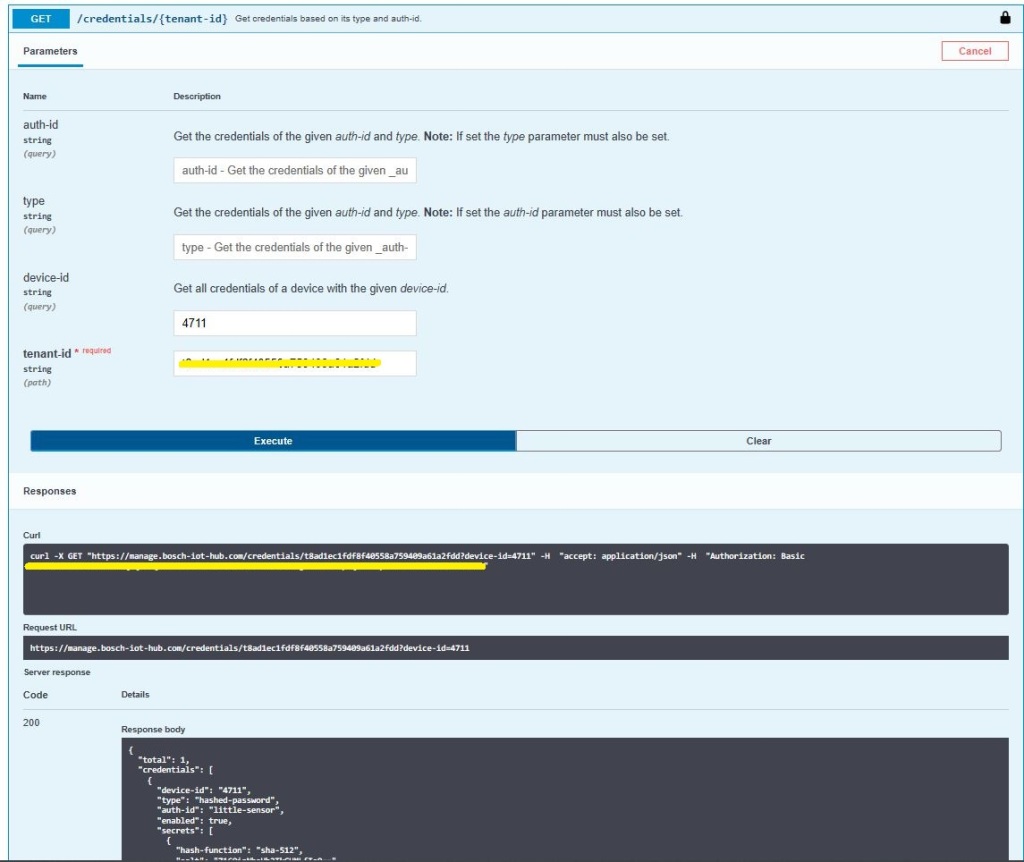
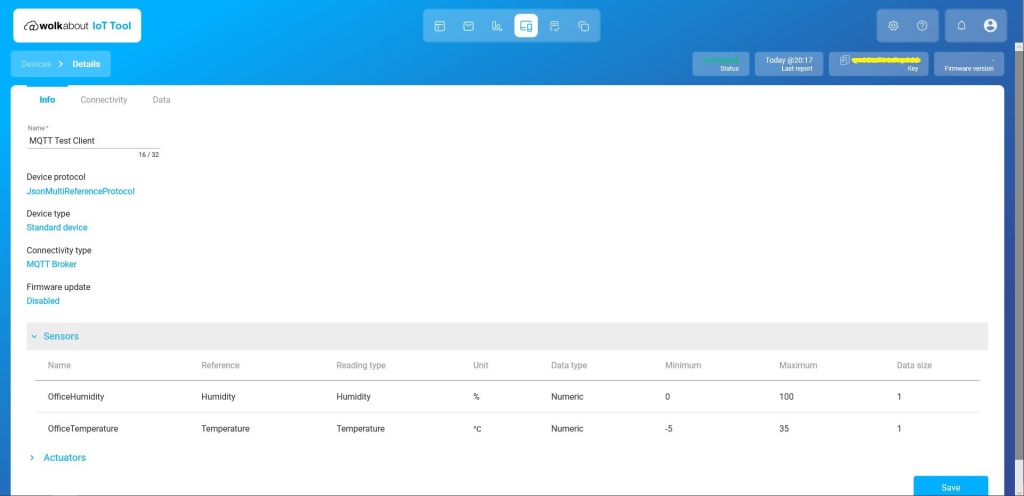
The walkabout device configuration was relatively easy but I need watch the instructional videos again to better understand the device and data semantics relationship.

Data semantics configuration
Devices setup
Device Setup
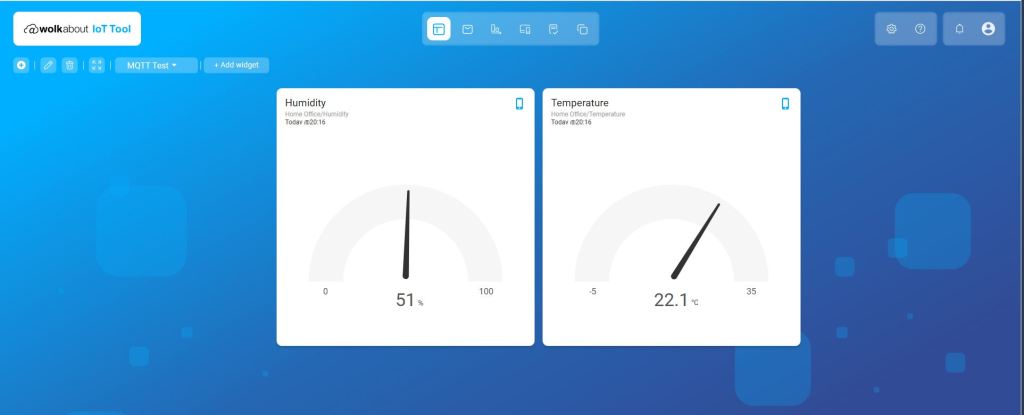
My first dashboard

SmartWorks with MQTTnet

As I’m testing my Message Queue Telemetry Transport(MQTT) LoRa gateway I’m building a proof of concept(PoC) .Net core console application for each IoT platform I would like to support.

This PoC was to confirm that I could connect to the SmartWorks (formerly Carriots) MQTT API then format topics and payloads correctly.

MQTTNet Console Client

The SmartWorks MQTT broker, username, and device ID are the required command line parameters. I didn’t notice any configuration options for cloud to device (C2D) messaging which maybe due to my device configuration or the free trial I was using.

namespace devMobile.Mqtt.TestClient.SmartWorks
{
   using System;
   using System.Diagnostics;
   using System.Threading;
   using System.Threading.Tasks;

   using MQTTnet;
   using MQTTnet.Client;
   using MQTTnet.Client.Disconnecting;
   using MQTTnet.Client.Options;
   using MQTTnet.Client.Receiving;
   using Newtonsoft.Json;
   using Newtonsoft.Json.Linq;

   class Program
   {
      private static IMqttClient mqttClient = null;
      private static IMqttClientOptions mqttOptions = null;
      private static string server;
      private static string username;
      private static string clientId;
      private static string commandTopic;
      private static string groupname;
      private static string feedname;

      static void Main(string[] args)
      {
         MqttFactory factory = new MqttFactory();
         mqttClient = factory.CreateMqttClient();

         if (args.Length != 3) 
         {
            Console.WriteLine("[MQTT Server] [UserName] [ClientID]");
            Console.WriteLine("Press <enter> to exit");
            Console.ReadLine();
            return;
         }

         server = args[0];
         username = args[1];
         clientId = args[2];

         mqttOptions = new MqttClientOptionsBuilder()
            .WithTcpServer(server)
            .WithCredentials(username, "")
            .WithClientId(clientId)
            .WithTls()
            .Build();

         mqttClient.UseDisconnectedHandler(new MqttClientDisconnectedHandlerDelegate(e => MqttClient_Disconnected(e)));
         mqttClient.ConnectAsync(mqttOptions).Wait();

         // Adafruit.IO format for topics which are called feeds
         string topicD2C = $"{username}/streams";

         while (true)
         {
            JObject payloadJObject = new JObject();

            payloadJObject.Add("at", "now");
            payloadJObject.Add("device", clientId);
            payloadJObject.Add("protocol", "v2");

            double temperature = 22.0 + (DateTime.UtcNow.Millisecond / 1000.0);
            double humidity = 50 + (DateTime.UtcNow.Millisecond / 100.0);

            JObject dataJObject = new JObject();
            dataJObject.Add("OfficeTemperature", temperature);
            dataJObject.Add("OfficeHumidity", humidity);

            payloadJObject.Add("data", dataJObject);

            string payload = JsonConvert.SerializeObject(payloadJObject);
            Console.WriteLine($"Topic:{topicD2C} Payload:{payload}");

            var message = new MqttApplicationMessageBuilder()
               .WithTopic(topicD2C)
               .WithPayload(payload)
               .WithAtLeastOnceQoS()
            .Build();

            Console.WriteLine("PublishAsync start");
            mqttClient.PublishAsync(message).Wait();
            Console.WriteLine("PublishAsync finish");

            Thread.Sleep(30100);
         }
      }

      private static async void MqttClient_Disconnected(MqttClientDisconnectedEventArgs e)
      {
         Debug.WriteLine("Disconnected");
         await Task.Delay(TimeSpan.FromSeconds(5));

         try
         {
            await mqttClient.ConnectAsync(mqttOptions);
         }
         catch (Exception ex)
         {
            Debug.WriteLine("Reconnect failed {0}", ex.Message);
         }
      }
   }
}

The ThingsBoard device configuration was relatively easy with convenient buttons to copy the Device ID (Client ID in test client) and Access Token (UserName in test client). I need to revisit the Device and Group configuration to see if I can make the automatically generated names more user friendly.

Devices configuration

The Device configuration form has a tab which has a link for the “Data Streams” form which was useful for debugging.

Device configuration

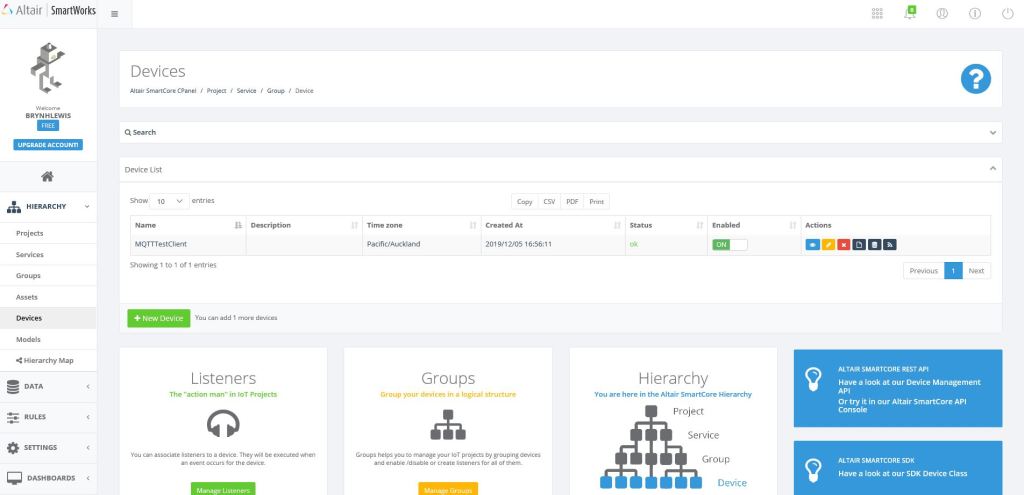
I have emailed SmartWorks support about a free trial of their dashboard product as it is not available in the free trial.

Device data stream query form

Overall the initial configuration went smoothly but the lack of any dashboard functionality in the free trial was quite limiting.

Azure IoT Hub SAS Tokens revisited yet again

Based my previous post on SAS Token Expiry I wrote a test harness to better understand DateTimeOffset

using System;

namespace UnixEpochTester
{
   class Program
   {
      static void Main(string[] args)
      {
         Console.WriteLine($"DIY                {new DateTime(1970, 1, 1, 0, 0, 0, DateTimeKind.Utc)}");
         Console.WriteLine($"DateTime.UnixEpoch {DateTime.UnixEpoch} {DateTime.UnixEpoch.Kind}");
         Console.WriteLine();

         TimeSpan fromUnixEpochNow = DateTime.UtcNow - DateTime.UnixEpoch;
         Console.WriteLine($"Epoc now {fromUnixEpochNow} {fromUnixEpochNow.TotalSeconds.ToString("f0")} sec");
         Console.WriteLine();

         TimeSpan fromUnixEpochFixed = new DateTime(2019, 11, 30, 2, 0, 0, DateTimeKind.Utc) - DateTime.UnixEpoch;
         Console.WriteLine($"Epoc  {fromUnixEpochFixed} {fromUnixEpochFixed.TotalSeconds.ToString("f0")} sec");
         Console.WriteLine();

         DateTimeOffset dateTimeOffset = new DateTimeOffset( new DateTime( 2019,11,30,2,0,0, DateTimeKind.Utc));
         Console.WriteLine($"Epoc DateTimeOffset {fromUnixEpochFixed} {dateTimeOffset.ToUnixTimeSeconds()}");
         Console.WriteLine();

         TimeSpan fromEpochStart = new DateTime(2019, 11, 30, 2, 0, 0, DateTimeKind.Utc) - DateTime.UnixEpoch;
         Console.WriteLine($"Epoc DateTimeOffset {fromEpochStart} {fromEpochStart.TotalSeconds.ToString("F0")}");
         Console.WriteLine();


         // https://www.epochconverter.com/ matches
         // https://www.unixtimestamp.com/index.php matches

         Console.WriteLine("Press ENTER to exit");
         Console.ReadLine();
      }
   }
}

I validated my numbers against a couple of online calculators and they matched which was a good start.

DateTimeOffset test harness

As I was testing my Azure MQTT Test Client I had noticed some oddness with MQTT connection timeouts.

string token = generateSasToken($"{server}/devices/{clientId}", password, "", new TimeSpan(0,5,0));
1/12/2019 1:29:52 PM> Device: [MQTTLoRa915MHz], Data:[{"OfficeTemperature":"22.391","OfficeHumidity":"93"}]
1/12/2019 1:30:22 PM> Device: [MQTTLoRa915MHz], Data:[{"OfficeTemperature":"22.29","OfficeHumidity":"64"}]
...
1/12/2019 1:43:56 PM> Device: [MQTTLoRa915MHz], Data:[{"OfficeTemperature":"22.591","OfficeHumidity":"98"}]
1/12/2019 1:44:26 PM> Device: [MQTTLoRa915MHz], Data:[{"OfficeTemperature":"22.754","OfficeHumidity":"68"}]


string token = generateSasToken($"{server}/devices/{clientId}", password, "", new TimeSpan(0,5,0));
1/12/2019 1:29:52 PM> Device: [MQTTLoRa915MHz], Data:[{"OfficeTemperature":"22.391","OfficeHumidity":"93"}]
1/12/2019 1:30:22 PM> Device: [MQTTLoRa915MHz], Data:[{"OfficeTemperature":"22.29","OfficeHumidity":"64"}]
...
1/12/2019 2:01:37 PM> Device: [MQTTLoRa915MHz], Data:[{"OfficeTemperature":"22.334","OfficeHumidity":"79"}]
1/12/2019 2:02:07 PM> Device: [MQTTLoRa915MHz], Data:[{"OfficeTemperature":"22.503","OfficeHumidity":"49"}]


string token = generateSasToken($"{server}/devices/{clientId}", password, "", new TimeSpan(0,5,0));
2/12/2019 9:27:21 PM> Device: [MQTTLoRa915MHz], Data:[{"OfficeTemperature":"22.196","OfficeHumidity":"61"}]
2/12/2019 9:27:51 PM> Device: [MQTTLoRa915MHz], Data:[{"OfficeTemperature":"22.788","OfficeHumidity":"91"}]
...
2/12/2019 9:36:24 PM> Device: [MQTTLoRa915MHz], Data:[{"OfficeTemperature":"22.670","OfficeHumidity":"64"}]
2/12/2019 9:36:54 PM> Device: [MQTTLoRa915MHz], Data:[{"OfficeTemperature":"22.836","OfficeHumidity":"94"}]


string token = generateSasToken($"{server}/devices/{clientId}", password, "", new TimeSpan(0,5,0));
2/12/2019 9:40:52 PM> Device: [MQTTLoRa915MHz], Data:[{"OfficeTemperature":"22.46","OfficeHumidity":"92"}]
2/12/2019 9:41:22 PM> Device: [MQTTLoRa915MHz], Data:[{"OfficeTemperature":"22.443","OfficeHumidity":"62"}]
...
2/12/2019 9:50:55 PM> Device: [MQTTLoRa915MHz], Data:[{"OfficeTemperature":"22.742","OfficeHumidity":"95"}]


string token = generateSasToken($"{server}/devices/{clientId}", password, "", new TimeSpan(0,10,0));
approx 15min as only 30 sec resolution
1/12/2019 12:50:23 PM> Device: [MQTTLoRa915MHz], Data:[{"OfficeTemperature":"22.630","OfficeHumidity":"65"}]
1/12/2019 12:50:53 PM> Device: [MQTTLoRa915MHz], Data:[{"OfficeTemperature":"22.798","OfficeHumidity":"95"}]
...
1/12/2019 1:03:59 PM> Device: [MQTTLoRa915MHz], Data:[{"OfficeTemperature":"22.677","OfficeHumidity":"41"}]
1/12/2019 1:04:30 PM> Device: [MQTTLoRa915MHz], Data:[{"OfficeTemperature":"22.26","OfficeHumidity":"72"}]


string token = generateSasToken($"{server}/devices/{clientId}", password, "", new TimeSpan(0,10,0));
approx 15min as only 30 sec resolution
1/12/2019 1:09:30 PM> Device: [MQTTLoRa915MHz], Data:[{"OfficeTemperature":"22.106","OfficeHumidity":"72"}]
1/12/2019 1:10:00 PM> Device: [MQTTLoRa915MHz], Data:[{"OfficeTemperature":"22.463","OfficeHumidity":"42"}]
...
1/12/2019 1:23:35 PM> Device: [MQTTLoRa915MHz], Data:[{"OfficeTemperature":"22.366","OfficeHumidity":"77"}]
1/12/2019 1:24:05 PM> Device: [MQTTLoRa915MHz], Data:[{"OfficeTemperature":"22.537","OfficeHumidity":"47"}]

The dataset with the 5 minute expiry which remained connected for approximately 30 mins was hopefully a configuration issue.

The updated SAS Token code not uses ToUnixTimeSeconds to eliminate the scope for local vs. UTC issues.

      public static string generateSasToken(string resourceUri, string key, string policyName, TimeSpan timeToLive)
      {
         DateTimeOffset expiryDateTimeOffset = new DateTimeOffset(DateTime.UtcNow.Add(timeToLive));

         string expiryEpoch = expiryDateTimeOffset.ToUnixTimeSeconds().ToString();
         string stringToSign = WebUtility.UrlEncode(resourceUri) + "\n" + expiryEpoch;

         HMACSHA256 hmac = new HMACSHA256(Convert.FromBase64String(key));
         string signature = Convert.ToBase64String(hmac.ComputeHash(Encoding.UTF8.GetBytes(stringToSign)));

         string token = $"SharedAccessSignature sr={WebUtility.UrlEncode(resourceUri)}&sig={WebUtility.UrlEncode(signature)}&se={expiryEpoch}";

         if (!String.IsNullOrEmpty(policyName))
         {
            token += "&skn=" + policyName;
         }

         return token;
      }

I need to test the expiry of my SAS Tokens some more especially with the client running on my development machine (NZT which is currently UTC+13) and in Azure (UTC timezone)

ThingsBoard with MQTTnet

As I’m testing my Message Queue Telemetry Transport(MQTT) LoRa gateway I’m building a proof of concept(PoC) .Net core console application for each IoT platform I would like to support.

This PoC was to confirm that I could connect to the ThingsBoard MQTT API then format topics and payloads correctly.

MQTTNet Console Client

The ThingsBoard MQTT broker, username, and client ID are the minimum command line options required with the CommandTopic optional.

   class Program
   {
      private static IMqttClient mqttClient = null;
      private static IMqttClientOptions mqttOptions = null;
      private static string server;
      private static string username;
      private static string clientId;
      private const string telemetryTopic = "v1/devices/me/telemetry";
      private static string commandTopic;

      static void Main(string[] args)
      {
         MqttFactory factory = new MqttFactory();
         mqttClient = factory.CreateMqttClient();

         if ((args.Length != 3) && (args.Length != 4))
         {
            Console.WriteLine("[MQTT Server] [UserName] [ClientID]");
            Console.WriteLine("[MQTT Server] [UserName] [ClientID] [CommandTopic]");
            Console.WriteLine("Press <enter> to exit");
            Console.ReadLine();
            return;
         }

         server =  args[0];
         username = args[1];
         clientId =  args[2];
         
         if (args.Length == 3)
         {
            Console.WriteLine($"MQTT Server:{server} ClientID:{clientId}");
         }

         if (args.Length == 4)
         {
            commandTopic = args[3];
            Console.WriteLine($"MQTT Server:{server} ClientID:{clientId} CommandTopic:{commandTopic}");
         }

         mqttOptions = new MqttClientOptionsBuilder()
            .WithTcpServer(server)
            .WithCredentials(username, "")
            .WithClientId(clientId)
            //.WithTls() blows up if this enabled, need to do more research on certificate config.
            .Build();

         mqttClient.UseDisconnectedHandler(new MqttClientDisconnectedHandlerDelegate(e => MqttClient_Disconnected(e)));
         mqttClient.UseApplicationMessageReceivedHandler(new MqttApplicationMessageReceivedHandlerDelegate(e => MqttClient_ApplicationMessageReceived(e)));
         mqttClient.ConnectAsync(mqttOptions).Wait();

         if (args.Length == 4)
         {
            mqttClient.SubscribeAsync(commandTopic, MQTTnet.Protocol.MqttQualityOfServiceLevel.AtLeastOnce).GetAwaiter().GetResult();
         }

         while (true)
         {
            JObject payloadJObject = new JObject();

            payloadJObject.Add("OfficeTemperature", "22." + DateTime.UtcNow.Millisecond.ToString());
            payloadJObject.Add("OfficeHumidity", (DateTime.UtcNow.Second + 40).ToString());

            string payload = JsonConvert.SerializeObject(payloadJObject);
            Console.WriteLine($"Topic:{telemetryTopic} Payload:{payload}");

            var message = new MqttApplicationMessageBuilder()
               .WithTopic(telemetryTopic)
               .WithPayload(payload)
               .WithAtLeastOnceQoS()
            .Build();

            Console.WriteLine("PublishAsync start");
            mqttClient.PublishAsync(message).Wait();
            Console.WriteLine("PublishAsync finish");

            Thread.Sleep(30100);
         }
      }

      private static void MqttClient_ApplicationMessageReceived(MqttApplicationMessageReceivedEventArgs e)
      {
         Console.WriteLine($"ClientId:{e.ClientId} Topic:{e.ApplicationMessage.Topic} Payload:{e.ApplicationMessage.ConvertPayloadToString()}");
      }

      private static async void MqttClient_Disconnected(MqttClientDisconnectedEventArgs e)
      {
         Debug.WriteLine("Disconnected");
         await Task.Delay(TimeSpan.FromSeconds(5));

         try
         {
            await mqttClient.ConnectAsync(mqttOptions);
         }
         catch (Exception ex)
         {
            Debug.WriteLine("Reconnect failed {0}", ex.Message);
         }
      }

The ThingsBoard device configuration was relatively easy with convenient buttons to copy the Device ID (Client ID in test client) and Access Token (UserName in test client). After looking at the source code for some of the other samples I figured out the ThingsBoard MQTT setup does not use the password field.

Device setup

The Device configuration form has a tab which displays the last telemetry which was useful for debugging. (I need to investigate the MQTT API support for claiming devices)

Device Telemetry display

To get telemetry data displayed on my dashboard I “added” it to my dashboard from the Entity configuration form. (I need to spend some more time watching the video tutorials to understand this process).

Device Entity View Setup

The dashboard designer had a number of “widgets” and what appeared to be the ability to add custom ones. Most forms also had “customer” option which appeared to be for multi-tenant support.

Selecting a dashboard graph widget
Configuring the y Axis Range for graph widget
Dashboard display home office Humidity & Temperature Information

Overall the initial configuration went smoothly after I figured out that the password was not required, and that Transport Layer Security(TLS) required some additional configuration.

Azure IoT Hub SAS Tokens revisited again

This post has been edited (2019-11-24) my original assumption about how DateTime.Kind unspecified was handled were incorrect.

As I was testing my Azure MQTT Test Client I noticed some oddness with MQTT connection timeouts and this got me wondering about token expiry times. So, I went searching again and found this Azure IoT Hub specific sample code

public static string generateSasToken(string resourceUri, string key, string policyName, int expiryInSeconds = 3600)
{
    TimeSpan fromEpochStart = DateTime.UtcNow - new DateTime(1970, 1, 1);
    string expiry = Convert.ToString((int)fromEpochStart.TotalSeconds + expiryInSeconds);

    string stringToSign = WebUtility.UrlEncode(resourceUri) + "\n" + expiry;

    HMACSHA256 hmac = new HMACSHA256(Convert.FromBase64String(key));
    string signature = Convert.ToBase64String(hmac.ComputeHash(Encoding.UTF8.GetBytes(stringToSign)));

    string token = String.Format(CultureInfo.InvariantCulture, "SharedAccessSignature sr={0}&sig={1}&se={2}", WebUtility.UrlEncode(resourceUri), WebUtility.UrlEncode(signature), expiry);

    if (!String.IsNullOrEmpty(policyName))
    {
        token += "&skn=" + policyName;
    }

    return token;
}

This code worked first time and was more flexible than mine which was a bonus. Though while running my MQTTNet based client I noticed the connection would drop after approximately 10mins (EDIT this was probably an unrelated networking issue).

A long time ago (25 years) I had issues sharing a Unix time value between an applications written with Borland C and Microsoft Visual C which made me wonder about Unix epoch base offsets.

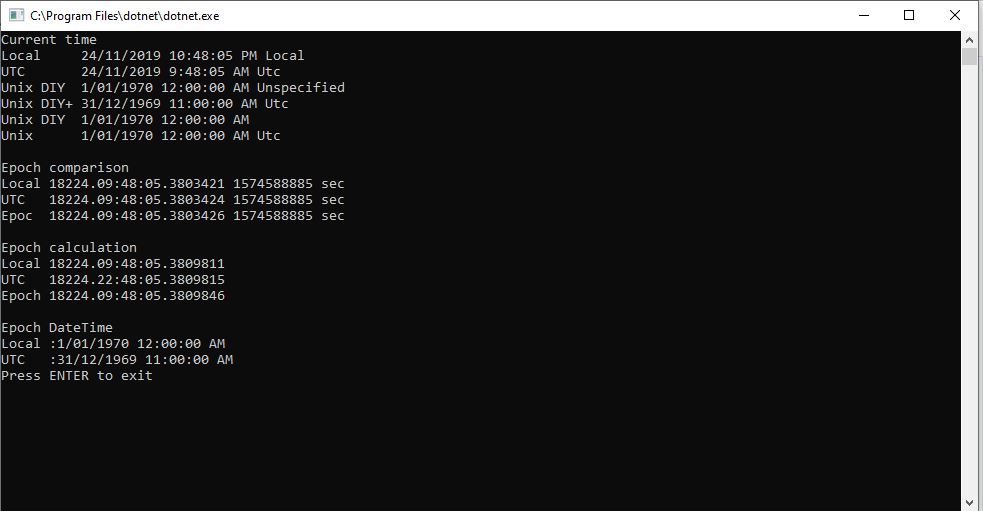
So to test my theory I built a Unix epoch test harness console application

using System;

namespace UnixEpocTest
{
   class Program
   {
      static void Main(string[] args)
      {
         TimeSpan ttl = new TimeSpan(0, 0, 0);

         Console.WriteLine("Current time");
         Console.WriteLine($"Local     {DateTime.Now} {DateTime.Now.Kind}");
         Console.WriteLine($"UTC       {DateTime.UtcNow} {DateTime.UtcNow.Kind}");
         Console.WriteLine($"Unix DIY  {new DateTime(1970, 1, 1)} {new DateTime(1970, 1, 1).Kind}");
         Console.WriteLine($"Unix DIY+ {new DateTime(1970, 1, 1).ToUniversalTime()} {new DateTime(1970, 1, 1).ToUniversalTime().Kind}");
         Console.WriteLine($"Unix DIY  {new DateTime(1970, 1, 1, 0,0,0, DateTimeKind.Utc)}");
         Console.WriteLine($"Unix      {DateTime.UnixEpoch} {DateTime.UnixEpoch.Kind}");
         Console.WriteLine();

         TimeSpan fromEpochStart = DateTime.UtcNow - new DateTime(1970, 1, 1);
         TimeSpan fromEpochStartUtc = DateTime.UtcNow - new DateTime(1970, 1, 1,0,0,0, DateTimeKind.Utc);
         TimeSpan fromEpochStartUnixEpoch = DateTime.UtcNow - DateTime.UnixEpoch;

         Console.WriteLine("Epoch comparison");
         Console.WriteLine($"Local {fromEpochStart} {fromEpochStart.TotalSeconds.ToString("f0")} sec");
         Console.WriteLine($"UTC   {fromEpochStartUtc} {fromEpochStartUtc.TotalSeconds.ToString("f0")} sec");
         Console.WriteLine($"Epoc  {fromEpochStartUnixEpoch} {fromEpochStartUnixEpoch.TotalSeconds.ToString("f0")} sec");
         Console.WriteLine();

         TimeSpan afterEpoch = DateTime.UtcNow.Add(ttl) - new DateTime(1970, 1, 1);
         TimeSpan afterEpochUtC = DateTime.UtcNow.Add(ttl) - new DateTime(1970, 1, 1).ToUniversalTime();
         TimeSpan afterEpochEpoch = DateTime.UtcNow.Add(ttl) - DateTime.UnixEpoch;

         Console.WriteLine("Epoch calculation");
         Console.WriteLine($"Local {afterEpoch}");
         Console.WriteLine($"UTC   {afterEpochUtC}");
         Console.WriteLine($"Epoch {afterEpochEpoch}");
         Console.WriteLine();

         Console.WriteLine("Epoch DateTime");
         Console.WriteLine($"Local :{new DateTime(1970, 1, 1)}");
         Console.WriteLine($"UTC   :{ new DateTime(1970, 1, 1).ToUniversalTime()}");

         Console.WriteLine("Press ENTER to exit");
         Console.ReadLine();

         Console.WriteLine("Hello World!");
      }
   }
}

EDIT: I now think the UtcNow to “unspecified” kind mathematics was being handled correctly. I have updated the code to use the DateTime.UnixEpoch constant so the code is more readable.

public static string generateSasToken(string resourceUri, string key, string policyName, int expiryInSeconds = 900)
      {
         TimeSpan fromEpochStart = DateTime.UtcNow - DateTime.UnixEpoch;
         string expiry = Convert.ToString((int)fromEpochStart.TotalSeconds + expiryInSeconds);

         string stringToSign = WebUtility.UrlEncode(resourceUri) + "\n" + expiry;

         HMACSHA256 hmac = new HMACSHA256(Convert.FromBase64String(key));
         string signature = Convert.ToBase64String(hmac.ComputeHash(Encoding.UTF8.GetBytes(stringToSign)));

         string token = String.Format(CultureInfo.InvariantCulture, "SharedAccessSignature sr={0}&sig={1}&se={2}", WebUtility.UrlEncode(resourceUri), WebUtility.UrlEncode(signature), expiry);

         if (!String.IsNullOrEmpty(policyName))
         {
            token += "&skn=" + policyName;
         }

         return token;
      }

I need to test the expiry of my SAS Tokens some more especially with the client running on my development machine (NZT which is currently UTC+13) and in Azure (UTC timezone)

Azure IoT Hub SAS Tokens revisited

A long time ago I wrote a post about uploading telemetry data to an Azure Event Hub from a Netduino 3 Wifi using HTTPS. To send messages to the EventHub I had to create a valid SAS Token which took a surprising amount of effort because of the reduced text encoding/decoding and cryptographic functionality available in .NET Micro Framework v4.3 (NetMF)

// Create a SAS token for a specified scope. SAS tokens are described in http://msdn.microsoft.com/en-us/library/windowsazure/dn170477.aspx.
private static string CreateSasToken(string uri, string keyName, string key)
{
   // Set token lifetime to 20 minutes. When supplying a device with a token, you might want to use a longer expiration time.
   uint tokenExpirationTime = GetExpiry(20 * 60);
 
   string stringToSign = HttpUtility.UrlEncode(uri) + "\n" + tokenExpirationTime;
 
   var hmac = SHA.computeHMAC_SHA256(Encoding.UTF8.GetBytes(key), Encoding.UTF8.GetBytes(stringToSign));
   string signature = Convert.ToBase64String(hmac);
 
   signature = Base64NetMf42ToRfc4648(signature);
 
   string token = "SharedAccessSignature sr=" + HttpUtility.UrlEncode(uri) + "&sig=" + HttpUtility.UrlEncode(signature) + "&se=" + tokenExpirationTime.ToString() + "&skn=" + keyName;
 
   return token;
}
 
private static string Base64NetMf42ToRfc4648(string base64netMf)
{
   var base64Rfc = string.Empty;
 
   for (var i = 0; i < base64netMf.Length; i++)
   {
      if (base64netMf[i] == '!')
      {
         base64Rfc += '+';
      }
      else if (base64netMf[i] == '*')
      {
         base64Rfc += '/';
      }
      else
      {
         base64Rfc += base64netMf[i];
      }
   }
   return base64Rfc;
}
 
static uint GetExpiry(uint tokenLifetimeInSeconds)
{
   const long ticksPerSecond = 1000000000 / 100; // 1 tick = 100 nano seconds
 
   DateTime origin = new DateTime(1970, 1, 1, 0, 0, 0, 0);
   TimeSpan diff = DateTime.Now.ToUniversalTime() - origin;
 
   return ((uint)(diff.Ticks / ticksPerSecond)) + tokenLifetimeInSeconds;
}

Initially for testing my Azure MQTT Test Client I manually generated the SAS tokens using Azure Device Explorer but figured it would be better if the application generated them.

An initial search lead to this article about how to generate a SAS token for an Azure Event Hub in multiple languages. For my first attempt I “copied and paste” the code sample for C# (I also wasn’t certain what to put in the KeyName parameter) and it didn’t work.

private static string createToken(string resourceUri, string keyName, string key)
{
    TimeSpan sinceEpoch = DateTime.UtcNow - new DateTime(1970, 1, 1);
    var week = 60 * 60 * 24 * 7;
    var expiry = Convert.ToString((int)sinceEpoch.TotalSeconds + week);
    string stringToSign = HttpUtility.UrlEncode(resourceUri) + "\n" + expiry;
    HMACSHA256 hmac = new HMACSHA256(Encoding.UTF8.GetBytes(key));
    var signature = Convert.ToBase64String(hmac.ComputeHash(Encoding.UTF8.GetBytes(stringToSign)));
    var sasToken = String.Format(CultureInfo.InvariantCulture, "SharedAccessSignature sr={0}&sig={1}&se={2}&skn={3}", HttpUtility.UrlEncode(resourceUri), HttpUtility.UrlEncode(signature), expiry, keyName);
    return sasToken;
}

By comparing the Device Explorer and C# generated SAS keys I worked out the keyName parameter was unnecessary so I removed.

private static string createToken(string resourceUri, string key)
{
    TimeSpan sinceEpoch = DateTime.UtcNow - new DateTime(1970, 1, 1);
    var week = 60 * 60 * 24 * 7;
    var expiry = Convert.ToString((int)sinceEpoch.TotalSeconds + week);
    string stringToSign = HttpUtility.UrlEncode(resourceUri) + "\n" + expiry;
    HMACSHA256 hmac = new HMACSHA256(Encoding.UTF8.GetBytes(key));
    var signature = Convert.ToBase64String(hmac.ComputeHash(Encoding.UTF8.GetBytes(stringToSign)));
    var sasToken = String.Format(CultureInfo.InvariantCulture, "SharedAccessSignature sr={0}&sig={1}&se={2}", HttpUtility.UrlEncode(resourceUri), HttpUtility.UrlEncode(signature), expiry);
    return sasToken;
}

The shared SAS token now looked closer to what I was expecting but the MQTTNet ConnectAsync was failing with an authentication exception. After looking at the Device Explorer SAS Key code, my .NetMF implementation and the code for the IoT Hub SDK I noticed the encoding for the HMAC Key was different. Encoding.UTF8.GetBytes vs. Convert.FromBase64String.

 private static string createToken(string resourceUri,string key, TimeSpan ttl)
      {
         TimeSpan afterEpoch = DateTime.UtcNow.Add( ttl ) - new DateTime(1970, 1, 1);

         string expiry = afterEpoch.TotalSeconds.ToString("F0");
         string stringToSign = HttpUtility.UrlEncode(resourceUri) + "\n" + expiry;
         HMACSHA256 hmac = new HMACSHA256(Convert.FromBase64String(key));
         string signature = Convert.ToBase64String(hmac.ComputeHash(Encoding.UTF8.GetBytes(stringToSign)));
         return  String.Format(CultureInfo.InvariantCulture, "SharedAccessSignature sr={0}&sig={1}&se={2}", HttpUtility.UrlEncode(resourceUri), HttpUtility.UrlEncode(signature), expiry);
      }

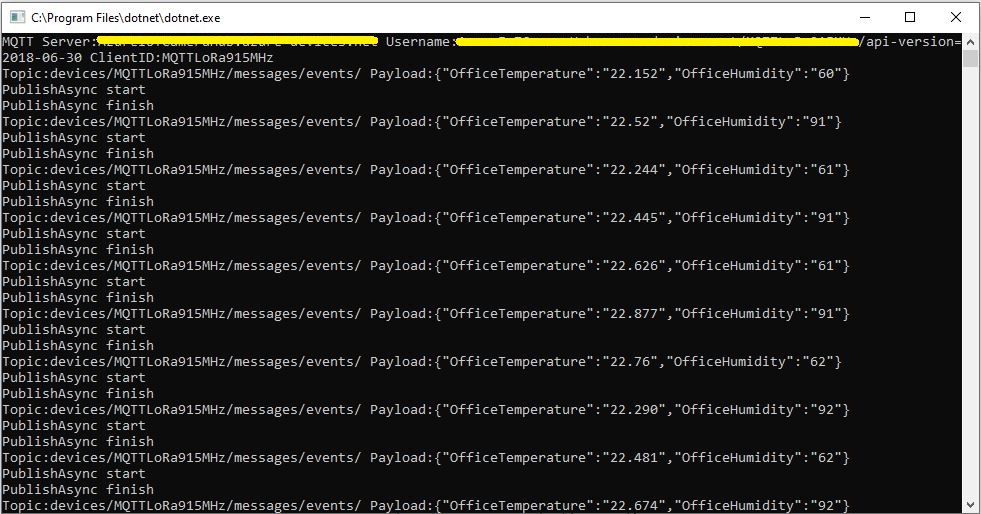
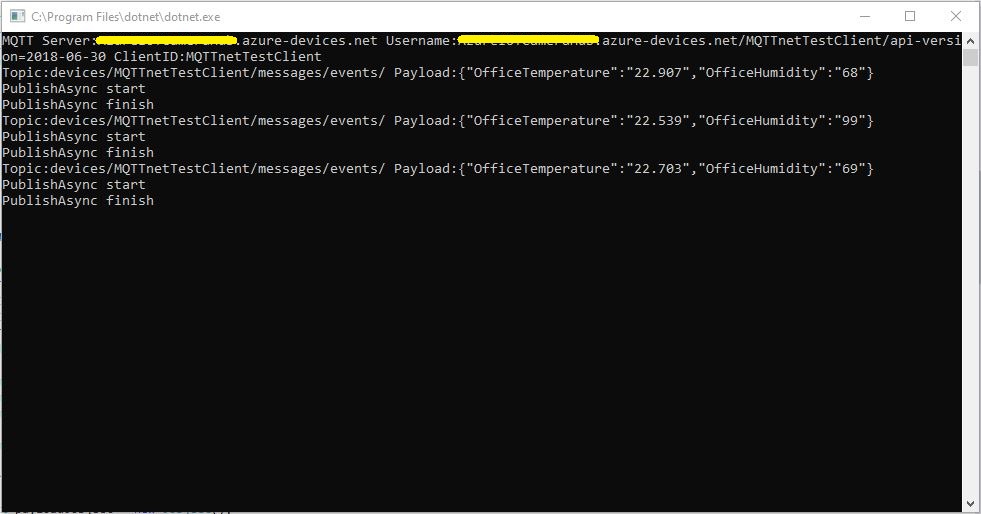
This approach appears to work reliably in my test harness.

MQTTnet client with new SAS Key Generator

User beware DIY Crypto often ends badly

Azure IoT Hub with MQTTnet

As I’m testing my Message Queue Telemetry Transport(MQTT) LoRa gateway I’m building a proof of concept(PoC) .Net core console application for each IoT platform I would like to support.

This PoC was to confirm that my device could connect to the Microsoft Azure IoT Hub MQTT API then format topics and payloads correctly.

Azure IoT Hub MQTT Console Client

I had tried with a couple of different MQTT libraries from micro controllers and embedded devices without success. With the benefit of hindsight (plus this article) I think I had the SAS key format wrong.

The Azure IoT Hub MQTT broker requires only a server name (fully resolved CName), device ID and SAS Key.

   class Program
   {
      private static IMqttClient mqttClient = null;
      private static IMqttClientOptions mqttOptions = null;
      private static string server;
      private static string username;
      private static string password;
      private static string clientId;
      private static string topicD2C;
      private static string topicC2D;

      static void Main(string[] args)
      {
         MqttFactory factory = new MqttFactory();
         mqttClient = factory.CreateMqttClient();

         if (args.Length != 3)
         {
            Console.WriteLine("[AzureIoTHubHostName] [deviceID] [SASKey]");
            Console.WriteLine("Press <enter> to exit");
            Console.ReadLine();
            return;
         }

         server = args[0];
         clientId = args[1];
         sasKey= args[2];

         username = $"{server}/{clientId}/api-version=2018-06-30";
         topicD2C = $"devices/{clientId}/messages/events/";
         topicC2D = $"devices/{clientId}/messages/devicebound/#";

         Console.WriteLine($"MQTT Server:{server} Username:{username} ClientID:{clientId}");

         mqttOptions = new MqttClientOptionsBuilder()
            .WithTcpServer(server, 8883)
            .WithCredentials(username, sasKey)
            .WithClientId(clientId)
            .WithTls()
            .Build();

         mqttClient.UseDisconnectedHandler(new MqttClientDisconnectedHandlerDelegate(e => MqttClient_Disconnected(e)));
         mqttClient.UseApplicationMessageReceivedHandler(new MqttApplicationMessageReceivedHandlerDelegate(e => MqttClient_ApplicationMessageReceived(e)));
         mqttClient.ConnectAsync(mqttOptions).Wait();

         mqttClient.SubscribeAsync(topicC2D, MQTTnet.Protocol.MqttQualityOfServiceLevel.AtLeastOnce).GetAwaiter().GetResult();

         while (true)
         {
            JObject payloadJObject = new JObject();

            payloadJObject.Add("OfficeTemperature", "22." + DateTime.UtcNow.Millisecond.ToString());
            payloadJObject.Add("OfficeHumidity", (DateTime.UtcNow.Second + 40).ToString());

            string payload = JsonConvert.SerializeObject(payloadJObject);
            Console.WriteLine($"Topic:{topicD2C} Payload:{payload}");

            var message = new MqttApplicationMessageBuilder()
               .WithTopic(topicD2C)
               .WithPayload(payload)
               .WithAtLeastOnceQoS()
            .Build();

            Console.WriteLine("PublishAsync start");
            mqttClient.PublishAsync(message).Wait();
            Console.WriteLine("PublishAsync finish");

            Thread.Sleep(30100);
         }
      }

      private static void MqttClient_ApplicationMessageReceived(MqttApplicationMessageReceivedEventArgs e)
      {
         Console.WriteLine($"ClientId:{e.ClientId} Topic:{e.ApplicationMessage.Topic} Payload:{e.ApplicationMessage.ConvertPayloadToString()}");
      }

      private static async void MqttClient_Disconnected(MqttClientDisconnectedEventArgs e)
      {
         Debug.WriteLine("Disconnected");
         await Task.Delay(TimeSpan.FromSeconds(5));

         try
         {
            await mqttClient.ConnectAsync(mqttOptions);
         }
         catch (Exception ex)
         {
            Debug.WriteLine("Reconnect failed {0}", ex.Message);
         }
      }
   }

Overall the initial configuration went smoothly after I figured out the required Quality of Service (QoS) settings, and the SAS Key format.

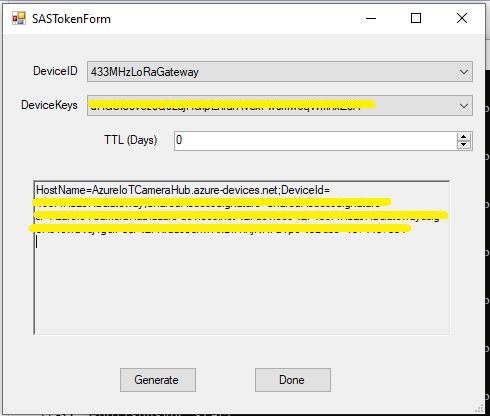
Using the approach described in the Microsoft documentation I manually generated the SAS Key.(In my Netduino samples I have code for generating a SAS Key in my HTTPS Azure IoT Hub Client)

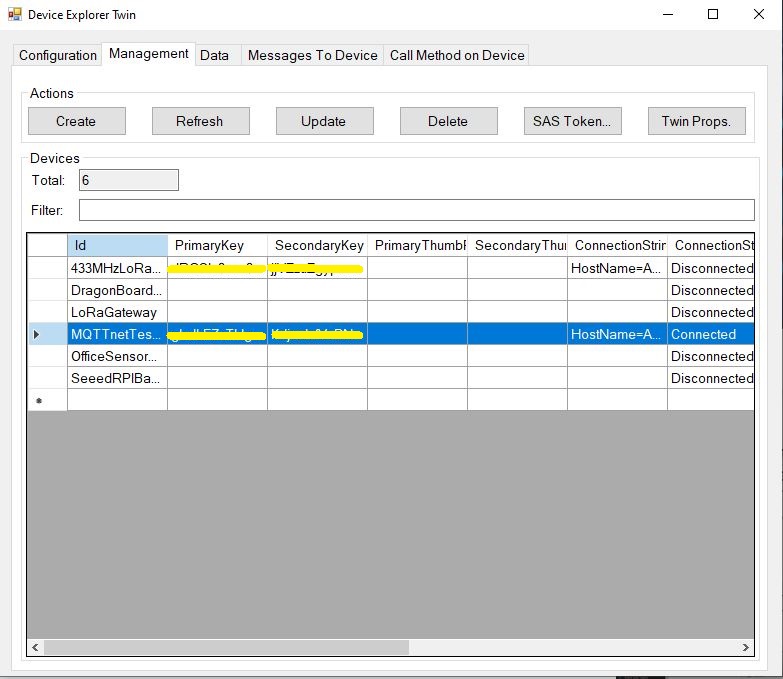
Azure Device Explorer Device Management
Azure Device Explorer SAS Key Generator

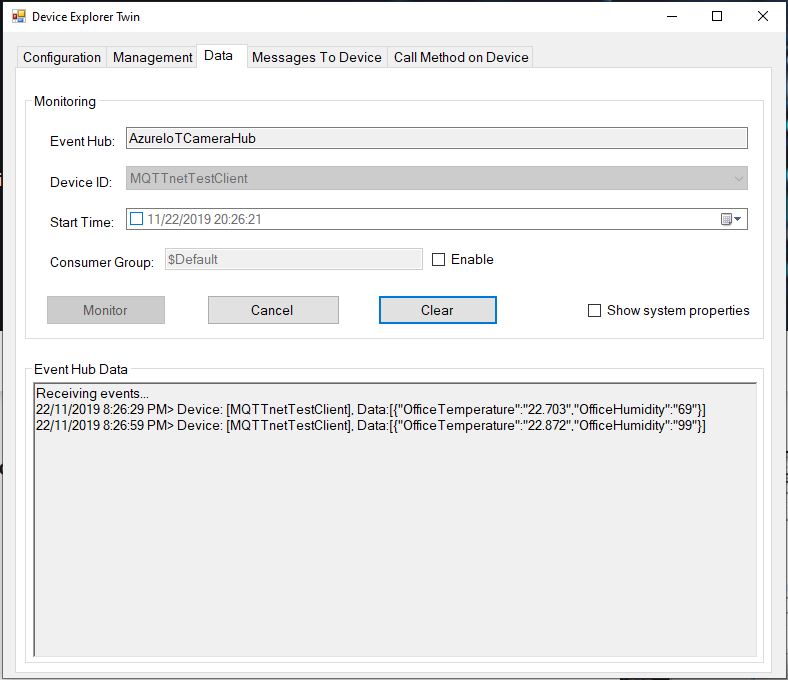
Once I had the configuration correct I could see telemetry from the device and send it messages.

Azure Device Explorer Data View

In a future post I will upload data to the Azure IoT Central for display. Then explore using a “module” attached to a device which maybe useful for my field gateway.

Thingspeak with MQTTnet

As I’m testing my Message Queue Telemetry Transport(MQTT) LoRa gateway I’m building a proof of concept(PoC) .Net core console application for each IoT platform I would like to support.

This PoC was to confirm that I could connect to the Thingspeak MQTT API then format topics and payloads correctly.

MQTT Console Client

The Thingspeak MQTT broker, username, password, and client ID, Channel, writeAPIKey, ClientID, channelData, are the minimum command line options required. The channelSubscribe, readAPIkey and field are optional.

   class Program
   {
      private static IMqttClient mqttClient = null;
      private static IMqttClientOptions mqttOptions = null;
      private static string server;
      private static string username;
      private static string password;
      private static string writeApiKey;
      private static string clientId;
      private static string channelData;
      private static string channelSubscribe;
      private static string readApiKey;
      private static string field;

      static void Main(string[] args)
      {
         MqttFactory factory = new MqttFactory();
         mqttClient = factory.CreateMqttClient();

         if ((args.Length != 6) && (args.Length != 8) && (args.Length != 9))
         {
            Console.WriteLine("[MQTT Server] [UserName] [Password] [WriteAPIKey] [ClientID] [Channel]");
            Console.WriteLine("[MQTT Server] [UserName] [Password] [WriteAPIKey] [ClientID] [Channel] [channelSubscribe] [ReadApiKey]");
            Console.WriteLine("[MQTT Server] [UserName] [Password] [WriteAPIKey] [ClientID] [Channel] [channelSubscribe] [ReadApiKey] [Field]");
            Console.WriteLine("Press <enter> to exit");
            Console.ReadLine();
            return;
         }

         server = args[0];
         username = args[1];
         password = args[2];
         writeApiKey = args[3];
         clientId = args[4];
         channelData = args[5];

         if (args.Length == 6)
         {
            Console.WriteLine($"MQTT Server:{server} Username:{username} ClientID:{clientId} ChannelData:{channelData}");
         }

         if (args.Length == 8)
         {
            channelSubscribe = args[6];
            readApiKey = args[7];
            Console.WriteLine($"MQTT Server:{server} Username:{username} ClientID:{clientId} ChannelData:{channelData} ChannelSubscribe:{channelSubscribe}");
         }

         if (args.Length == 9)
         {
            channelSubscribe = args[6];
            readApiKey = args[7];
            field = args[8];
            Console.WriteLine($"MQTT Server:{server} Username:{username} ClientID:{clientId} ChannelData:{channelData} ChannelSubscribe:{channelSubscribe} Field:{field}");
         }

         mqttOptions = new MqttClientOptionsBuilder()
            .WithTcpServer(server)
            .WithCredentials(username, password)
            .WithClientId(clientId)
            .WithTls()
            .Build();

         mqttClient.ConnectAsync(mqttOptions).Wait();

         if (args.Length == 8)
         {
            string topic = $"channels/{channelSubscribe}/subscribe/fields/+/{readApiKey}";
            
            Console.WriteLine($"Subscribe Topic:{topic}");

            mqttClient.SubscribeAsync(topic, MQTTnet.Protocol.MqttQualityOfServiceLevel.AtMostOnce).Wait(); 
            mqttClient.UseApplicationMessageReceivedHandler(new MqttApplicationMessageReceivedHandlerDelegate(e => MqttClient_ApplicationMessageReceived(e)));
         }
         if (args.Length == 9)
         {
            string topic = $"channels/{channelSubscribe}/subscribe/fields/{field}/{readApiKey}";

            Console.WriteLine($"Subscribe Topic:{topic}");

            mqttClient.SubscribeAsync(topic, MQTTnet.Protocol.MqttQualityOfServiceLevel.AtMostOnce).Wait();
            mqttClient.UseApplicationMessageReceivedHandler(new MqttApplicationMessageReceivedHandlerDelegate(e => MqttClient_ApplicationMessageReceived(e)));
         }

         mqttClient.UseDisconnectedHandler(new MqttClientDisconnectedHandlerDelegate(e => MqttClient_Disconnected(e)));

         string topicTemperatureData = $"channels/{channelData}/publish/{writeApiKey}";

         Console.WriteLine();

         while (true)
         {
            string value = "field1=22." + DateTime.UtcNow.Millisecond.ToString() + "&field2=60." + DateTime.UtcNow.Millisecond.ToString();
            Console.WriteLine($"Publish Topic {topicTemperatureData}  Value {value}");

            var message = new MqttApplicationMessageBuilder()
               .WithTopic(topicTemperatureData)
               .WithPayload(value)
               .WithQualityOfServiceLevel(MQTTnet.Protocol.MqttQualityOfServiceLevel.AtMostOnce)
//               .WithRetainFlag()
            .Build();

            Console.WriteLine("PublishAsync start");
            mqttClient.PublishAsync(message).Wait();
            Console.WriteLine("PublishAsync finish");
            Console.WriteLine();

            Thread.Sleep(30100);
         }
      }

      private static void MqttClient_ApplicationMessageReceived(MqttApplicationMessageReceivedEventArgs e)
      {
         Console.WriteLine($"ApplicationMessageReceived ClientId:{e.ClientId} Topic:{e.ApplicationMessage.Topic} Qos:{e.ApplicationMessage.QualityOfServiceLevel} Payload:{e.ApplicationMessage.ConvertPayloadToString()}");
         Console.WriteLine();
      }

      private static async void MqttClient_Disconnected(MqttClientDisconnectedEventArgs e)
      {
         Debug.WriteLine("Disconnected");
         await Task.Delay(TimeSpan.FromSeconds(5));

         try
         {
            await mqttClient.ConnectAsync(mqttOptions);
         }
         catch (Exception ex)
         {
            Debug.WriteLine("Reconnect failed {0}", ex.Message);
         }
      }
   }
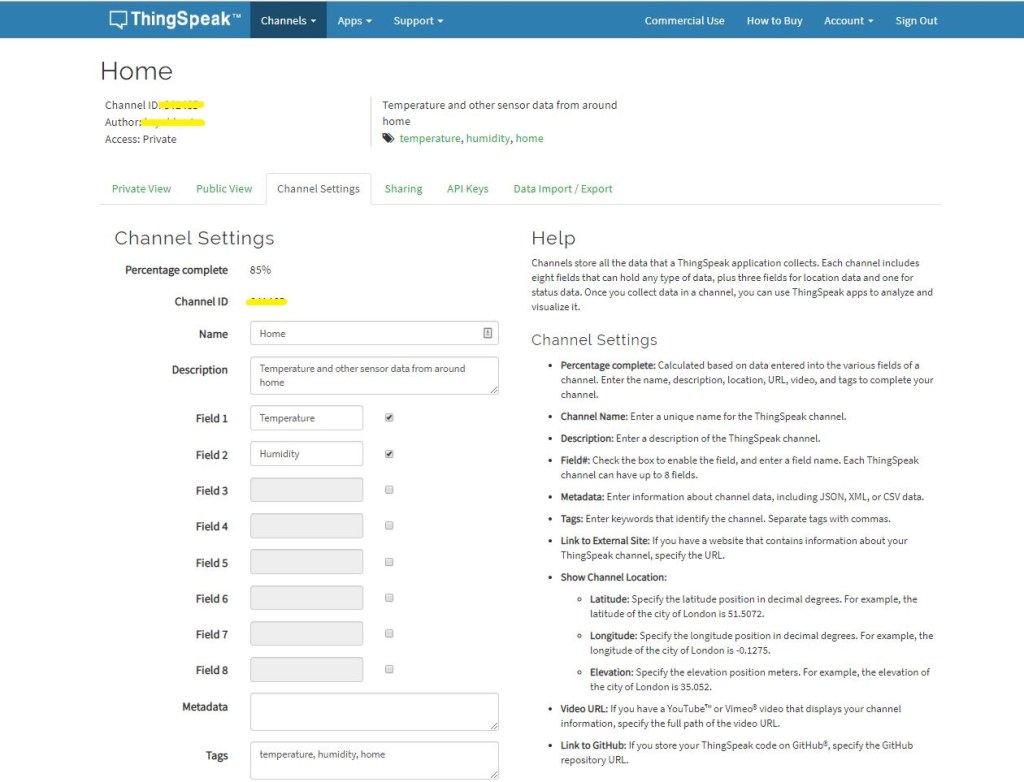
Channel configuration

The ThingSpeak channel setup has many attributes (link to an external site, link to a GitHub repository, fields for elevation, latitude, longitude etc. ) but only 8 data fields which seems a bit limiting (some of my sensor nodes report more than 8 values).

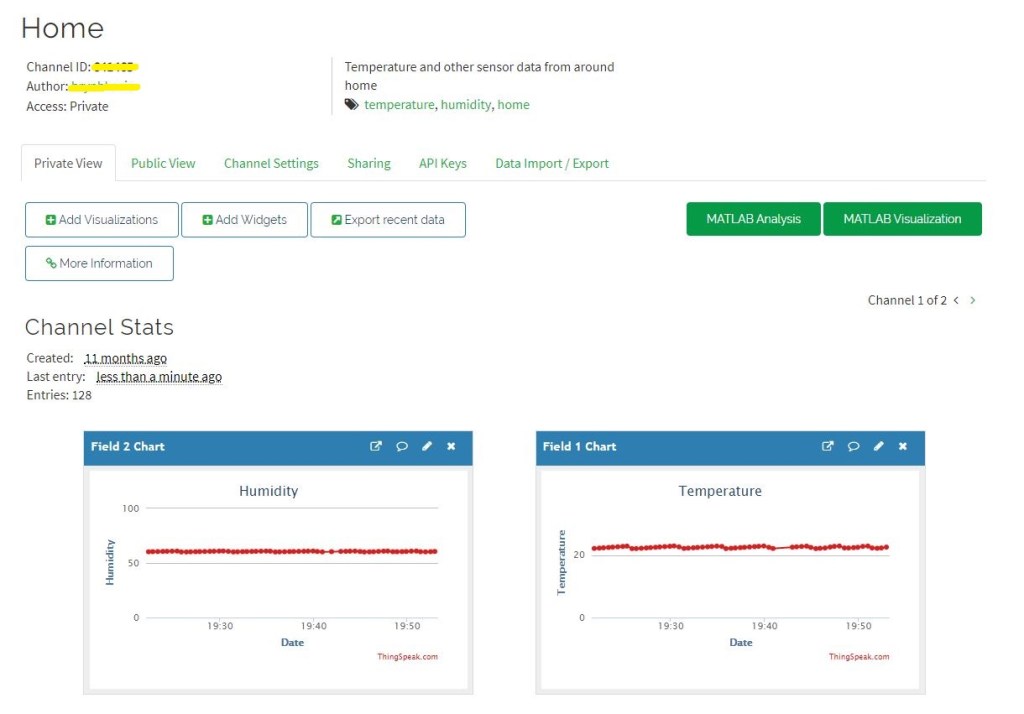
Dashboard

The Thingspeak dashboard configuration was fairly simple, though the maximum of eight sequentially numbered of inputs (Fields) might require some mapping code.

Overall the initial configuration went smoothly after I figured out the required Quality of Service (QoS) settings, retain flag usage and the different APIKeys on the publish vs. subscribe topics.

I have not explored the advanced analysis enabled by the tight integration with MATLAB which could be quite an advantage for applications requiring that sort of functionality.
Adafruit MQTT Cloud to Device Messaging

After getting MQ Telemetry Transport (MQTT) Device to Cloud (D2C) messaging working for AdaFruit.IO I have also got Cloud to Device (C2D) messaging working as well.

The MQTT broker, username, API key, client ID, optional group name (to keep MQTT aligned with REST API terminology), command topic and feed name are command line options.

The Adafruit IO MQTT documentation suggests an approach for naming topics which allows a bit more structure for feed (D2C and C2D) names than the REST API (which only does D2C).

class Program
{
	private static IMqttClient mqttClient = null;
	private static IMqttClientOptions mqttOptions = null;
	private static string server;
	private static string username;
	private static string password;
	private static string clientId;
	private static string commandTopic;
	private static string groupname;
	private static string feedname;

	static void Main(string[] args)
	{
		MqttFactory factory = new MqttFactory();
		mqttClient = factory.CreateMqttClient();

		if ((args.Length != 6) && (args.Length != 7))
		{
			Console.WriteLine("[MQTT Server] [UserName] [Password] [ClientID] [CommandTopic] [GroupName] [FeedName]");
			Console.WriteLine("[MQTT Server] [UserName] [Password] [ClientID] [CommandTopic] [FeedName]");
			Console.WriteLine("Press <enter> to exit");
			Console.ReadLine();
			return;
		}

		server = args[0];
		username = args[1];
		password = args[2];
		clientId = args[3];
		commandTopic = args[4];
		if (args.Length == 6)
		{
			feedname = args[5].ToLower();
			Console.WriteLine($"MQTT Server:{server} Username:{username} ClientID:{clientId} CommandTopic:{commandTopic} Feedname:{feedname}");
		}

		if (args.Length == 7)
		{
			groupname = args[5].ToLower();
			feedname = args[6].ToLower();
			Console.WriteLine($"MQTT Server:{server} Username:{username} ClientID:{clientId} CommandTopic:{commandTopic} Groupname:{groupname} Feedname:{feedname}");
		}

		mqttOptions = new MqttClientOptionsBuilder()
			.WithTcpServer(server)
			.WithCredentials(username, password)
			.WithClientId(clientId)
			.WithTls()
			.Build();

		mqttClient.Disconnected += MqttClient_Disconnected;
		mqttClient.ConnectAsync(mqttOptions).Wait();
		mqttClient.ApplicationMessageReceived += MqttClient_ApplicationMessageReceived;

		// Adafruit.IO format for topics which are called feeds
		string topic = string.Empty;

		if (args.Length == 6)
		{
			topic = $"{username}/feeds/{feedname}";				
		}

		if (args.Length == 7)
		{
			topic = $"{username}/feeds/{groupname}.{feedname}";
		}

		mqttClient.SubscribeAsync(commandTopic, MQTTnet.Protocol.MqttQualityOfServiceLevel.AtLeastOnce).GetAwaiter().GetResult();

		while (true)
		{
			string value = "22." + DateTime.UtcNow.Millisecond.ToString();
			Console.WriteLine($"Topic:{topic} Value:{value}");

			var message = new MqttApplicationMessageBuilder()
				.WithTopic(topic)
				.WithPayload(value)
				.WithQualityOfServiceLevel(MQTTnet.Protocol.MqttQualityOfServiceLevel.AtLeastOnce)
			.WithRetainFlag()
			.Build();

			Console.WriteLine("PublishAsync start");
			mqttClient.PublishAsync(message).Wait();
			Console.WriteLine("PublishAsync finish");

			Thread.Sleep(30100);
		}
	}

	private static void MqttClient_ApplicationMessageReceived(object sender, MqttApplicationMessageReceivedEventArgs e)
	{
		Console.WriteLine($"ClientId:{e.ClientId} Topic:{e.ApplicationMessage.Topic} Payload:{e.ApplicationMessage.ConvertPayloadToString()}");
	}

	private static async void MqttClient_Disconnected(object sender, MqttClientDisconnectedEventArgs e)
	{
		Debug.WriteLine("Disconnected");
		await Task.Delay(TimeSpan.FromSeconds(5));

		try
		{
			await mqttClient.ConnectAsync(mqttOptions);
		}
		catch (Exception ex)
		{
			Debug.WriteLine("Reconnect failed {0}", ex.Message);
		}
	}
}

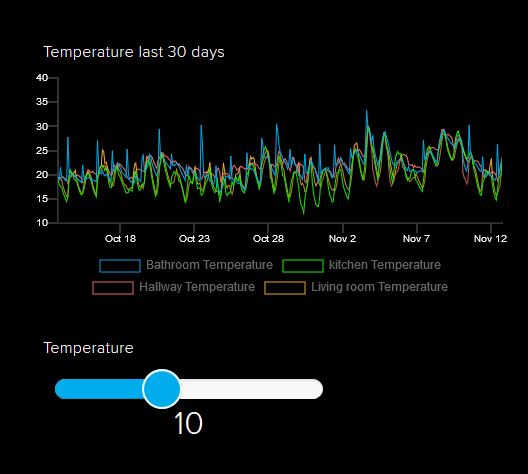
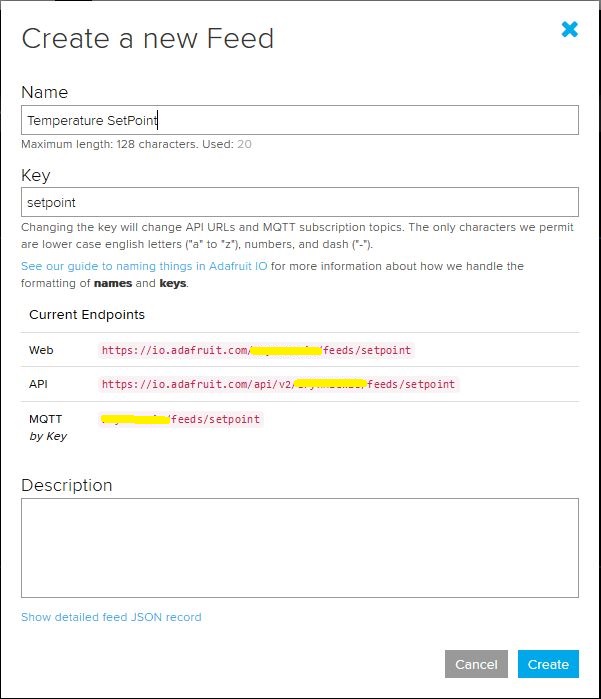
I configured a slider on the dashboard for my home called “setpoint” (yet again I was tripped up “automatically” camel casing the name because I’m a C# developer) which my MQTT client subscribed to.

AdaFruit.IO Home monitoring dashboard
setpoint feed configuration

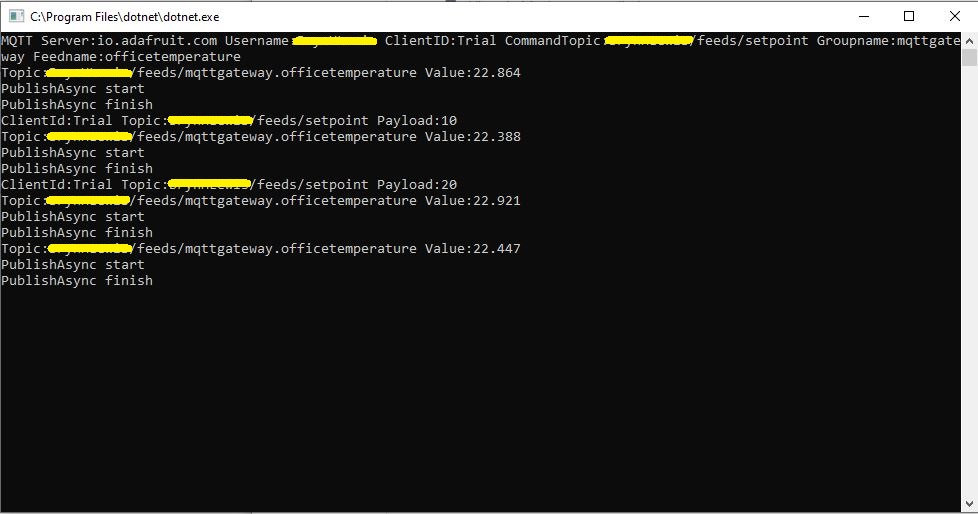
After figuring out the format of the command topic I found that when the slider was moved the MQTT client subscription event fired reliably.

AdaFruit Client showing the setpoint value change notifications

Overall the process went pretty well, though the manual configuration of the subscriptions to AdaFruit.IO feeds could become a bit of a problem at scale.

Ask Sensors with MQTTnet

After a 6 month pause I’m back working on my Message Queue Telemetry Transport(MQTT) LoRa gateway.

As I’m testing my Message Queue Telemetry Transport(MQTT) LoRa gateway I’m building a proof of concept(PoC) .Net core console application for each IoT platform I would like to support.

This PoC was to confirm that I could connect to the Ask Sensors MQTT API then format topics and payloads correctly.

Console test application

The MQTT broker, username, password, and client ID are command line options.

class Program
{
	private static IMqttClient mqttClient = null;
	private static IMqttClientOptions mqttOptions = null;
	private static string server;
	private static string username;
	private static string apiKey;
	private static string clientID;

	static void Main(string[] args)
	{
		MqttFactory factory = new MqttFactory();
		mqttClient = factory.CreateMqttClient();
		bool heatPumpOn = false;

		if (args.Length != 4)
		{
			Console.WriteLine("[MQTT Server] [UserName] [APIKey] [ClientID]");
			Console.WriteLine("Press <enter> to exit");
			Console.ReadLine();
			return;
		}

		server = args[0];
		username = args[1];
		apiKey = args[2];
		clientID = args[3];

		Console.WriteLine($"MQTT Server:{server} Username:{username} ClientID:{clientID}");

		mqttOptions = new MqttClientOptionsBuilder()
			.WithTcpServer(server)
			.WithCredentials(username, "")
			.WithClientId(clientID)
			//.WithTls() // This is a bit of a worry
			.Build();

		mqttClient.ApplicationMessageReceived += MqttClient_ApplicationMessageReceived;
		mqttClient.Disconnected += MqttClient_Disconnected;
		mqttClient.ConnectAsync(mqttOptions).Wait();

		// AskSensors formatted client state update topic
		string stateTopic = $"{username}/{apiKey}";

		while (true)
		{
			string payloadText;
			double temperature = 22.0 + (DateTime.UtcNow.Millisecond / 1000.0);
			double humidity = 50 + (DateTime.UtcNow.Millisecond / 100.0);
			double speed = 10 + (DateTime.UtcNow.Millisecond / 100.0);
			Console.WriteLine($"Topic:{stateTopic} Temperature:{temperature:0.00} Humidity:{humidity:0} HeatPumpOn:{heatPumpOn}");

			// First JSON attempt didn't work
			payloadText = @"{""Humidity"":55}";

            // Second attempt worked
            payloadText = $"module1=22";

            // Third attempt with "real" values injected
            payloadText = $"module1={temperature}&m2={humidity}";

            var message = new MqttApplicationMessageBuilder()
					.WithTopic(stateTopic)
					.WithPayload(payloadText)
					.WithQualityOfServiceLevel(global::MQTTnet.Protocol.MqttQualityOfServiceLevel.AtLeastOnce)
				   .WithExactlyOnceQoS()
				   //.WithAtLeastOnceQoS()
				   //.WithRetainFlag()
				   .Build();

				Console.WriteLine("PublishAsync start");
				mqttClient.PublishAsync(message).Wait();
				Console.WriteLine("PublishAsync finish");

				Thread.Sleep(30100);
			}
		}

	private static async void MqttClient_Disconnected(object sender, MqttClientDisconnectedEventArgs e)
	{
		Debug.WriteLine("Disconnected");
		await Task.Delay(TimeSpan.FromSeconds(5));

		try
		{
			await mqttClient.ConnectAsync(mqttOptions);
		}
		catch (Exception ex)
		{
			Debug.WriteLine("Reconnect failed {0}", ex.Message);
		}
	}

The Ask Sensors screen designer has 8 different types of Graph (line, bar, scatter, gauge, table, binary. digital, map)

Ask sensors dashboard configuration was fairly simple, though sequential numbering of inputs (modules) might require some mapping code.

Overall the initial configuration went smoothly after I figured out the payload format (not JSON), though the functionality (of a free subscription) did appear to be quite limited.

Since I first started building my MQTT gateway there have been several breaking updates to the MQTTNet API which so I will have to refresh all the applications in my solution.