Random wanderings through Microsoft Azure esp. PaaS plumbing, the IoT bits, AI on Micro controllers, AI on Edge Devices, .NET nanoFramework, .NET Core on *nix and ML.NET+ONNX
The first message sent shortly after I powered up the device had the latitude and longitude of Null Island
The Asset Tracker UserApplicationId is 65002 and the payload is similar to the Swarm Eval Kit. I created some message payloads (location of Christchurch Cathedral) for testing.
namespace PayloadFormatter // Additional namespace for shortening interface when usage in formatter code
{
    using System.Collections.Generic;

    using Newtonsoft.Json.Linq;

    public interface IFormatterUplink
    {
        public JObject Evaluate(IDictionary<string, string> properties, uint organisationId, uint deviceId, byte deviceType, ushort userApplicationId, JObject payloadJson, string payloadText, byte[] payloadBytes);
    }

    public interface IFormatterDownlink
    {
        public byte[] Evaluate(IDictionary<string, string> properties, uint organisationId, uint deviceId, byte deviceType, ushort userApplicationId, JObject payloadJson, string payloadText, byte[] payloadBytes);
    }
}
The definitions of the uplink & downlink payload formatter evaluator interfaces have been updated and shifted to a new project.
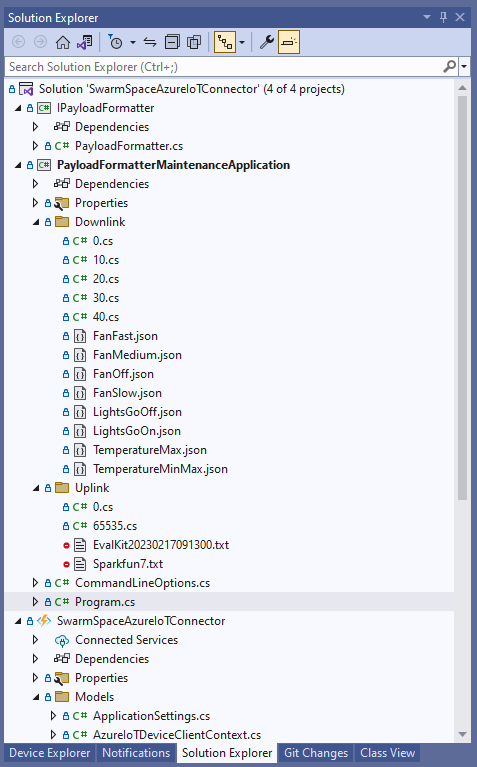
Visual Studio 2022 Solution with payloadformatter maintenance application
I built a console application to help with developing and debugging uplink or downlink formatters. The application has a number of command line parameters which specify the formatter to be used, UserApplicationId, OrganizationId, DeviceType etc.
public class CommandLineOptions
{
    [Option('d', "Direction", Required = true, HelpText = "Test Uplink or DownLink formatter")]
	public string Direction { get; set; }

    [Option('p', "filename", HelpText = "Uplink or Downlink Payload file name")]
    public string PayloadFilename { get; set; } = string.Empty;

    [Option('o', "OrganisationId", Required = true, HelpText = "Organisation unique identifier")]
    public uint OrganizationId { get; set; }

    [Option('i', "DeviceId", Required = true, HelpText = "Device unique identitifer")]
    public uint DeviceId { get; set; }

    [Option('t', "DeviceType", Required = true, HelpText = "Device type number")]
    public byte DeviceType { get; set; }

    [Option('u', "UserApplicationId", Required = true, HelpText = "User Application Id")]
    public ushort UserApplicationId { get; set; }

    [Option('h', "SwarmHiveReceivedAtUtc", HelpText = "Swarm Hive received at time UTC")]
    public DateTime? SwarmHiveReceivedAtUtc { get; set; }

    [Option('w', "UplinkWebHookReceivedAtUtc", HelpText = "Webhook received at time UTC")]
    public DateTime? UplinkWebHookReceivedAtUtc { get; set; }

    [Option('s', "Status", HelpText = "Uplink local file system file name")]
    public byte? Status { get; set; }

    [Option('c', "Client", HelpText = "Uplink local file system file name")]
    public string Client { get; set; }
 }
The downlink formatter (similar approach for uplink) loads the sample file as an array of bytes, then tries to convert it to text, and finally to JSON. Then the formatter code is “compiled” and the executed with the file payload and command line parameters.
private static async Task DownlinkFormatterCore(CommandLineOptions options)
{
    Dictionary<string, string> properties = new Dictionary<string, string>();

    string formatterFolder = Path.Combine(Environment.CurrentDirectory, "downlink");
    Console.WriteLine($"Downlink- uplinkFormatterFolder: {formatterFolder}");

    string formatterFile = Path.Combine(formatterFolder, $"{options.UserApplicationId}.cs");
    Console.WriteLine($"Downlink- UserApplicationId: {options.UserApplicationId}");
    Console.WriteLine($"Downlink- Payload formatter file: {formatterFile}");

    PayloadFormatter.IFormatterDownlink evalulator;
    try
    {
        evalulator = CSScript.Evaluator.LoadFile<PayloadFormatter.IFormatterDownlink>(formatterFile);
     }
    catch (CSScriptLib.CompilerException cex)
    {
        Console.Write($"Loading or compiling file:{formatterFile} failed Exception:{cex}");
        return;
    }

    string payloadFilename = Path.Combine(formatterFolder, options.PayloadFilename);
    Console.WriteLine($"Downlink- payloadFilename:{payloadFilename}");
    byte[] uplinkBytes;

    try
    {
        uplinkBytes = File.ReadAllBytes(payloadFilename);
    }
    catch (DirectoryNotFoundException dex)
    {
        Console.WriteLine($"Uplink payload filename directory {formatterFolder} not found:{dex}");
        return;
    }
    catch (FileNotFoundException fnfex)
    {
        Console.WriteLine($"Uplink payload filename {payloadFilename} not found:{fnfex}");
        return;
    }
    catch (FormatException fex)
    {
        Console.WriteLine($"Uplink payload file invalid format {payloadFilename} not found:{fex}");
        return;
    }

    // See if payload can be converted to a string
    string uplinkText = string.Empty;
    try
    {
        uplinkText = Encoding.UTF8.GetString(uplinkBytes);
    }
    catch (FormatException fex)
    {
        Console.WriteLine("Encoding.UTF8.GetString failed:{0}", fex.Message);
    }

    // See if payload can be converted to JSON
    JObject uplinkJson;
    try
    {
        uplinkJson = JObject.Parse(uplinkText);
    }
    catch (JsonReaderException jrex)
    {
        Console.WriteLine("JObject.Parse failed Exception:{1}", jrex);

        uplinkJson = new JObject();
    }

    Console.WriteLine("Properties");
    foreach (var property in properties)
    {
        Console.WriteLine($"{property.Key}:{property.Value}");
    }

    // Transform the byte and optional text and JSON payload
    Byte[] payload;
    try
    {
        payload = evalulator.Evaluate(properties, options.OrganizationId, options.DeviceId, options.DeviceType, options.UserApplicationId, uplinkJson, uplinkText, uplinkBytes);
    }
    catch (Exception ex)
    {
        Console.WriteLine($"evalulatorUplink.Evaluate failed Exception:{ex}");
        return;
    }

    Console.WriteLine("Payload");
    Console.WriteLine(Convert.ToBase64String(payload));
}
The sample JSON payload is what would be sent by Azure IoT Central to a device to configure the fan speed
Azure IoT Central M138 Breakout device template with the Fan Status command selected
{
  "FanStatus": 2
}
If the downlink payload formatter is compiled and executes successfully the Base64 representation output is displayed
using System;
using System.Collections.Generic;
using Newtonsoft.Json.Linq;

public class FormatterDownlink : PayloadFormatter.IFormatterDownlink
{
    public byte[] Evaluate(IDictionary<string, string> properties, uint organisationId, uint deviceId, byte deviceType, ushort userApplicationId, JObject payloadJson, string payloadText, byte[] payloadBytes)
    {
        byte? status = payloadJson.Value<byte?>("FanStatus");

        if ( status.HasValue )
        {
            return new byte[] { status.Value };
        }

        return new byte[]{};
    }
}
If the downlink payload formatter syntax is incorrect e.g. { status.Value ; }; an error message with the line and column is displayed.
using System;
using System.Collections.Generic;
using Newtonsoft.Json.Linq;

public class FormatterDownlink : PayloadFormatter.IFormatterDownlink
{
    public byte[] Evaluate(IDictionary<string, string> properties, uint organisationId, uint deviceId, byte deviceType, ushort userApplicationId, JObject payloadJson, string payloadText, byte[] payloadBytes)
    {
        byte? status = payloadJson.Value<byte?>("FanStatus");

        if ( status.HasValue )
        {
            return new byte[] { status.Value ; };
        }

        return new byte[]{};
    }
}
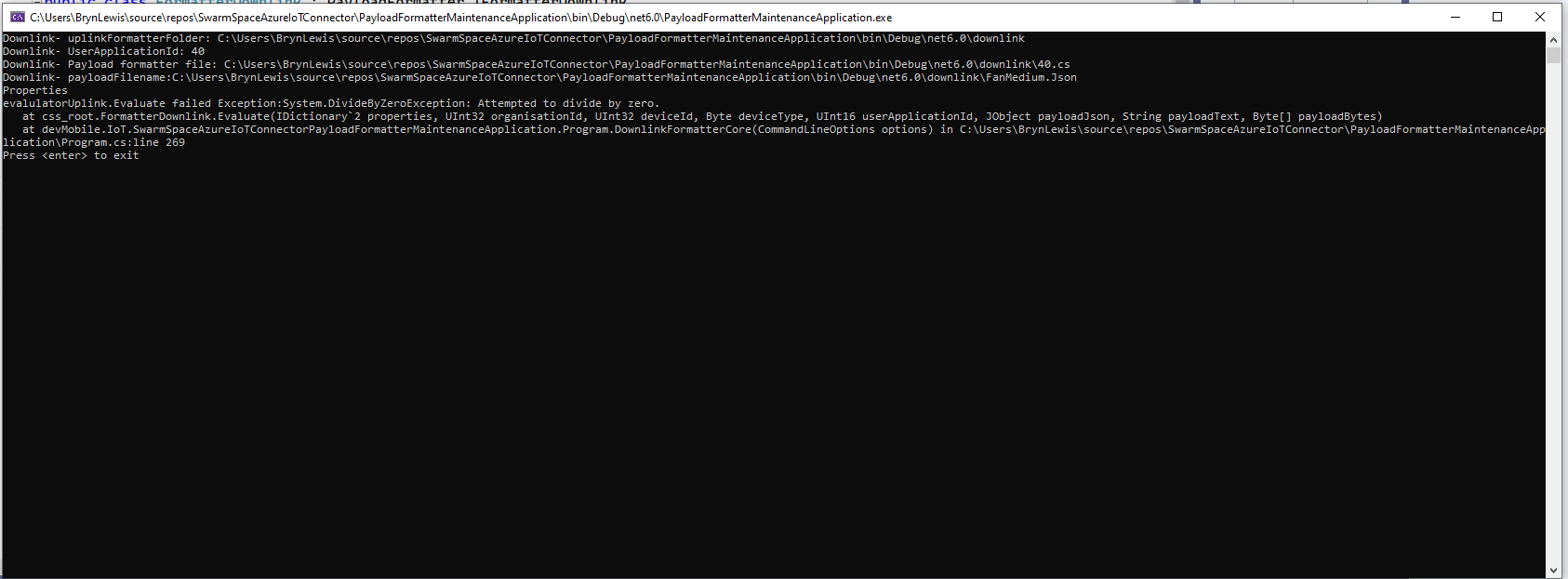
If the downlink payload formatter syntax is correct but execution fails (in the example code division by zero) an error message is displayed.
using System;
using System.Collections.Generic;
using Newtonsoft.Json.Linq;

public class FormatterDownlink : PayloadFormatter.IFormatterDownlink
{
    public byte[] Evaluate(IDictionary<string, string> properties, uint organisationId, uint deviceId, byte deviceType, ushort userApplicationId, JObject payloadJson, string payloadText, byte[] payloadBytes)
    {
        byte? status = payloadJson.Value<byte?>("FanStatus");

        if ( status.HasValue )
        {
            int divideByZero = 10;

            divideByZero = divideByZero / 0;

            return new byte[] { status.Value };
        }

        return new byte[]{};
    }
}
The application now has a StartUpService which loads the Azure DeviceClient cache (Lazy Cache) in the background as the application starts up. If an uplink message is received from a SwarmDevice before, it has been loaded by the FunctionsStartup the DeviceClient information is cached and another connection to the Azure IoT Hub is not established.
I’m looking at building a webby user interface where users an interactivity list, create, edit, delete formatters with syntax highlighter support, and the executing the formatter with sample payloads.
Swarm Space Azure IoT Connector Identity Translation Gateway Architecture
This approach uses most of the existing building blocks, and that’s it no more changes.
This post could have been much longer with more screen grabs and code snippets, so this is the “highlights package”. This post took a lot longer than I expected as building, testing locally, then deploying the different implementations was time consuming.
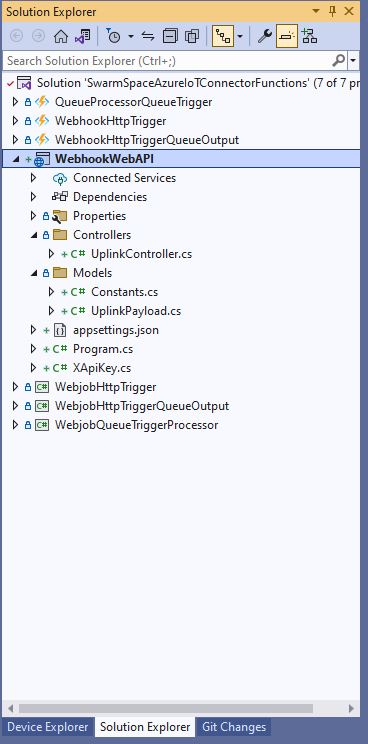
Swarm Space Connector Functions Projects
I built the projects to investigate the different options taking into account reliability, robustness, amount of code, performance (I think slow startup could be a problem). The code is very “plain” I used the default options, no copyright notices, default formatting, context sensitive error messages were used to add any required “using” statements, libraries etc.
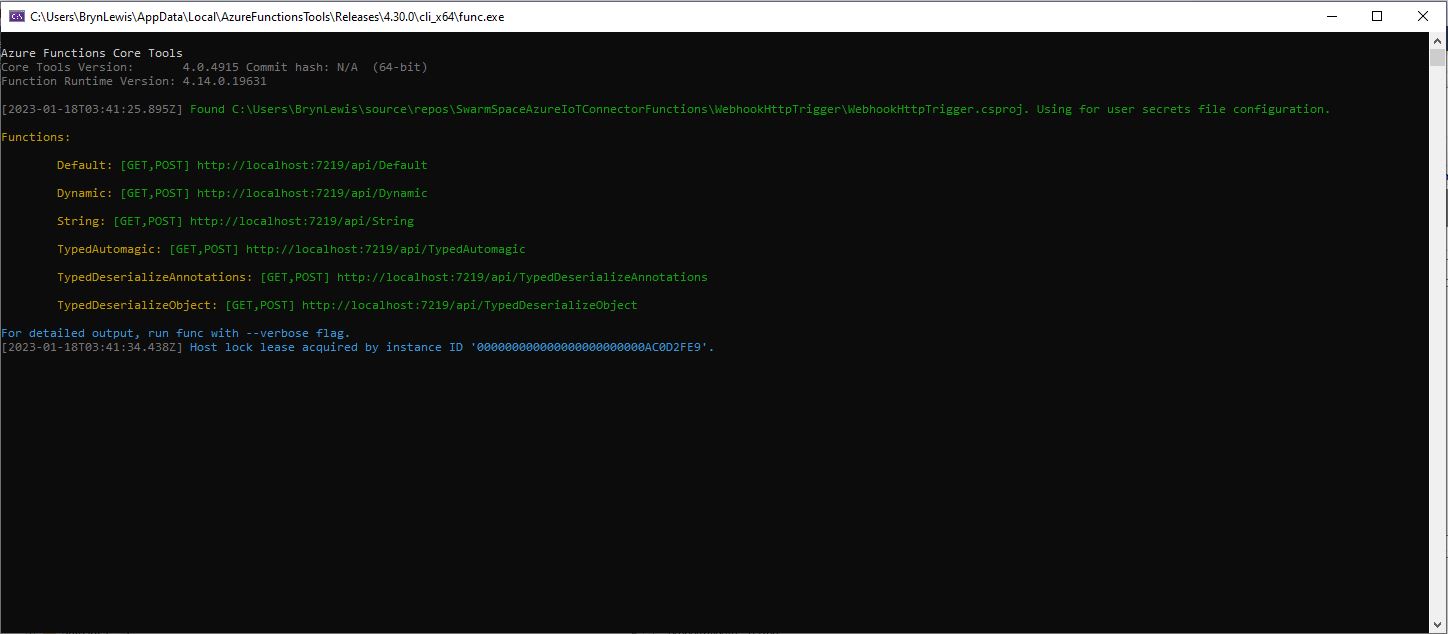
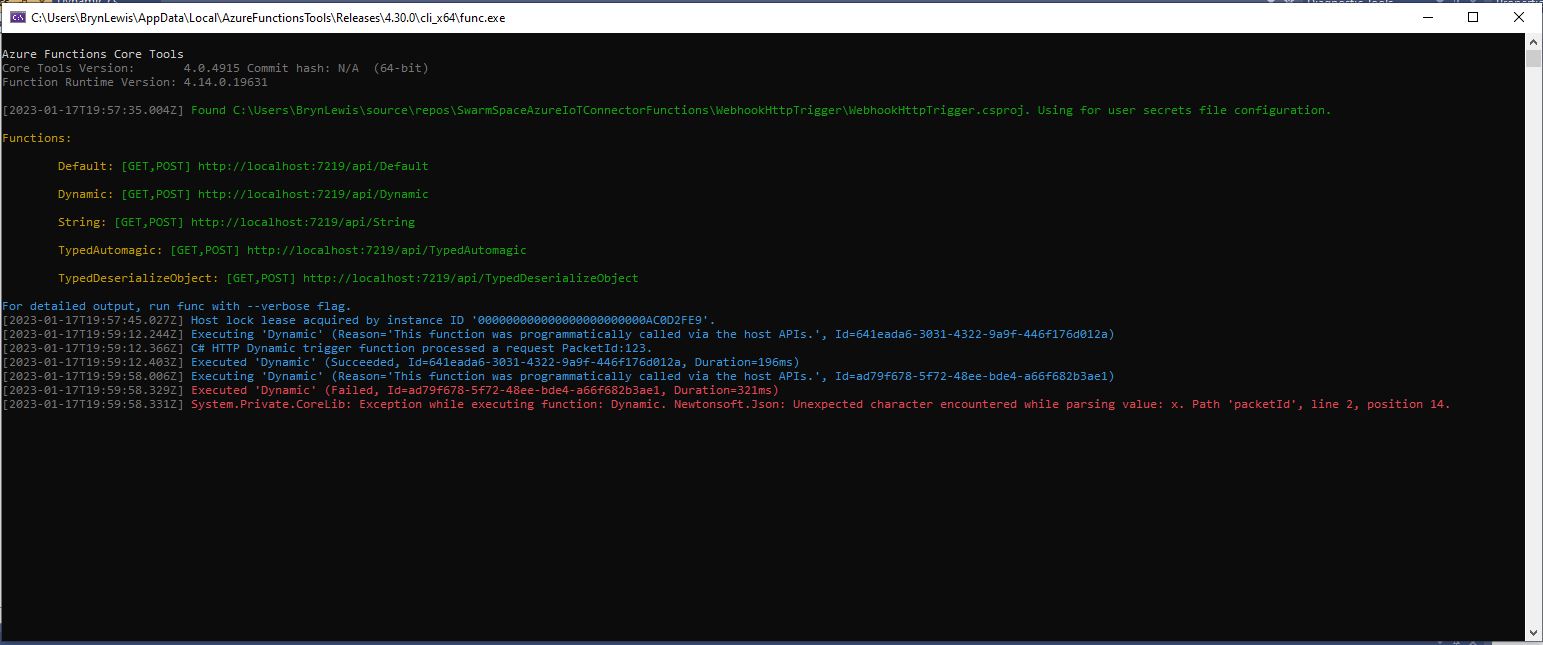
The desktop emulator hosting the six functions
I also deployed the Azure Functions and ASP .NET CoreWebAPI application to check there were no difference (beyond performance) in the way they worked. I included a “default” function (generated by the new project wizard) for reference while I was building the others.
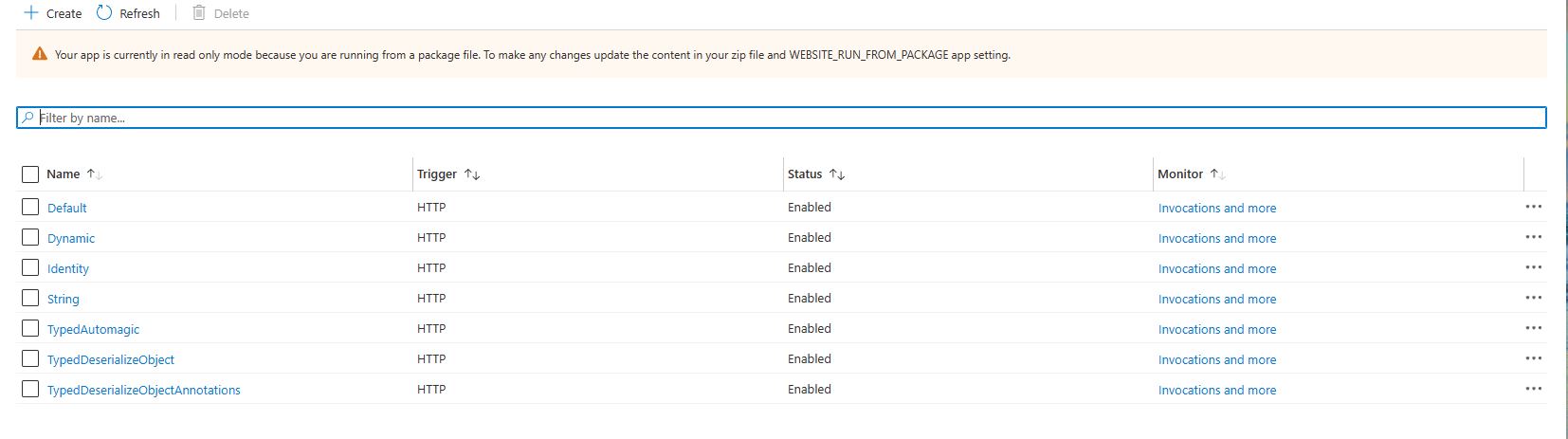
The function application with six functions in deployed to Azure
namespace WebhookHttpTrigger
{
    public static class TypedAutomagic
    {
        [FunctionName("TypedAutomagic")]
        public static async Task<IActionResult> Run(
            [HttpTrigger(AuthorizationLevel.Function, "get", "post", Route = null)] UplinkPayload payload,
            ILogger log)
        {
            log.LogInformation($"C# HTTP trigger function typed TypedAutomagic UplinkPayload processed a request PacketId:{payload.PacketId}");

            return new OkObjectResult("Hello, This HTTP triggered automagic function executed successfully.");
        }
    }
}
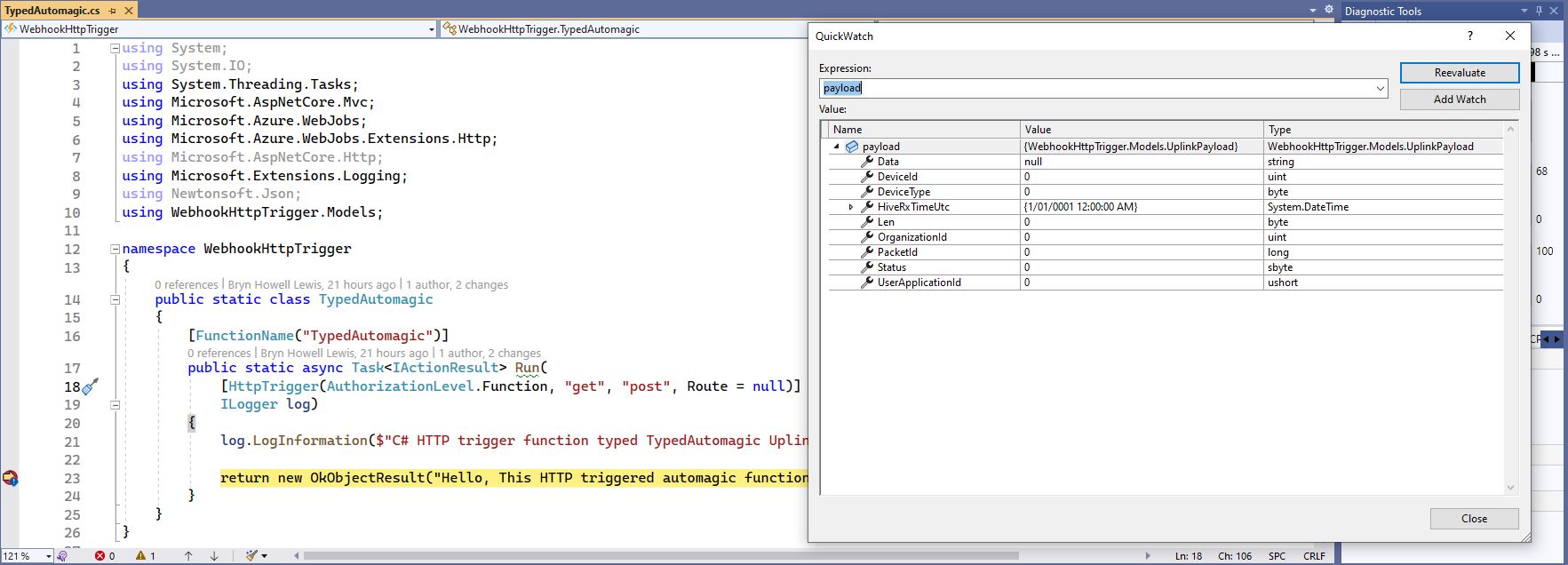
Successful execution of TypedAutomagic function
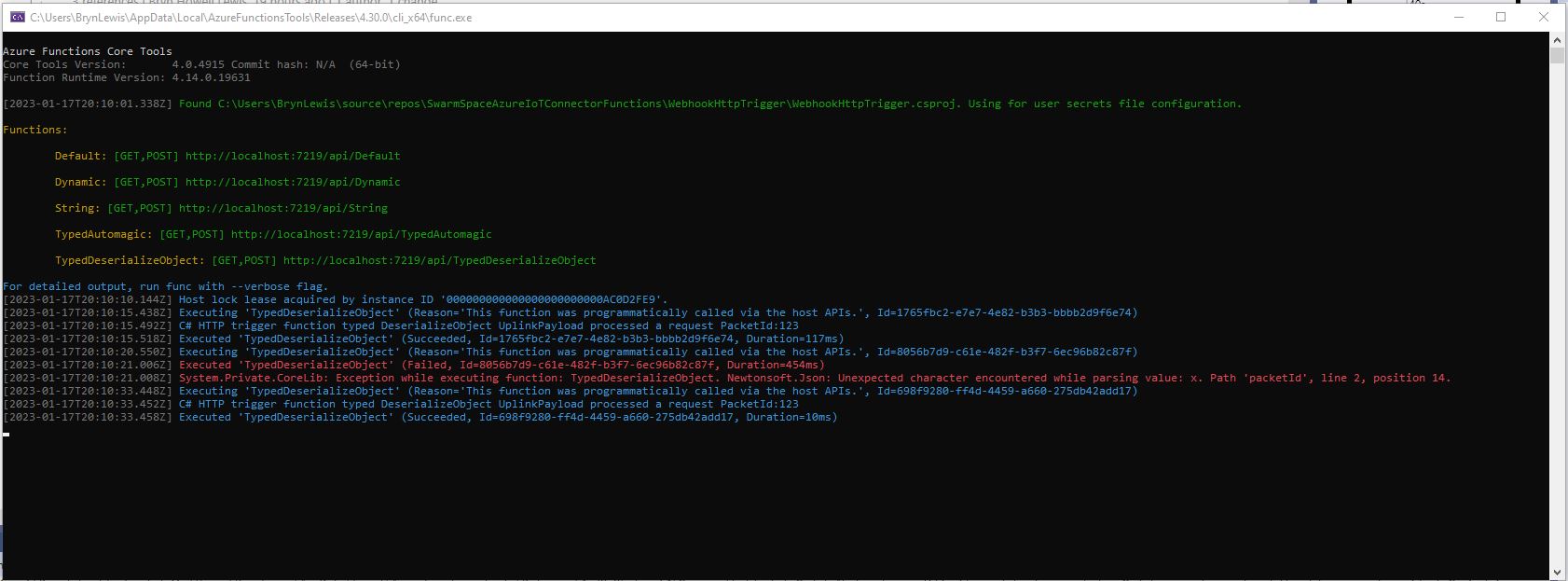
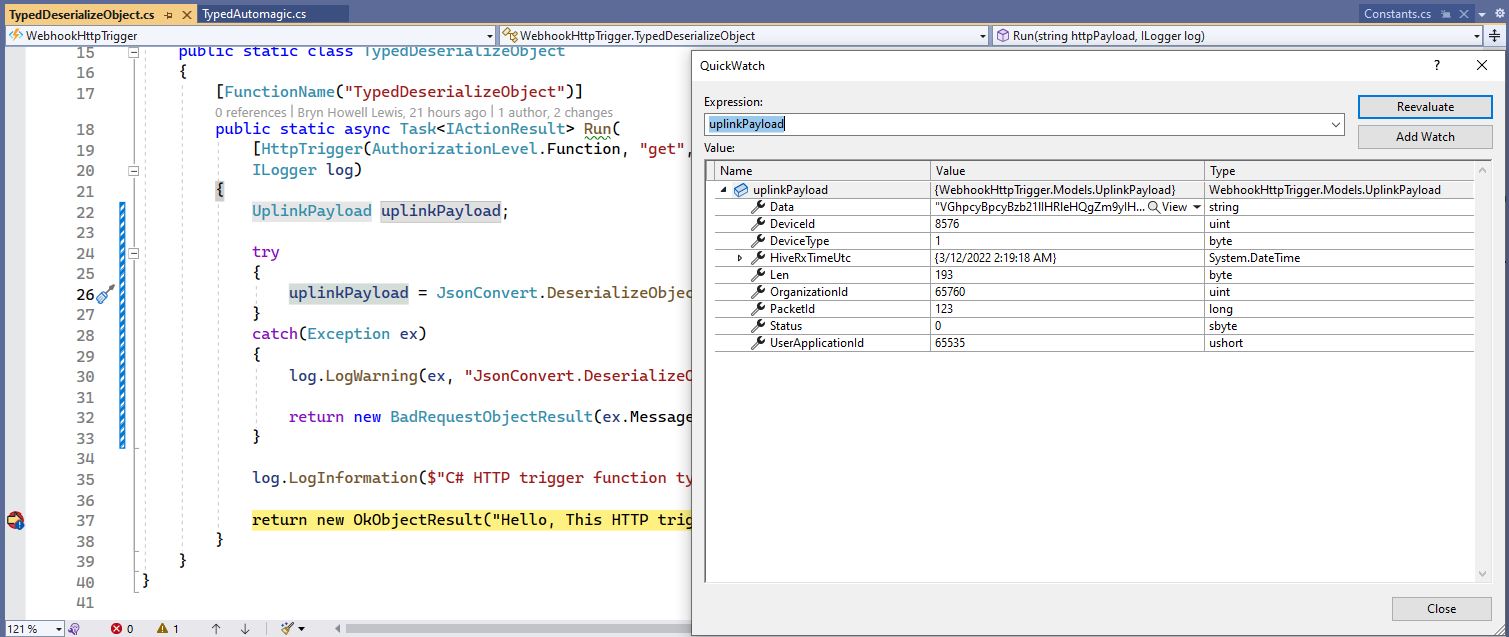
The “TypedAutomagic” implementation also detected when the JSON property values in the payload couldn’t be deserialised successfully, but if the hiveRxTime was invalid the value was set to 1/1/0001 12:00:00 am.
namespace WebhookHttpTrigger
{
    public static class TypedDeserializeObjectAnnotations
    {
        [FunctionName("TypedDeserializeObjectAnnotations")]
        public static async Task<IActionResult> Run(
            [HttpTrigger(AuthorizationLevel.Function, "get", "post", Route = null)] string httpPayload,
            ILogger log)
        {
            UplinkPayload uplinkPayload;

            try
            {
                uplinkPayload = JsonConvert.DeserializeObject<UplinkPayload>(httpPayload);
            }
            catch (Exception ex)
            {
                log.LogWarning(ex, "JsonConvert.DeserializeObject failed");

                return new BadRequestObjectResult(ex.Message);
            }

            var context = new ValidationContext(uplinkPayload, serviceProvider: null, items: null);

            var results = new List<ValidationResult>();

            var isValid = Validator.TryValidateObject(uplinkPayload, context, results,true);

            if (!isValid)
            {
                log.LogWarning("Validator.TryValidateObject failed results:{results}", results);

                return new BadRequestObjectResult(results);
            }

            log.LogInformation($"C# HTTP trigger function typed DeserializeObject UplinkPayload processed a request PacketId:{uplinkPayload.PacketId}");

            return new OkObjectResult("Hello, This HTTP triggered DeserializeObject function executed successfully.");
        }
    }
}
I built an ASP .NET CoreWebAPI version with two uplink method implementations, one which used dependency injection (DI) and the other that didn’t. I also added code to validate the deserialisation of HiveRxTimeUtc.
...
 [HttpPost]
public async Task<IActionResult> Post([FromBody] UplinkPayload payload)
{
    // Check that the post data is good
    if (!this.ModelState.IsValid)
    {
        _logger.LogWarning("QueuedController validation failed {0}", this.ModelState.ToString());

        return this.BadRequest(this.ModelState);
    }

    if ( payload.HiveRxTimeUtc == DateTime.MinValue)
    {
        _logger.LogWarning("HiveRxTimeUtc validation failed");

        return this.BadRequest();
    }

    try
    {
        QueueClient queueClient = new QueueClient(_configuration.GetConnectionString("AzureWebApi"), "uplink");

        //await queueClient.CreateIfNotExistsAsync();

        await queueClient.SendMessageAsync(Convert.ToBase64String(JsonSerializer.SerializeToUtf8Bytes(payload)));
    }
    catch (Exception ex)
    {
        _logger.LogError(ex,"Unable to open/create queue or send message", ex);

        return this.Problem("Unable to open queue (creating if it doesn't exist) or send message", statusCode: 500, title: "Uplink payload not sent");
    }

    return this.Ok();
}
Swarm Space Azure IoT Connector Identity Translation Gateway Architecture
The new approach uses most of the existing building blocks but adds an Azure HTTP Trigger which receives the Swarm Space Bumble bee hive Webhook Delivery Method calls and writes them to an Azure Storage Queue.
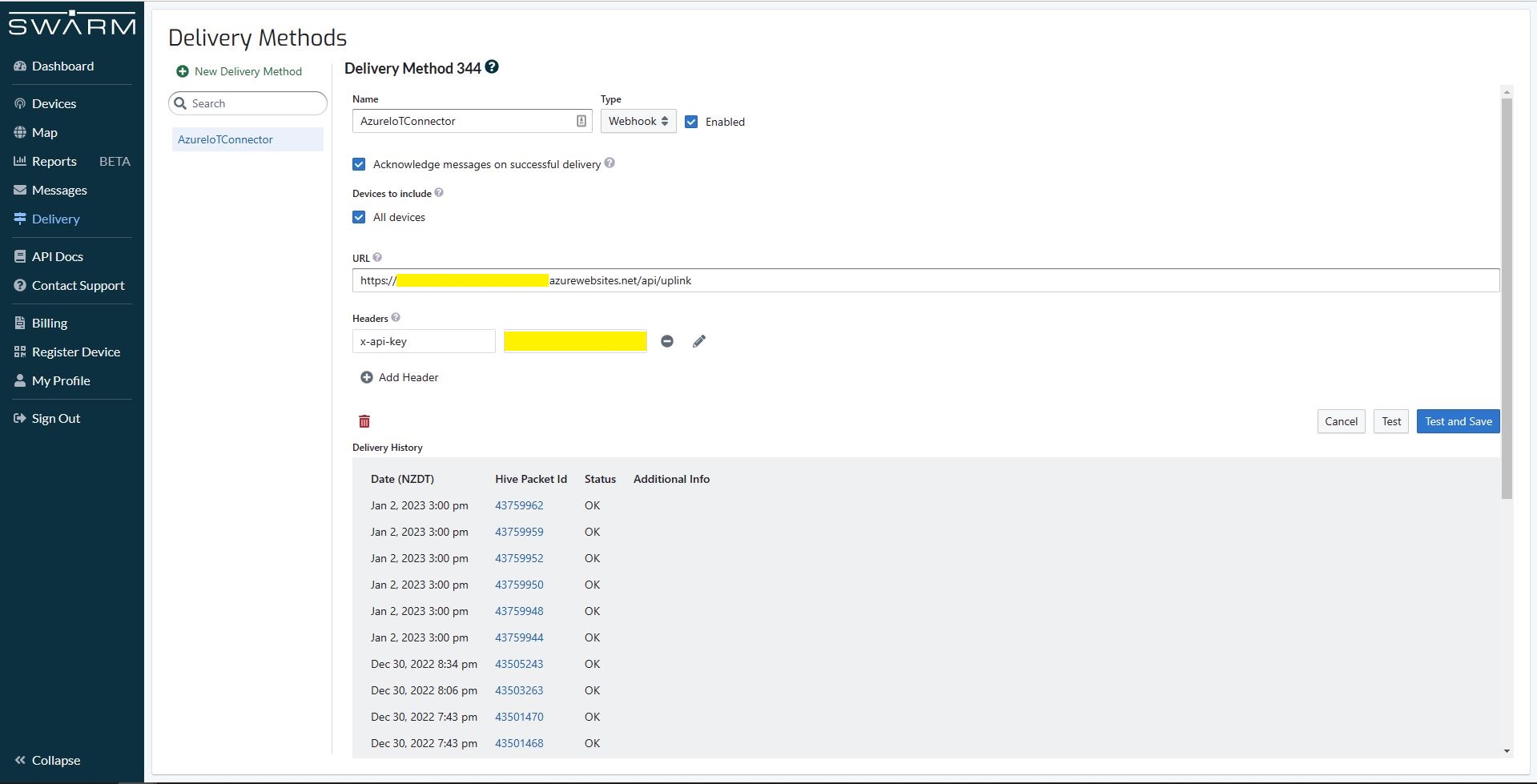
Swarm Space Bumble bee hive Web Hook Delivery method
The uplink and downlink formatters are now called asynchronously so they have limited impact on the overall performance of the application.
Azure IoT Central with consecutive duplicate PacketIds
Then I started to pay more attention and noticed that duplicate PacketIds could be interleaved
Azure IoT Central with interleaved duplicate PacketIds
Shortly after noticing the interleaved PacketIds I checked the Delivery Method and found there were message delivery timeouts.
Swarm Space Delivery with method timeouts
In Azure Application Insights I could see that the UplinkController was taking up to 15 seconds to execute which was longer than the bumblebee hive delivery timeout.
In Telerik Fiddler I could see calls to the UplinkController taking 16 seconds to execute. (I did see 30+ seconds)
Telerik Fiddler showing duration of Uplink controller calls
To see if the problem was loading CS-Script I added code to load a simple function as the application started. After averaging the duration over many executions there was little difference in the duration.
public interface IApplication
{
    public DateTime Startup(DateTime utcNow);
}
...
protected override async Task ExecuteAsync(CancellationToken cancellationToken)
{
    await Task.Yield();

    _logger.LogInformation("StartUpService.ExecuteAsync start");

    // Force the loading and startup of CS Script evaluator
    dynamic application = CSScript.Evaluator
        .LoadCode(
                @"using System;
                public class Application : IApplication
                {
                    public DateTime Startup(DateTime utcNow)
                    {
                        return utcNow;
                    }
                }");

    DateTime result = application.Startup(DateTime.UtcNow);

    try
    {
        await _swarmSpaceBumblebeeHive.Login(cancellationToken);

       await _azureIoTDeviceClientCache.Load(cancellationToken);
    }
    catch (Exception ex)
    {
        _logger.LogError(ex, "StartUpService.ExecuteAsync error");

        throw;
    }

    _logger.LogInformation("StartUpService.ExecuteAsync finish");
}
using System;
using System.Globalization;
using System.Text;

using Microsoft.Azure.Devices.Client;

using Newtonsoft.Json;
using Newtonsoft.Json.Linq;

public class FormatterUplink : PayloadFormatter.IFormatterUplink
{
    public Message Evaluate(int organisationId, int deviceId, int deviceType, int userApplicationId, JObject telemetryEvent, JObject payloadJson, string payloadText, byte[] payloadBytes)
    {
        if ((payloadText != "") && (payloadJson != null))
        {
            JObject location = new JObject();

            location.Add("lat", payloadJson.GetValue("lt"));
            location.Add("lon", payloadJson.GetValue("ln"));
            location.Add("alt", payloadJson.GetValue("a"));

            telemetryEvent.Add("DeviceLocation", location);
        }

        Message ioTHubmessage = new Message(Encoding.ASCII.GetBytes(JsonConvert.SerializeObject(telemetryEvent)));

        ioTHubmessage.Properties.Add("iothub-creation-time-utc", DateTimeOffset.FromUnixTimeSeconds((long)payloadJson.GetValue("d")).ToString("s", CultureInfo.InvariantCulture));

        return ioTHubmessage;
    }
}
I then added code to load the most complex uplink and downlink formatters as the application started. There was a significant reduction in the UplinkController execution durations, but it could still take more than 30 seconds.
I then added detailed telemetry to the code and found that the duration (also variability) was a combination of Azure IoT Device Provisoning Service(DPS) registration, Azure IoT Hub connection establishment, CS-Script payload formatter loading/compilation/execution, application startup tasks and message uploading durations.
After much experimentation It looks like that “synchronously” calling the payload processing code from the Uplink controller is not a viable approach as the Swarm Space Bumblebee hive calls regularly timeout resulting in duplicate messages.
public interface IFormatterUplink
{
    public Message Evaluate(int organisationId, int deviceId, int deviceType, int userApplicationId, JObject telemetryEvent, JObject payloadJson, string payloadText, byte[] payloadBytes);
}
public class FormatterUplink : PayloadFormatter.IFormatterUplink
{
    public Message Evaluate(int organisationId, int deviceId, int deviceType, int userApplicationId, JObject telemetryEvent, JObject payloadJson, string payloadText, byte[] payloadBytes)
    {
        Message ioTHubmessage = new Message(Encoding.ASCII.GetBytes(JsonConvert.SerializeObject(telemetryEvent)));

        return ioTHubmessage;
    }
}
Satellite Passes with gap in coverage from 16:18 to 18:42 highlighted
In the Swarm Hive Delivery Method messages from the Swarm Eval Kit and Swarm Tracker in my backyard arriving in “clusters”.
Swarm Hive Delivery Methods webhook calls.
The messages in each “cluster” were processed by a payload formatter then forwarded to Azure IoT Central for processing. All the messages in a cluster had similar event creation times which was “breaking” graphs and device tracking maps. After running the application locally using Telerik Fiddler to try different payloads I realised that the Microsoft.Azure.Azure.Devices.Client message iothub-creation-time-utc property was set to the when the message was received by Swarm Space infrastructure.
_logger.LogDebug("Uplink-DeviceId:{0} PacketId:{1} TelemetryEvent before:{0}", payload.DeviceId, payload.PacketId, JsonConvert.SerializeObject(telemetryEvent, Formatting.Indented));

telemetryEvent = swarmSpaceFormatterUplink.Evaluate(telemetryEvent, payload.Data, payloadBytes, payloadText, payloadJson);

_logger.LogDebug("Uplink-DeviceId:{0} PacketId:{1} TelemetryEvent after:{0}", payload.DeviceId, payload.PacketId, JsonConvert.SerializeObject(telemetryEvent, Formatting.Indented));

// Send the message to Azure IoT Hub
using (Message ioTHubmessage = new Message(Encoding.ASCII.GetBytes(JsonConvert.SerializeObject(telemetryEvent))))
{
   // Ensure the displayed time is the acquired time rather than the uploaded time.
   ioTHubmessage.Properties.Add("iothub-creation-time-utc", payload.HiveRxTime.ToString("s", CultureInfo.InvariantCulture));
   ioTHubmessage.Properties.Add("PacketId", payload.PacketId.ToString());
   ioTHubmessage.Properties.Add("OrganizationId", payload.OrganizationId.ToString());
   ioTHubmessage.Properties.Add("ApplicationId", payload.UserApplicationId.ToString());
   ioTHubmessage.Properties.Add("DeviceId", payload.DeviceId.ToString());
   ioTHubmessage.Properties.Add("deviceType", payload.DeviceType.ToString());

   await deviceClient.SendEventAsync(ioTHubmessage);

   _logger.LogInformation("Uplink-DeviceID:{deviceId} SendEventAsync success", payload.DeviceId);
}
The Swarm Eval Kit uplink (JSON) message generated by the sample firmware “d” field is the number of seconds since the Unix Epoch that the message payload was constructed.
Swarm Hive Messages with “d” field in the JSON payload highlighted
Online Unix Epoch Convertor displaying Unix Epoch 1672561286 in NZDT and UTC time
The revised 65355.cs payload formatter adds an “iothub-creation-time-utc” field to the TelemetryEvent
using System;
using System.Globalization;

using Newtonsoft.Json.Linq;

public class FormatterUplink : PayloadFormatter.IFormatterUplink
{
    public JObject Evaluate(JObject telemetryEvent, string payloadBase64, byte[] payloadBytes, string payloadText, JObject payloadJson)
    {
        if ((payloadText != "" ) && ( payloadJson != null))
        {
            JObject location = new JObject();

            location.Add("lat", payloadJson.GetValue("lt"));
            location.Add("lon", payloadJson.GetValue("ln"));
            location.Add("alt", payloadJson.GetValue("a"));

            telemetryEvent.Add("DeviceLocation", location);
        };

        telemetryEvent.Add("iothub-creation-time-utc", DateTimeOffset.FromUnixTimeSeconds((long)payloadJson.GetValue("d")).ToString("s", CultureInfo.InvariantCulture));

        return telemetryEvent;
    }
}
The payload formatters of my Azure IoT Hub Cloud Identity Translation Gateway use CS-Script and even a simple one was taking more than half a second to compile each time it was called.
using System;
using System.Globalization;

using Newtonsoft.Json.Linq;

public class FormatterUplink : PayloadFormatter.IFormatterUplink
{
    public JObject Evaluate(JObject telemetryEvent, string payloadBase64, byte[] payloadBytes, string payloadText, JObject payloadJson)
    {
        if ((payloadText != "" ) && ( payloadJson != null))
        {
            JObject location = new JObject();

            location.Add("lat", payloadJson.GetValue("lt"));
            location.Add("lon", payloadJson.GetValue("ln"));
            location.Add("alt", payloadJson.GetValue("a"));

            telemetryEvent.Add("Location", location);
        };

        return telemetryEvent;
    }
}
Azure IoT Central uplink telemetry message payload
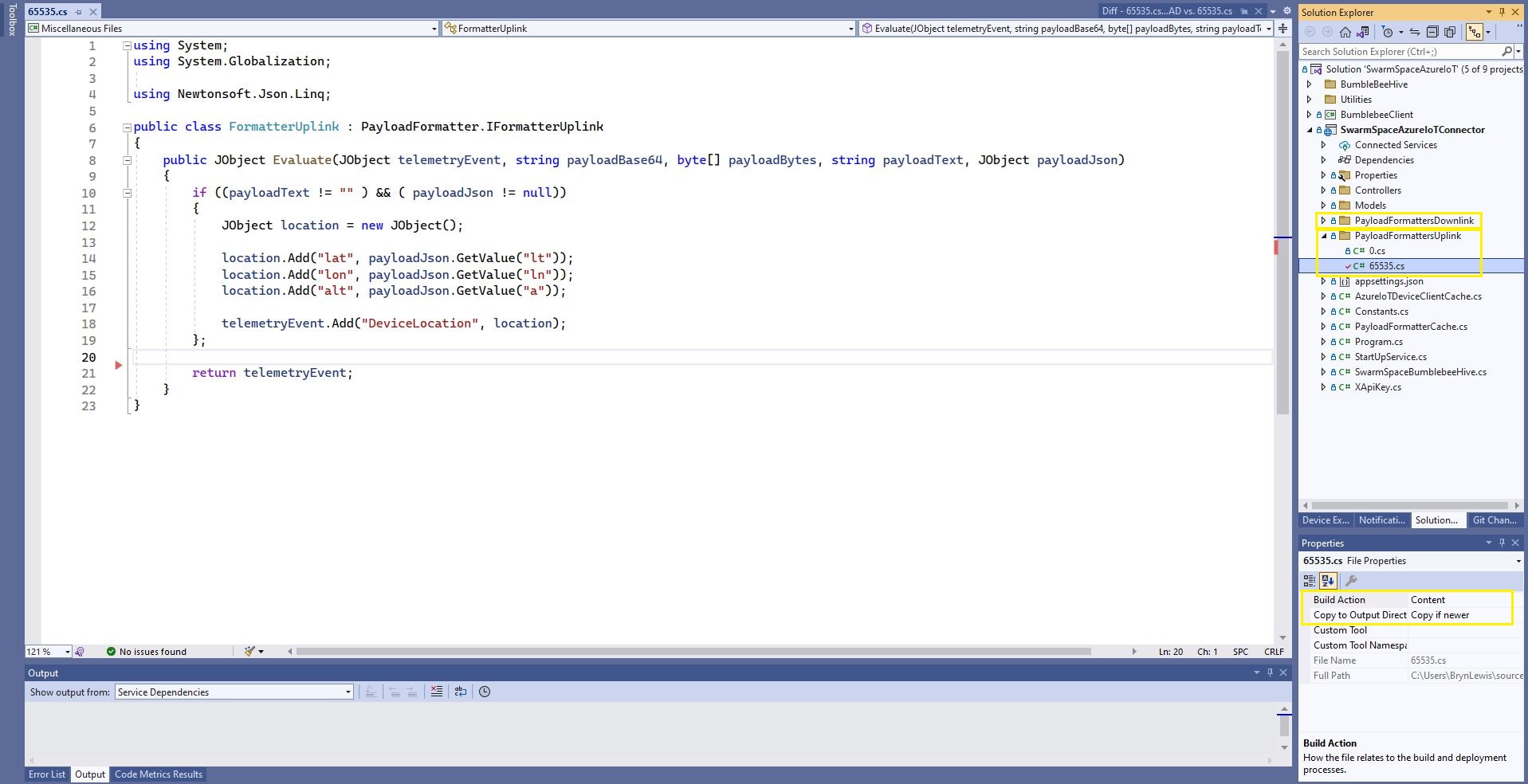
The formatter files are currently part of the SwarmSpaceAzureIoTConnector project (moving to Azure Blob Storage) so are configured as “content” (bonus syntax highlighting works) and “copy if newer” so they are included in the deployment package.
public class FormatterCache : IFormatterCache
{
    private readonly ILogger<FormatterCache> _logger;
    private readonly Models.ApplicationSettings _applicationSettings;
    private readonly static IAppCache _payloadFormatters = new CachingService();

    public FormatterCache(ILogger<FormatterCache>logger, IOptions<Models.ApplicationSettings> applicationSettings)
    {
        _logger = logger;
        _applicationSettings = applicationSettings.Value;
    }

    public async Task<IFormatterUplink> UplinkGetAsync(int userApplicationId)
    {
        IFormatterUplink payloadFormatterUplink = await _payloadFormatters.GetOrAddAsync<PayloadFormatter.IFormatterUplink>($"U{userApplicationId}", (ICacheEntry x) => UplinkLoadAsync(userApplicationId), memoryCacheEntryOptions);

        return payloadFormatterUplink;
    }

    private async Task<IFormatterUplink> UplinkLoadAsync(int userApplicationId)
    {
        string payloadformatterFilePath = $"{_applicationSettings.PayloadFormattersUplinkFilePath}\\{userApplicationId}.cs";

        if (!File.Exists(payloadformatterFilePath))
        {
            _logger.LogInformation("PayloadFormatterUplink- UserApplicationId:{0} PayloadFormatterPath:{1} not found using default:{2}", userApplicationId, payloadformatterFilePath, _applicationSettings.PayloadFormatterUplinkDefault);

            return CSScript.Evaluator.LoadFile<PayloadFormatter.IFormatterUplink>(_applicationSettings.PayloadFormatterUplinkDefault);
        }

        _logger.LogInformation("PayloadFormatterUplink- UserApplicationId:{0} loading PayloadFormatterPath:{1}", userApplicationId, payloadformatterFilePath);

        return CSScript.Evaluator.LoadFile<PayloadFormatter.IFormatterUplink>(payloadformatterFilePath);
    }
...
}
The default uplink and downlink formatters are configured in application settings and are used when a UserApplicationId specific formatter is not configured.
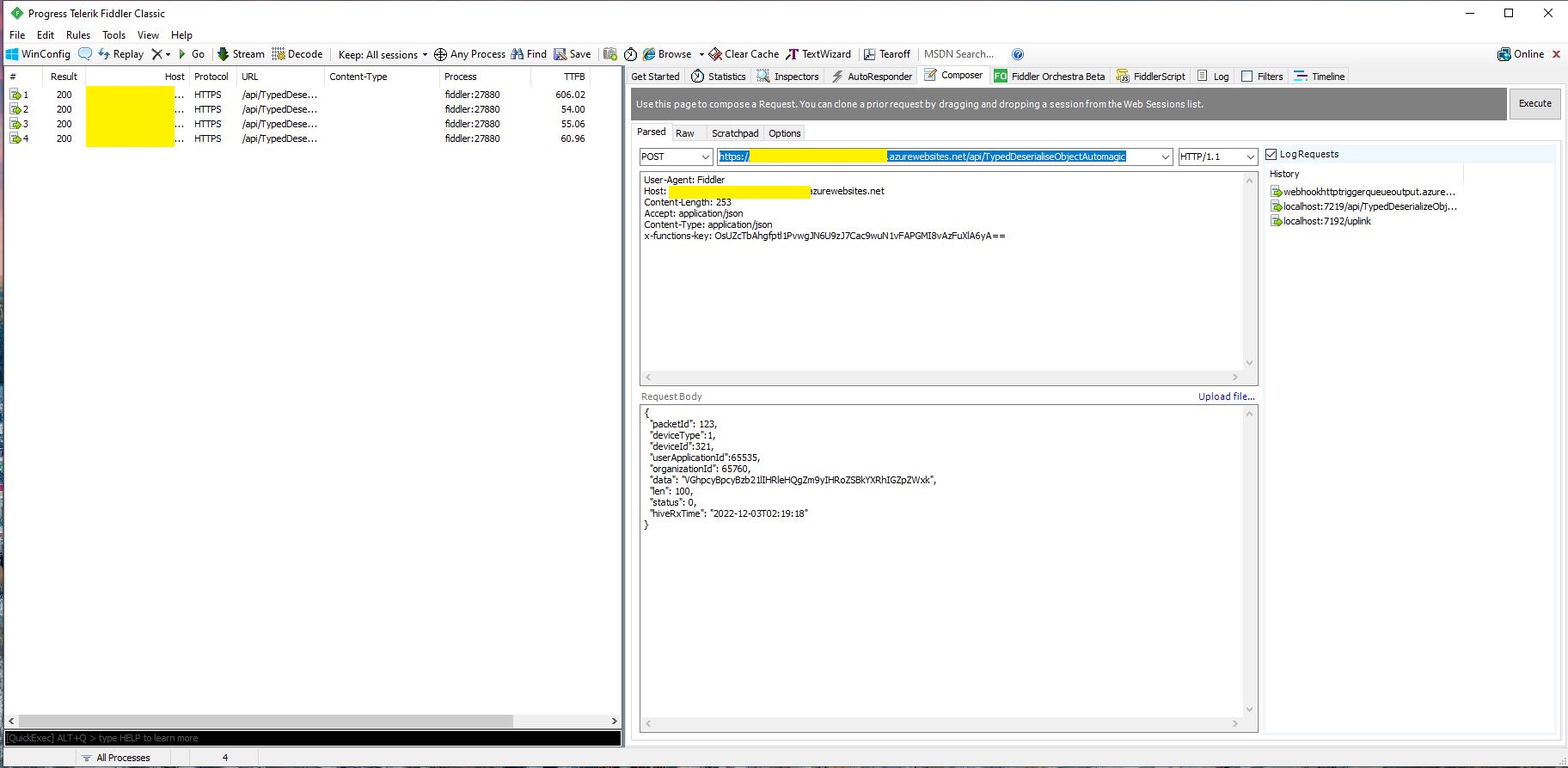
Fiddler Composer illustrating compiled formatter timings before and after caching
const string codeSwarmSpaceUplinkFormatterCode = @"
   using Newtonsoft.Json.Linq;

   public class UplinkFormatter : PayloadFormatter.ISwarmSpaceFormatterUplink
   {
       public JObject Evaluate(JObject telemetryEvent, string payloadBase64, byte[] payloadBytes, string payloadText, JObject payloadJson)
       {
           if ((payloadText != """" ) && ( payloadJson != null))
           {
               JObject location = new JObject() ;

               location.Add(""Lat"", payloadJson.GetValue(""lt""));
               location.Add(""Lon"", payloadJson.GetValue(""ln""));
               location.Add(""Alt"", payloadJson.GetValue(""a""));

               telemetryEvent.Add( ""location"", location);
           };

           return telemetryEvent;
       }
   }";
}
The PayloadFormatter namespace was added to reduce the length of the payload formatter C# interface declarations.
namespace PayloadFormatter
{
    using Newtonsoft.Json.Linq;

    public interface ISwarmSpaceFormatterUplink
    {
        public JObject Evaluate(JObject telemetry, string payloadBase64, byte[] payloadBytes, string payloadText, JObject payloadJson);
    }

    public interface ISwarmSpaceFormatterDownlink
    {
        public string Evaluate(JObject payloadJson, string payloadText, byte[] payloadBytes, string payloadBase64);
    }
}

namespace devMobile.IoT.SwarmSpace.AzureIoT.Connector
{
    using System.Threading.Tasks;
    using Microsoft.Extensions.Logging;

    using CSScriptLib;

    using PayloadFormatter;

    public interface ISwarmSpaceFormatterCache
    {
        public Task<ISwarmSpaceFormatterUplink> PayloadFormatterGetOrAddAsync(int userApplicationId);

    }

    public class SwarmSpaceFormatterCache : ISwarmSpaceFormatterCache
    {
        private readonly ILogger<SwarmSpaceFormatterCache> _logger;

        public SwarmSpaceFormatterCache(ILogger<SwarmSpaceFormatterCache>logger)
        {
            _logger = logger;
        }

        public async Task<ISwarmSpaceFormatterUplink> PayloadFormatterGetOrAddAsync(int deviceId)
        {
            return CSScript.Evaluator.LoadCode<PayloadFormatter.ISwarmSpaceFormatterUplink>(codeSwarmSpaceUplinkFormatterCode);
        }
...
}
The parameters of the formatter are Base64 encoded, textual and a Newtonsoft JObject representations of the uplink payload and a telemetry event populated with some uplink message metadata.
Azure IoT Central uplink telemetry message payload
The initial “compile” of an uplink formatter was taking approximately 2.1 seconds so they will be “compiled” on demand and cached in a Dictionary with the UserApplicationId as the key. A default uplink formatter will be used when a UserApplicationId specific uplink formatter is not configured.













 devMobile's blog