ONNX Tensor loading Initial Comparison

This is the second in a series of posts from my session at the Agent Camp – Christchurch about using Open Neural Network Exchange(ONNX) for processing Moving Picture Experts Group (MPEG) video and Pulse Code Modulation(PCM) audio streams.

These benchmarks use Ultralytics Yolo26 standard object detection model input image size of 640*640pixels.

var _tensor= new DenseTensor<float>(new[] { 1, 3, modelH, modelW });

The original nested loop: multi-dimensional [0,c,y,x] indexer, with divide by 255f. This is the baseline to measure all other implementations against.

[Benchmark(Baseline = true, Description = "Baseline: indexer + / 255f")]
public void Baseline()
{
   for (int y = 0; y < modelH; y++)
      for (int x = 0; x < modelW; x++)
      {
          var c = _letterboxed.GetPixel(x, y);

         _tensor[0, 0, y, x] = px.Red / 255f;
         _tensor[0, 1, y, x] = px.Green / 255f;
         _tensor[0, 2, y, x] = px.Blue / 255f;
      }
}

The implementation bypasses the multi-dimensional [0,c,y,x] indexer entirely with Span<> over the tensor’s backing buffer. Channel planes are at offsets 0, planeSize, and 2*planeSize. Then a single loop reads each pixel once; writes to all three planes interleaved.

[Benchmark(Description = "Buffer span: flat index, interleaved")]
public void BufferSpan()
{
   SKColor[] pixels = _letterboxed.Pixels;
   const float scaler = 1 / 255f;
   int planeSize = _modelW* _modelW;
   Span<float> buf = _tensor.Buffer.Span;

   for (int i = 0; i < planeSize; i++)
   {
      SKColor px = pixels[i];
      buf[i] = px.Red * scaler;
      buf[planeSize + i] = px.Green * scaler;
      buf[2 * planeSize + i] = px.Blue * scaler;
   }
}

This implementation slices the flat buffer into three non-overlapping channel spans, it then runs three separate sequential loops, one for each colour. This Combines the benefits of span (no indexer overhead, JIT can also auto-vectorise) and with split loops which the JIT can eliminate per-element bounds checks after the slice.

   [Benchmark(Description = "Buffer span split: 3× sequential flat loops")]
   public void BufferSpanSplit()
   {
      SKColor[] pixels = _letterboxed.Pixels;
      const float scaler = 1 / 255f;
      int planeSize = _modelW* _modelH;
      Span<float> buf = _tensor.Buffer.Span;

      Span<float> rPlane = buf.Slice(0, planeSize);
      Span<float> gPlane = buf.Slice(planeSize, planeSize);
      Span<float> bPlane = buf.Slice(2 * planeSize, planeSize);

      for (int i = 0; i < planeSize; i++) rPlane[i] = pixels[i].Red * scaler;
      for (int i = 0; i < planeSize; i++) gPlane[i] = pixels[i].Green * scaler;
      for (int i = 0; i < planeSize; i++) bPlane[i] = pixels[i].Blue * scaler;
   }

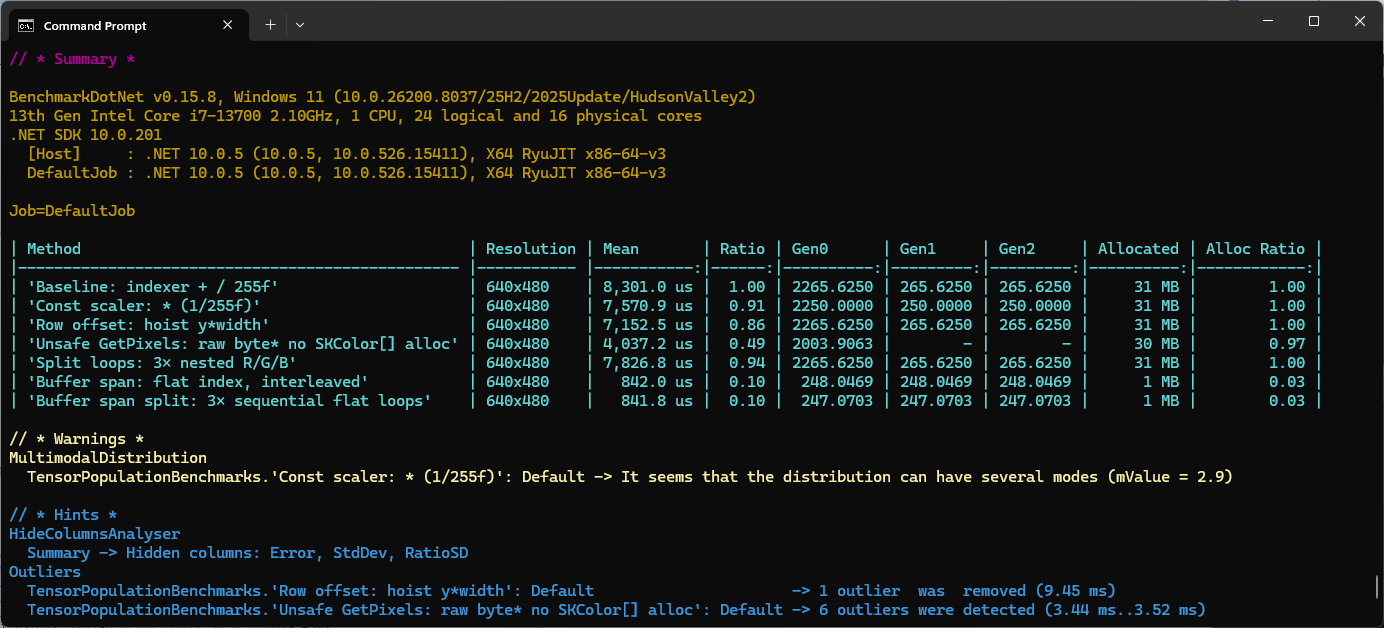
The minimal difference in performance of the two fastest implementations of the benchmark suite running on my development box was a surprise. It will be interesting to see how the performance of the different implementations changes on my Seeedstudio EdgeBox RPi 200 which has a different instruction set (esp. ARM NEON Single Instruction, Multiple Data (SIMD) extensions) and memory caching model
These benchmarks should be treated as indicative not authoritative 
SkiaSharp and ImageSharp Initial Comparison

This is the first in a series of posts from my session at the Agent Camp – Christchurch about using Open Neural Network Exchange(ONNX) for processing Moving Picture Experts Group (MPEG) video and Pulse Code Modulation(PCM) audio streams.

For processing video streams one of the first steps is extracting individual Joint Photographic Experts Group(JPEG) images from MPEG Real-Time Streaming Protocol(RTSP) stream. The jpeg images then have to transformed into an ONNX DenseTensor<float> in the correct format for the Ultralytics Yolo26 model. These image processing posts will use Ultralytics Yolo26 standard Small object detection model which has an input image size of 640*640pixels.

I have used both the YoloSharp and YoloDotNet libraries (Thank you Niklas Swärd and dme-compunet I appreciate the amount of effort you have put in). Both these libraries have support for object detection, instance segmentation, oriented bounding boxes detection(OBB), classification and pose estimation. They both have support for different versions, video stream processing, plotting minimum bounding boxes, Non-Maximum Suppression(NMS) for earlier models like YOLOv8 or YOLO11. I just need object detection (none of the other model types, plotting minimum boxes etc.) to work as fast as possible on my Seeedstudio EdgeBox RPi 200.

First step, was to use Benchmark.Net compare the performance of Six Labors ImageSharp (used by YoloSharp) and SkiaSharp (used by YoloDotNet). Six Labors ImageSharp  is a high-performance, fully managed, 2D graphics API whereas SkiaSharp is a wrapper for Google’s Skia 2D Graphics Library.

ImageSharp Benchmark
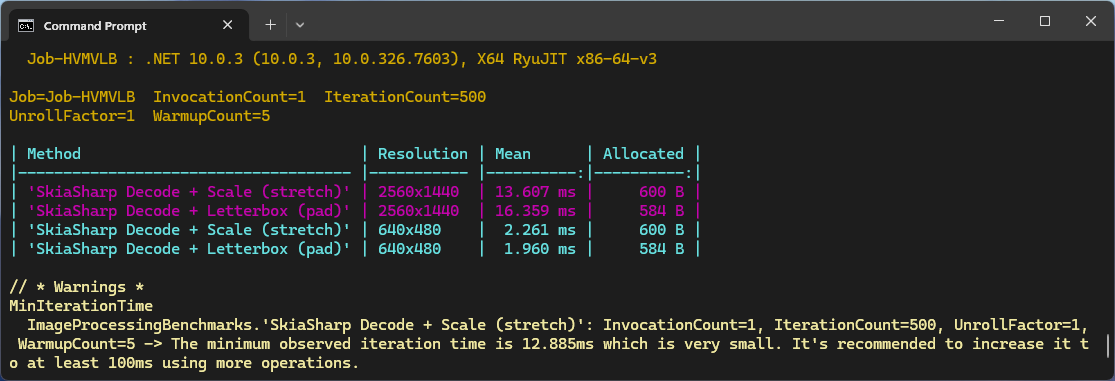
SkiaSharp Benchmark

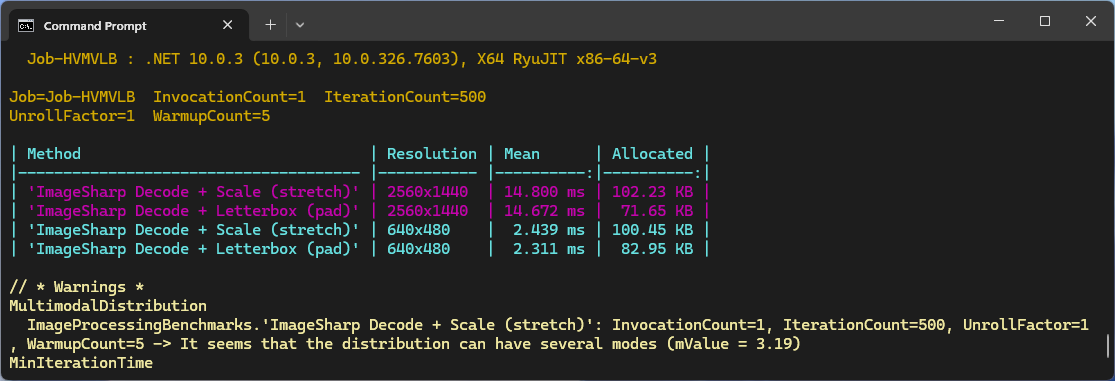
The initial comparison running on my development box (will benchmark on my Seeedstudio EdgeBox RPi 200.) was roughly what I was expecting though the SkaiSharp 2560×1440 mean duration was a bit odd. I think that the difference in the amount of memory allocated is because SkaiSharp’s memory is allocated by the native code. Both benchmarks need some refactoring to improve repeatability on my different platforms.

These benchmarks should be treated as indicative not authoritative 
Message Transformation with cached transform binaries

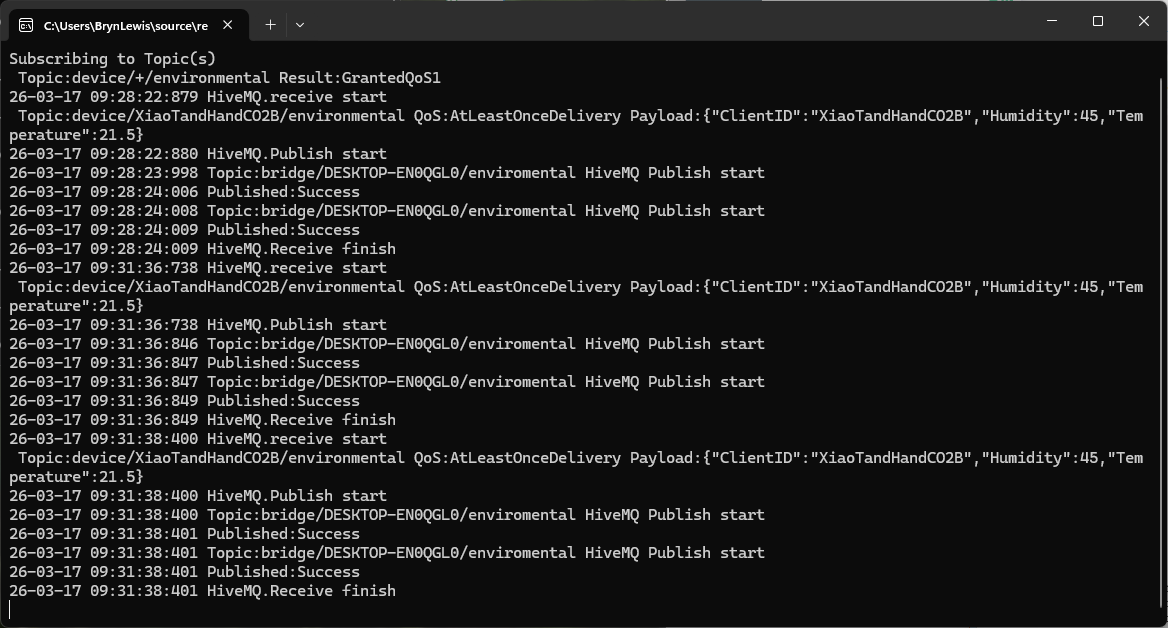
The second prototype of “transforming” telemetry data used C# code complied and binary cached on demand. The HiveMQClient based application subscribes to topics (devices publishing environmental measurements) and then republishes them to multiple topics.

public class messageTransformer : IMessageTransformer
{
   public MQTT5PublishMessage[] Transform(MQTT5PublishMessage message)
   {
      if (message.Payload is null)
      {
         return [];
      }

      var payload = Encoding.UTF8.GetString(message.Payload);

      // Simple transformations: convert to both upper and lower case
      var toLower = new MQTT5PublishMessage
      {
         Topic = message.Topic,
         Payload = Encoding.UTF8.GetBytes(payload.ToLower()),
         QoS = QualityOfService.AtLeastOnceDelivery
      };

      var toUpper = new MQTT5PublishMessage
      {
         Topic = message.Topic,
         Payload = Encoding.UTF8.GetBytes(payload.ToUpper()),
         QoS = QualityOfService.AtLeastOnceDelivery
      };

      return [toLower, toUpper];
   }
}

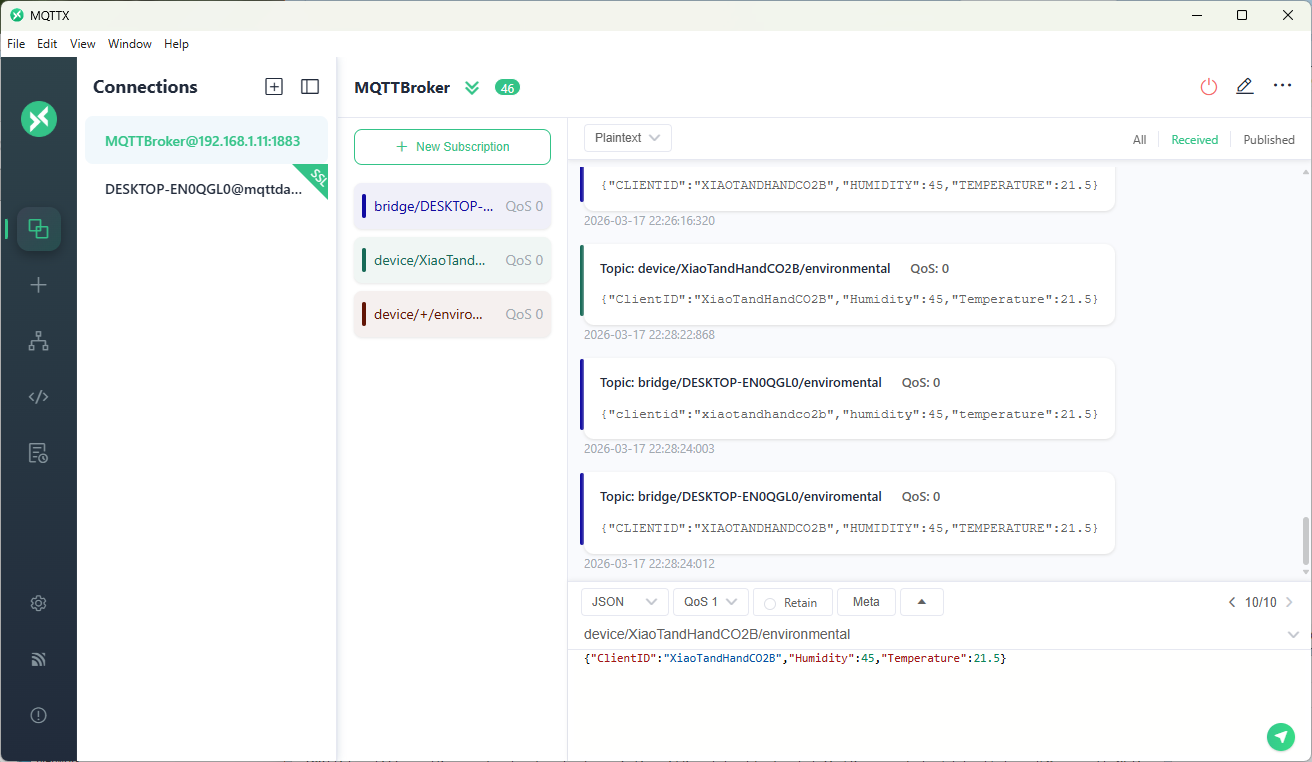
The sample C# code (LowerUpper.cs) implements the IMessageTransformer interface and republishes both lower and upper case versions of the message.

Once the transformer had been loaded then compiled there was no noticeable difference between the application, loaded from constant string, and loaded from external file versions.

private static void OnMessageReceived(object? sender, HiveMQtt.Client.Events.OnMessageReceivedEventArgs e)
{
   HiveMQClient client = (HiveMQClient)sender!;

   Console.WriteLine($"{DateTime.UtcNow:yy-MM-dd HH:mm:ss:fff} HiveMQ.receive start");
   Console.WriteLine($" Topic:{e.PublishMessage.Topic} QoS:{e.PublishMessage.QoS} Payload:{e.PublishMessage.PayloadAsString}");

   Console.WriteLine($"{DateTime.UtcNow:yy-MM-dd HH:mm:ss:fff} HiveMQ.Publish start");
   foreach (string topic in _applicationSettings.PublishTopics.Split(',', StringSplitOptions.RemoveEmptyEntries | StringSplitOptions.TrimEntries))
   {
      e.PublishMessage.Topic = string.Format(topic, _applicationSettings.ClientId);

      var transformer = _scriptEngine.GetTransformer();

      if (transformer is null)
      {
         Console.WriteLine($"{DateTime.UtcNow:yy-MM-dd HH:mm:ss:fff} Transformer is null");
         return;
      }

      var transformedMessages = transformer.Transform(e.PublishMessage);
      if (transformedMessages is null)
      {
         Console.WriteLine($"{DateTime.UtcNow:yy-MM-dd HH:mm:ss:fff} Transformer returned null");
         return;
      }

      if (transformedMessages.Length == 0)
      {
         Console.WriteLine($"{DateTime.UtcNow:yy-MM-dd HH:mm:ss:fff} Transformer returned no messages");
         return;
      }

      foreach (MQTT5PublishMessage message in transformer.Transform(e.PublishMessage))
      {
         if (message is null)
         {
            Console.WriteLine($"{DateTime.UtcNow:yy-MM-dd HH:mm:ss:fff} Transformer message is null");

            continue;
         }

         try
         {
            Console.WriteLine($"{DateTime.UtcNow:yy-MM-dd HH:mm:ss:fff} Topic:{e.PublishMessage.Topic} HiveMQ Publish start ");

            var resultPublish = client.PublishAsync(message).GetAwaiter().GetResult();

            Console.WriteLine($"{DateTime.UtcNow:yy-MM-dd HH:mm:ss:fff} Published:{resultPublish.QoS1ReasonCode} {resultPublish.QoS2ReasonCode}");
         }
         catch (Exception ex)
         {
            Console.WriteLine($"{DateTime.UtcNow:yy-MM-dd HH:mm:ss:fff} HiveMQ Publish exception {ex.Message}");
         }
      }
   }
   Console.WriteLine($"{DateTime.UtcNow:yy-MM-dd HH:mm:ss:fff} HiveMQ.Receive finish");
}

I used a local instance of NanoMQ: An Ultra-lightweight MQTT Broker for IoT Edge for testing

The MQTTX application subscribed to topics that devices (XiaoTandHandCO2A, XiaoTandHandCO2B etc.) and the simulated bridge (in my case DESKTOP-EN0QGL0) published.