The Inside Airbnb London dataset download has a GeoJSON file with neighbourhood boundaries.

To load the GeoJSON I used GeoJSON.Text to deserialise the neighbourhood Feature boundaries (polygon & multipolygon).
using System.Text.Json;
using System.Data;
using System.Data.SqlClient;

using Microsoft.SqlServer.Types;

using Dapper;

string jsonString = File.ReadAllText("your geoJSON file");

using (IDbConnection connection = new SqlConnection("This is not the connection string you are looking for"))
{
   connection.Open();

   var neighbourHoods = JsonSerializer.Deserialize<GeoJSON.Text.Feature.FeatureCollection>(jsonString)!;

   Console.WriteLine($"Features:{neighbourHoods.Features.Count}");
   foreach (var feature in neighbourHoods.Features)
   {
      string neighbourhood = feature.Properties["neighbourhood"].ToString();

      Console.WriteLine($"Neightbourhood:{neighbourhood}");

      var geometery = (GeoJSON.Text.Geometry.MultiPolygon)feature.Geometry;

      var s = new SqlGeographyBuilder();

      s.SetSrid(4326);

      s.BeginGeography(OpenGisGeographyType.MultiPolygon);
      s.BeginGeography(OpenGisGeographyType.Polygon); // A

      Console.WriteLine($"Polygon cordinates:{geometery.Coordinates.Count}");
      foreach (var coordinates in geometery.Coordinates)
      {
        //s.BeginGeography(OpenGisGeographyType.Polygon); // B

         Console.WriteLine($"Linestring cordinates:{coordinates.Coordinates.Count}");
         foreach (var c in coordinates.Coordinates)
         {
            Console.WriteLine($"Point cordinates:{c.Coordinates.Count}");

            s.BeginFigure(c.Coordinates[0].Latitude, c.Coordinates[0].Longitude, null, null);

            for (int i = 1; i < c.Coordinates.Count; i++)
            {
               s.AddLine(c.Coordinates[i].Latitude, c.Coordinates[i].Longitude);

               Console.Write('.');
            }
            Console.WriteLine();

            s.EndFigure();
         }
         //s.EndGeography(); //B
      }

      s.EndGeography(); //A
      s.EndGeography(); // OpenGisGeographyType.MultiPolygon

      connection.Execute("INSERT INTO Neighbourhood (Name, Boundary) VALUES( @Neighbourhood, geography::STMPolyFromText(@boundary, 4326))", new { neighbourhood, boundary = s.ConstructedGeography.ToString()});

      Console.WriteLine();
   }
}

Console.WriteLine("loaded press <enter> to exit");
Console.ReadLine();
The neighbourhood feature loader utility is pretty “nasty” and was built for my specific scenario
CREATE TABLE [dbo].[Neighbourhood](
	[NeighbourhoodUID] [uniqueidentifier] NOT NULL,
	[Name] [nvarchar](50) NOT NULL,
	[Boundary] [geography] NOT NULL,
 CONSTRAINT [PK_Neighbourhood] PRIMARY KEY CLUSTERED
(
	[NeighbourhoodUID] ASC
)
I used Dapper to insert rows into the Neighbourhood table
DECLARE @PointGeography AS GEOGRAPHY

SET @PointGeography = geography::Point(51.512837,-0.2894983, 4326) --Flat
--SET @PointGeography = geography::Point(51.5053469,-0.0262693,4326) -- Canary Wharf
--SET @PointGeography = geography::Point(51.476853,0.0,4326) -- Greenwich
--SET @PointGeography = geography::Point(51.501476,-0.140634, 4326) -- Buckingham palace
--SET @PointGeography = geography::Point(51.533611, -0.318889, 4326) -- Hoover factory
--SET @PointGeography = geography::Point(51.5045, -0.0865, 4326) -- Shard
--SET @PointGeography = geography::Point(51.5145683288574,-0.0194199997931719, 4326) -- D0FD60C0-CC45-4517-91F6-00161E710F28 Tower Hamlets
--SET @PointGeography = geography::Point(51.5553092956543,0.00039999998989515, 4326) -- 80264AED-BC74-4150-B393-02D42711E2E6 Waltham Forest
--SET @PointGeography = geography::Point(51.4925193786621,-0.192310005426407, 4326) -- D36E4D1C-4A35-4B6E-B9A7-01E8D732FD3B Kensington and Chelsea
SET @PointGeography = geography::Point(51.5185317993164,-0.199739992618561, 4326) -- 2CAE3CAE-5E43-4F20-9550-01B86D7EF6FF Westminster

SELECT Name, @PointGeography.STWithin(Neighbourhood.Boundary) as 'STWithin', Neighbourhood.Boundary.STContains(@PointGeography) as 'STContains'
FROM Neighbourhood
ORDER BY Name
To test the neighbourhood geography I built a test harness with some “known” locations
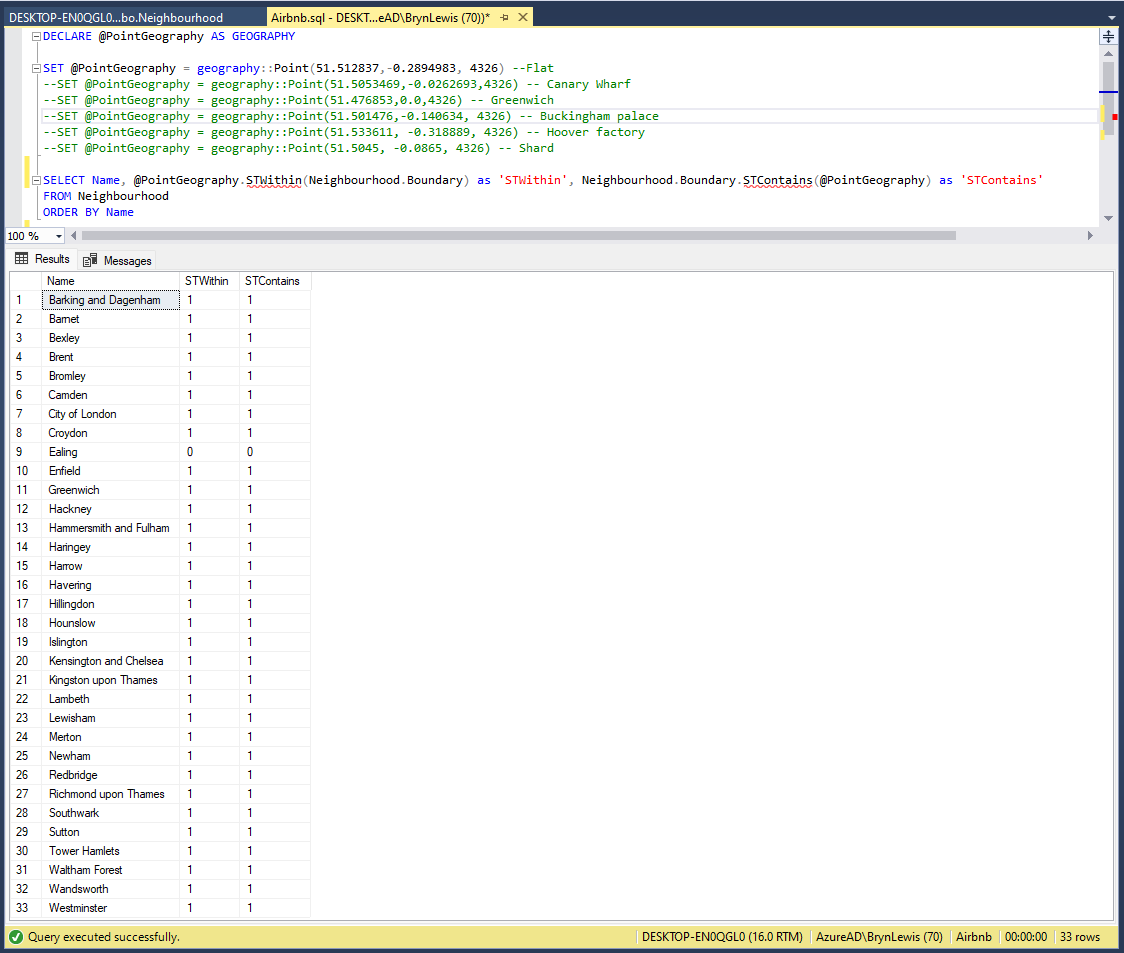
The query results were the inverse of what I was expecting.

I had forgotten that GeoJSON uses the right-hand rule and Microsoft SQL server uses the left-hand rule for polygons.
UPDATE Neighbourhood SET Boundary = Boundary.ReorientObject()
The neighbourhood dataset is tiny so I used ReorientObject to fix the boundary geography polygons.
 devMobile's blog