ML.Net YoloV5 + Security Camera Revisited

This post is about “revisiting” my ML.Net YoloV5 + Camera on ARM64 Raspberry PI application, updating it to .NET 6, the latest version of the TechWings yolov5-net (library formerly from mentalstack) and the latest version of the ML.Net Open Neural Network Exchange(ONNX) libraries.

Visual Studio 2022 with updated NuGet packages

The updated TechWings yolov5-net library now uses Six Labors ImageSharp for markup rather than System.Drawing.Common. (I found System.Drawing.Common a massive Pain in the Arse (PiTA))

private static async void ImageUpdateTimerCallback(object state)
{
   DateTime requestAtUtc = DateTime.UtcNow;

   // Just incase - stop code being called while photo already in progress
   if (_cameraBusy)
   {
      return;
   }
   _cameraBusy = true;

   Console.WriteLine($"{DateTime.UtcNow:yy-MM-dd HH:mm:ss} Image processing start");

   try
   {
#if SECURITY_CAMERA
      Console.WriteLine($" {DateTime.UtcNow:yy-MM-dd HH:mm:ss:fff} Security Camera Image download start");

      using (Stream cameraStream = await _httpClient.GetStreamAsync(_applicationSettings.CameraUrl))
      using (Stream fileStream = File.Create(_applicationSettings.ImageInputFilenameLocal))
      {
         await cameraStream.CopyToAsync(fileStream);
      }

      Console.WriteLine($" {DateTime.UtcNow:yy-MM-dd HH:mm:ss:fff} Security Camera Image download done");
#endif

      List<YoloPrediction> predictions;

      // Process the image on local file system
      using (Image<Rgba32> image = await Image.LoadAsync<Rgba32>(_applicationSettings.ImageInputFilenameLocal))
      {
         Console.WriteLine($" {DateTime.UtcNow:yy-MM-dd HH:mm:ss:fff} YoloV5 inferencing start");
         predictions = _scorer.Predict(image);
         Console.WriteLine($" {DateTime.UtcNow:yy-MM-dd HH:mm:ss:fff} YoloV5 inferencing done");

#if OUTPUT_IMAGE_MARKUP
         Console.WriteLine($" {DateTime.UtcNow:yy-MM-dd HH:mm:ss:fff} Image markup start");

         var font = new Font(new FontCollection().Add(_applicationSettings.ImageOutputMarkupFontPath), _applicationSettings.ImageOutputMarkupFontSize);

         foreach (var prediction in predictions) // iterate predictions to draw results
         {
            double score = Math.Round(prediction.Score, 2);

            var (x, y) = (prediction.Rectangle.Left - 3, prediction.Rectangle.Top - 23);

            image.Mutate(a => a.DrawPolygon(Pens.Solid(prediction.Label.Color, 1),
                  new PointF(prediction.Rectangle.Left, prediction.Rectangle.Top),
                  new PointF(prediction.Rectangle.Right, prediction.Rectangle.Top),
                  new PointF(prediction.Rectangle.Right, prediction.Rectangle.Bottom),
                  new PointF(prediction.Rectangle.Left, prediction.Rectangle.Bottom)
            ));

            image.Mutate(a => a.DrawText($"{prediction.Label.Name} ({score})",
                  font, prediction.Label.Color, new PointF(x, y)));
         }

         await image.SaveAsJpegAsync(_applicationSettings.ImageOutputFilenameLocal);

         Console.WriteLine($" {DateTime.UtcNow:yy-MM-dd HH:mm:ss:fff} Image markup done");
#endif
      }


#if PREDICTION_CLASSES
      Console.WriteLine($" {DateTime.UtcNow:yy-MM-dd HH:mm:ss:fff} Image classes start");
      foreach (var prediction in predictions)
      {
         Console.WriteLine($"  Name:{prediction.Label.Name} Score:{prediction.Score:f2} Valid:{prediction.Score > _applicationSettings.PredictionScoreThreshold}");
      }
      Console.WriteLine($" {DateTime.UtcNow:yy-MM-dd HH:mm:ss:fff} Image classes done");
#endif

#if PREDICTION_CLASSES_OF_INTEREST
      IEnumerable<string> predictionsOfInterest = predictions.Where(p => p.Score > _applicationSettings.PredictionScoreThreshold).Select(c => c.Label.Name).Intersect(_applicationSettings.PredictionLabelsOfInterest, StringComparer.OrdinalIgnoreCase);

      if (predictionsOfInterest.Any())
      {
         Console.WriteLine($" {DateTime.UtcNow:yy-MM-dd HH:mm:ss} Camera image comtains {String.Join(",", predictionsOfInterest)}");
      }

#endif
   }
   catch (Exception ex)
   {
      Console.WriteLine($"{DateTime.UtcNow:yy-MM-dd HH:mm:ss} Camera image download, upload or post procesing failed {ex.Message}");
   }
   finally
   {
      _cameraBusy = false;
   }

   TimeSpan duration = DateTime.UtcNow - requestAtUtc;

   Console.WriteLine($"{DateTime.UtcNow:yy-MM-dd HH:mm:ss} Image processing done {duration.TotalSeconds:f2} sec");
   Console.WriteLine();
}

The names of the input image, output image and yoloV5 model file are configured in the appsettings.json (on device) or secrets.json (Visual Studio 2022 desktop) file. The location (ImageOutputMarkupFontPath) and size (ImageOutputMarkupFontSize) of the font used are configurable to make it easier run the application on different devices and operating systems.

{
   "ApplicationSettings": {
      "ImageTimerDue": "0.00:00:15",
      "ImageTimerPeriod": "0.00:00:30",

      "CameraUrl": "HTTP://10.0.0.56:85/images/snapshot.jpg",
      "CameraUserName": "",
      "CameraUserPassword": "",

      "ImageInputFilenameLocal": "InputLatest.jpg",
      "ImageOutputFilenameLocal": "OutputLatest.jpg",

      "ImageOutputMarkupFontPath": "C:/Windows/Fonts/consola.ttf",
      "ImageOutputMarkupFontSize": 16,

      "YoloV5ModelPath": "YoloV5/yolov5s.onnx",

      "PredictionScoreThreshold": 0.5,

      "PredictionLabelsOfInterest": [
         "bicycle",
         "person",
         "bench"
      ]
   }
}

The test-rig consisted of a Unv ADZK-10 Security Camera, Power over Ethernet(PoE) module and my development desktop PC.
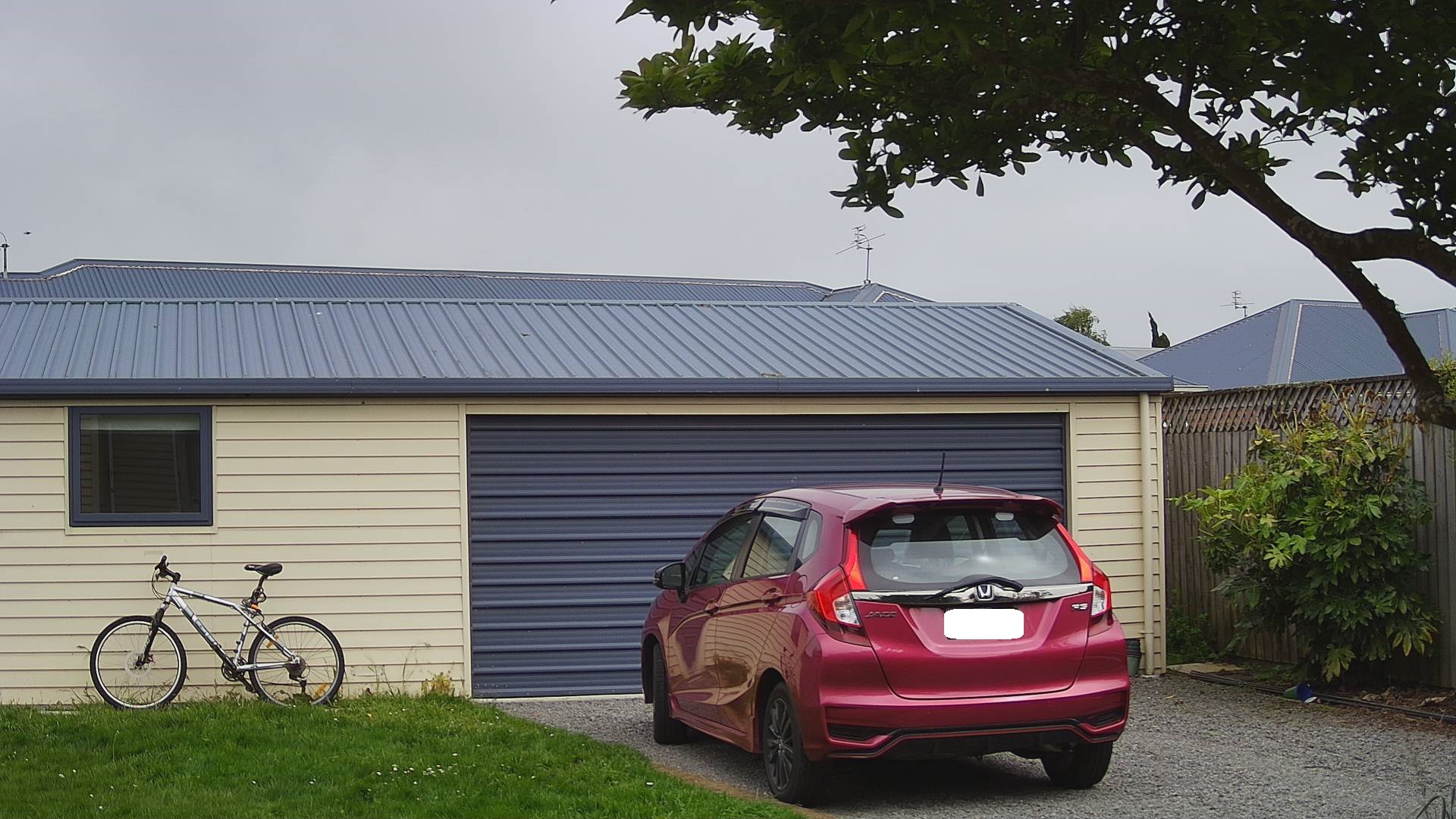
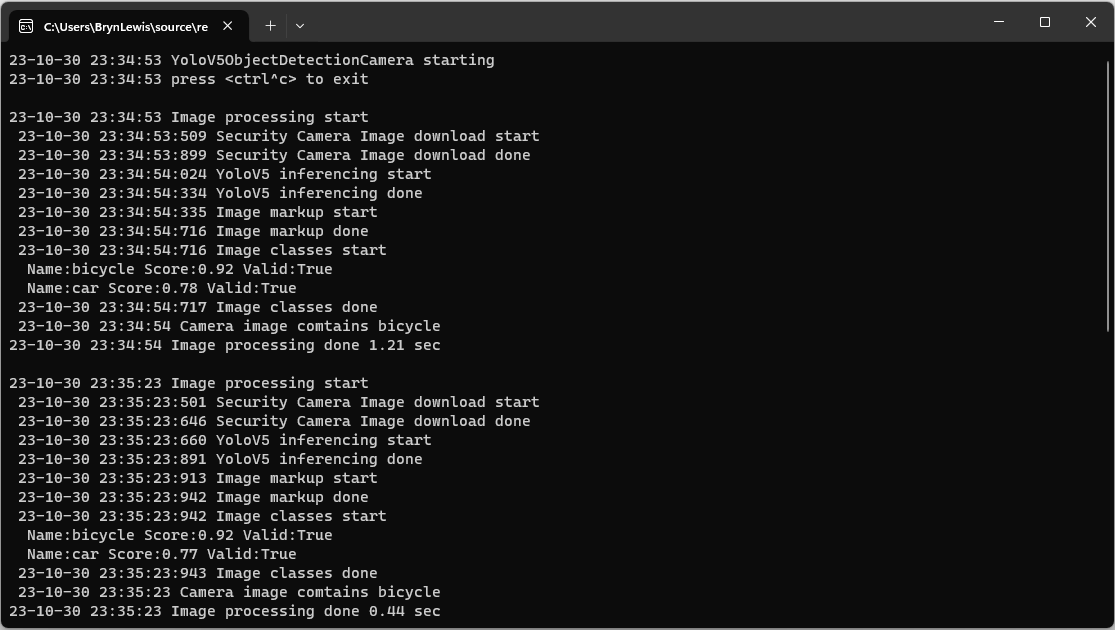
My bicycle and “mother in laws” car in backyard
YoloV5ObjectDetectionCamera running on my desktop PC

Once the YoloV5s model was loaded, inferencing was taking roughly 0.47 seconds.

Marked up image of my bicycle and “mother in laws” car in backyard

Summary

Again, I was “standing on the shoulders of giants” the TechWings code just worked. With a pretrained yoloV5 model, the ML.Net Open Neural Network Exchange(ONNX) plumbing it took a couple of hours to update the application. Most of this time was learning about the Six Labors ImageSharp library to mark up the images.

Myriota Connector – Payload formatters revisited again

The myriota Azure IoT Hub Cloud Identity Translation Gateway payload formatters use compiled C# code to convert uplink/downlink packet payloads to JSON/byte array. While trying out different formatters I had “compile” and “evaluation” errors which would have been a lot easier to debug if there was more diagnostic information in the Azure Application Insights logging.

namespace PayloadFormatter // Additional namespace for shortening interface when usage in formatter code
{
    using System.Collections.Generic;

    using Newtonsoft.Json.Linq;

    public interface IFormatterUplink
    {
        public JObject Evaluate(IDictionary<string, string> properties, string terminalId, DateTime timestamp, byte[] payloadBytes);
    }

    public interface IFormatterDownlink
    {
        public byte[] Evaluate(IDictionary<string, string> properties, string terminalId, JObject? payloadJson, byte[] payloadBytes);
    }
}

An uplink payload formatter is loaded from Azure Storage Blob, compiled with Oleg Shilo’s CS-Script then cached in memory with Alastair Crabtree’s LazyCache.

// Get the payload formatter from Azure Storage container, compile, and then cache binary.
IFormatterUplink formatterUplink;

try
{
   formatterUplink = await _payloadFormatterCache.UplinkGetAsync(context.PayloadFormatterUplink, cancellationToken);
}
catch (Azure.RequestFailedException aex)
{
   _logger.LogError(aex, "Uplink- PayloadID:{0} payload formatter load failed", payload.Id);

   return payload;
}
catch (NullReferenceException nex)
{
   _logger.LogError(nex, "Uplink- PayloadID:{id} formatter:{formatter} compilation failed missing interface", payload.Id, context.PayloadFormatterUplink);

   return payload;
}
catch (CSScriptLib.CompilerException cex)
{
   _logger.LogError(cex, "Uplink- PayloadID:{id} formatter:{formatter} compiler failed", payload.Id, context.PayloadFormatterUplink);

   return payload;
}
catch (Exception ex)
{
   _logger.LogError(ex, "Uplink- PayloadID:{id} formatter:{formatter} compilation failed", payload.Id, context.PayloadFormatterUplink);

   return payload;
}

If the Azure Storage blob is missing or the payload formatter code incorrect an exception is thrown. I added specialised exception handers for Azure.RequestFailedException, NullReferenceException and CSScriptLib.CompilerException to add more detail to the Azure Application Insights logging.

// Process the payload with configured formatter
Dictionary<string, string> properties = new Dictionary<string, string>();
JObject telemetryEvent;

try
{
   telemetryEvent = formatterUplink.Evaluate(properties, packet.TerminalId, packet.Timestamp, payloadBytes);
}
catch (Exception ex)
{
   _logger.LogError(ex, "Uplink- PayloadId:{0} TerminalId:{1} Value:{2} Bytes:{3} payload formatter evaluate failed", payload.Id, packet.TerminalId, packet.Value, Convert.ToHexString(payloadBytes));

   return payload;
}

if (telemetryEvent is null)
{
   _logger.LogError("Uplink- PayloadId:{0} TerminalId:{1} Value:{2} Bytes:{3} payload formatter evaluate failed returned null", payload.Id, packet.TerminalId, packet.Value, Convert.ToHexString(payloadBytes));

   return payload;
}

The Evaluate method can return many different types of exception so in the initial version only the “generic” exception is caught and logged.

using System;
using System.Collections.Generic;

using Newtonsoft.Json;
using Newtonsoft.Json.Linq;

public class FormatterUplink : PayloadFormatter.IFormatterUplink
{
    public JObject Evaluate(IDictionary<string, string> properties, string terminalId, DateTime timestamp, byte[] payloadBytes)
    {
        JObject telemetryEvent = new JObject();

        telemetryEvent.Add("Bytes", BitConverter.ToString(payloadBytes));
        telemetryEvent.Add("Bytes", BitConverter.ToString(payloadBytes));

        return telemetryEvent;
    }
}

There are a number (which should grow over time) of test uplink/downlink payload formatters for testing different compile and execution failures.

Azure IoT Storage Explorer container with sample formatter blobs.

I used Azure Storage Explorer to upload my test payload formatters to the uplink/downlink Azure Storage containers.

Myriota Connector – Uplink Payload Formatters Test Harness

The myriota Azure IoT Hub Cloud Identity Translation Gateway payload formatters use compiled C# code to convert uplink packet payloads to JSON.

...
public class FormatterUplink : PayloadFormatter.IFormatterUplink
{
    public JObject Evaluate(IDictionary<string, string> properties, string application, string terminalId, DateTime timestamp, byte[] payloadBytes)
    {
        JObject telemetryEvent = new JObject();

        if (payloadBytes is null)
        {
            return telemetryEvent;
        }

        telemetryEvent.Add("SequenceNumber", BitConverter.ToUInt16(payloadBytes));

        JObject location = new JObject();

        double latitude = BitConverter.ToInt32(payloadBytes, 2) / 10000000.0;
        location.Add("lat", latitude);

        double longitude = BitConverter.ToInt32(payloadBytes, 6) / 10000000.0;
        location.Add("lon", longitude);

        location.Add("alt", 0);

        telemetryEvent.Add("DeviceLocation", location);

        UInt32 packetimestamp = BitConverter.ToUInt32(payloadBytes, 10);

        DateTime fixAtUtc = DateTime.UnixEpoch.AddSeconds(packetimestamp);

        telemetryEvent.Add("FixAtUtc", fixAtUtc);

        properties.Add("iothub-creation-time-utc", fixAtUtc.ToString("s", CultureInfo.InvariantCulture));

        return telemetryEvent;
    }
}

When writing payload formatters, the Visual Studio 2022 syntax highlighting is really useful for spotting syntax errors and with the “Downlink Payload Formatter Test Harness” application payload formatters can be executed and debugged before deployment with Azure Storage Explorer.

private static void ApplicationCore(CommandLineOptions options)
{
    Dictionary<string, string> properties = new Dictionary<string, string>();

    Console.WriteLine($"Uplink formatter file:{options.FormatterPath}");

    PayloadFormatter.IFormatterUplink evalulatorUplink;
    try
    {
        evalulatorUplink = CSScript.Evaluator.LoadFile<PayloadFormatter.IFormatterUplink>(options.FormatterPath);
    }
    catch (CSScriptLib.CompilerException cex)
    {
        Console.Write($"Loading or compiling file:{options.FormatterPath} failed Exception:{cex}");
        return;
    }

    byte[] payloadBytes;
    try
    {
        payloadBytes = Convert.FromHexString(options.PayloadHex);
    }
    catch (FormatException fex)
    {
        Console.WriteLine("Convert.FromHexString failed:{0}", fex.Message);
        return;
    }

    DateTime timeStamp;
    if (options.TimeStamp.HasValue)
    {
        timeStamp = options.TimeStamp.Value;
    }
    else
    {
        timeStamp = DateTime.UtcNow;
    }

    JObject telemetryEvent;

    try
    {
        telemetryEvent = evalulatorUplink.Evaluate(properties, options.Application, options.TerminalId, timeStamp, payloadBytes);
    }
    catch (Exception ex)
    {
        Console.WriteLine($"evalulatorUplink.Evaluate failed Exception:{ex}");
        return;
    }

    telemetryEvent.TryAdd("Application", options.Application);
    telemetryEvent.TryAdd("TerminalId", options.TerminalId);
    if ( options.TimeStamp.HasValue)
    {
        telemetryEvent.TryAdd("TimeStamp", options.TimeStamp.Value.ToString("s", CultureInfo.InvariantCulture));
    }
    telemetryEvent.TryAdd("DataLength", payloadBytes.Length);
    telemetryEvent.TryAdd("Data", Convert.ToHexString( payloadBytes));

    Console.WriteLine("Properties:");
    foreach (var property in properties)
    {
        Console.WriteLine($"{property.Key}:{property.Value}");
    }
    Console.WriteLine("");

    Console.WriteLine("JSON Telemetry event payload");
    Console.WriteLine(telemetryEvent.ToString(Formatting.Indented));
}

-f C:\Users\…\PayloadFormatters\Uplink\tracker.cs -t 0088812345 -a Tracker -h 3800bd9812e6fed5e066bd8e0c65cccccccccccc

The myriota uplink packet payload are only 20 bytes long (40 Hex characters) which can be copied n paste from the uplink queue messages.

Myriota Connector – Uplink Payload formatters revisited

The myriota Azure IoT Hub Cloud Identity Translation Gateway payload formatters use compiled C# code to convert uplink packet payloads to JSON.

namespace PayloadFormattercode
{
    using System.Collections.Generic;

    using Newtonsoft.Json.Linq;

    public interface IFormatterUplink
    {
        public JObject Evaluate(IDictionary<string, string> properties, string application, string terminalId, DateTime timestamp, JObject payloadJson, string payloadText, byte[] payloadBytes);
    }
..
}

The myriota uplink packet payload is only 20 bytes long so it is very unlikely that the payloadText and payloadJSON parameters would ever be populated so I removed them from the interface. The uplink message handler interface has been updated and the code to convert (if possible) the payload bytes to text and then to JSON deleted.

namespace PayloadFormatter
{
    using System.Collections.Generic;

    using Newtonsoft.Json.Linq;

    public interface IFormatterUplink
    {
        public JObject Evaluate(IDictionary<string, string> properties, string application, string terminalId, DateTime timestamp, byte[] payloadBytes);
    }
...
}

All of the sample payload formatters have been updated to reflect the updated parameters. The sample Tracker.cs payload formatter unpacks a message from Myriota Dev Kit running the Tracker sample and returns an Azure IoT Central compatible location telemetry payload.

/*
myriota tracker payload format

typedef struct {
  uint16_t sequence_number;
  int32_t latitude;   // scaled by 1e7, e.g. -891234567 (south 89.1234567)
  int32_t longitude;  // scaled by 1e7, e.g. 1791234567 (east 179.1234567)
  uint32_t time;      // epoch timestamp of last fix
} __attribute__((packed)) tracker_message; 

*/ 
using System;
using System.Collections.Generic;
using System.Globalization;

using Newtonsoft.Json;
using Newtonsoft.Json.Linq;


public class FormatterUplink : PayloadFormatter.IFormatterUplink
{
    public JObject Evaluate(IDictionary<string, string> properties, string application, string terminalId, DateTime timestamp, byte[] payloadBytes)
    {
        JObject telemetryEvent = new JObject();

        if (payloadBytes is null)
        {
            return telemetryEvent;
        }

        telemetryEvent.Add("SequenceNumber", BitConverter.ToUInt16(payloadBytes));

        JObject location = new JObject();

        double latitude = BitConverter.ToInt32(payloadBytes, 2) / 10000000.0;
        location.Add("lat", latitude);

        double longitude = BitConverter.ToInt32(payloadBytes, 6) / 10000000.0;
        location.Add("lon", longitude);

        location.Add("alt", 0);

        telemetryEvent.Add("DeviceLocation", location);

        UInt32 packetimestamp = BitConverter.ToUInt32(payloadBytes, 10);

        DateTime fixAtUtc = DateTime.UnixEpoch.AddSeconds(packetimestamp);

        telemetryEvent.Add("FixAtUtc", fixAtUtc);

        properties.Add("iothub-creation-time-utc", fixAtUtc.ToString("s", CultureInfo.InvariantCulture));

        return telemetryEvent;
    }
}

If a message payload is text or JSON it can still be converted in the payload formatter.